Analytics Using Amazon Redshift ML Template

Cloudairy
 Copy link

Get your team started in minutes
Sign up with your work email for seamless collaboration.
Whiteboard
Copy link

Leverage Amazon Redshift ML to build, train, and deploy machine learning models directly in your data warehouse. This template helps you get started faster with a streamlined workflow for predictive analytics and smarter insights.
Leverage Amazon Redshift ML to build, train, and deploy machine learning models directly in your data warehouse. This template helps you get started faster with a streamlined workflow for predictive analytics and smarter insights.
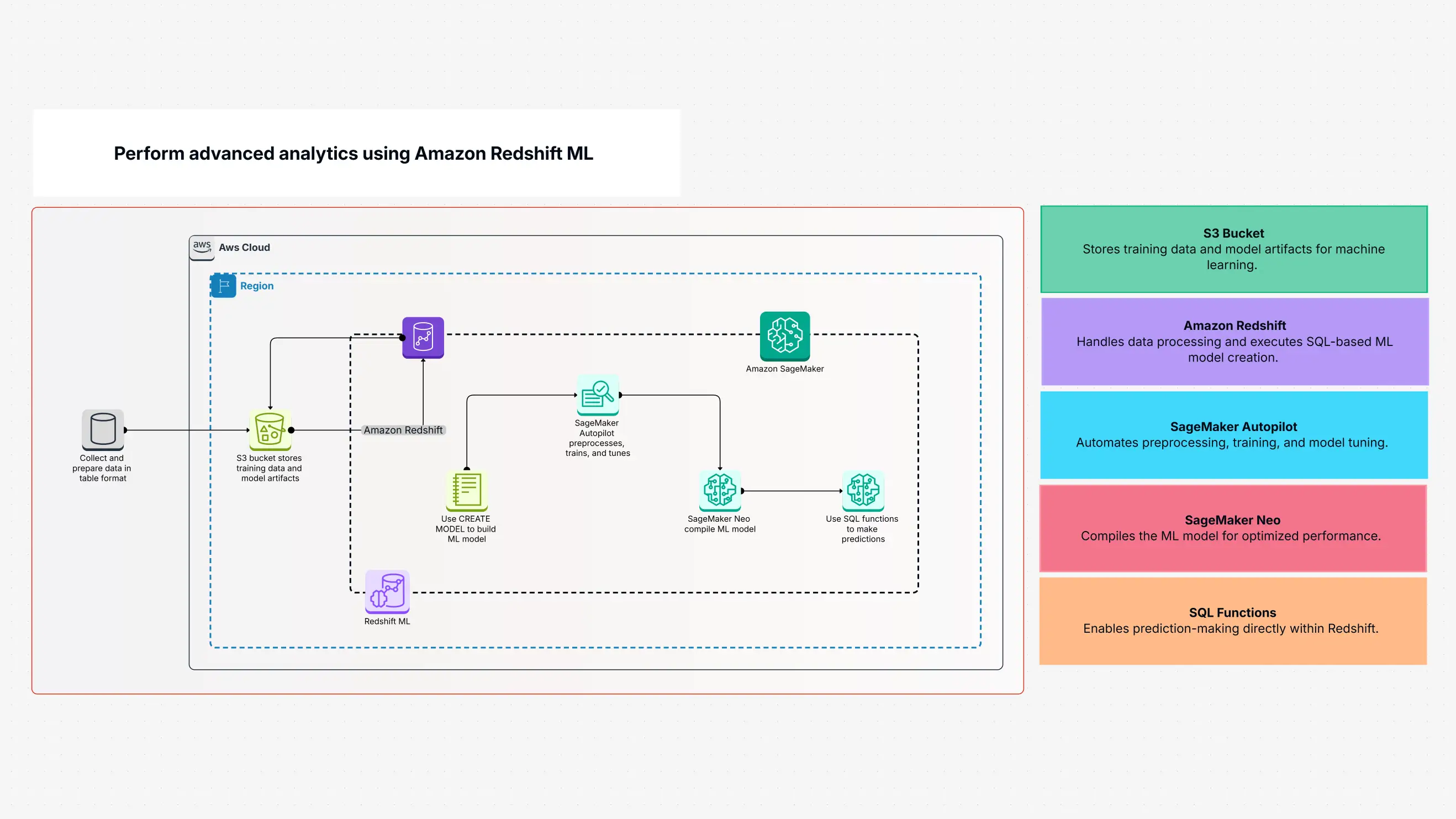
The Amazon Redshift ML template works like a simple workflow that first keeps your data in S3, which acts like a safe storage box. After that, the data goes to SageMaker, where SQL is used to train it for machine learning. This lets you make real-time predictions using simple SQL commands.
This template shows a smooth architecture that connects Redshift, SageMaker Autopilot, SageMaker Neo, and S3. It lets you do predictive analytics easily, even if you do not know complex machine learning coding.
Instead of working the old, slow way to move data and build machine learning, you can use the Amazon Redshift ML template. It is a powerful tool that helps your business go to the next level. It removes the problems between data storage and machine learning by letting you build, train, and deploy ML models right inside Redshift.
This makes your work faster, reduces the need for many outside tools, cuts down data transfer, and improves model performance using SageMaker Neo. With SQL-based predictions, businesses can get insights faster, automate forecasts, and make smarter decisions—all from their Redshift setup.
This template is perfect for:
It is made for people who want to add machine learning to their workflow without hiring a full team of data scientists. It is most useful for companies already using Amazon Redshift and want to add predictive analytics to their work.
The best time to use this template is when you have structured data in Redshift, a need for forecasting or predictions, and want to scale machine learning without leaving your database system.
This template makes your work smoother with features like:
You can set up your Redshift ML workflow easily with Cloudairy:
Once your architecture is ready, start the ML workflow:
The Amazon Redshift ML Analytics template makes machine learning easier with tools like S3 and SageMaker. It removes the need to move your data across many places or systems.
This template stores your data, trains your model, and lets you use SQL to get real-time answers. It helps businesses build ML models and receive the results they need quickly. With simple integration of AWS tools, it helps teams become more data-driven without needing deep ML knowledge.
Amazon Redshift ML lets you create, train, and deploy models inside your data warehouse. Analysts can use SQL to apply machine learning without writing hard code. This template helps speed up ML use by taking advantage of Redshift ML’s power and scale. It brings predictive analytics into daily work, letting organizations make better decisions using forecasting, anomaly detection, and classification.
Loading subcategories...
 Manage all your work in one place
Collaborate with your team
Use Cloudairy for FREE—forever
Explore More