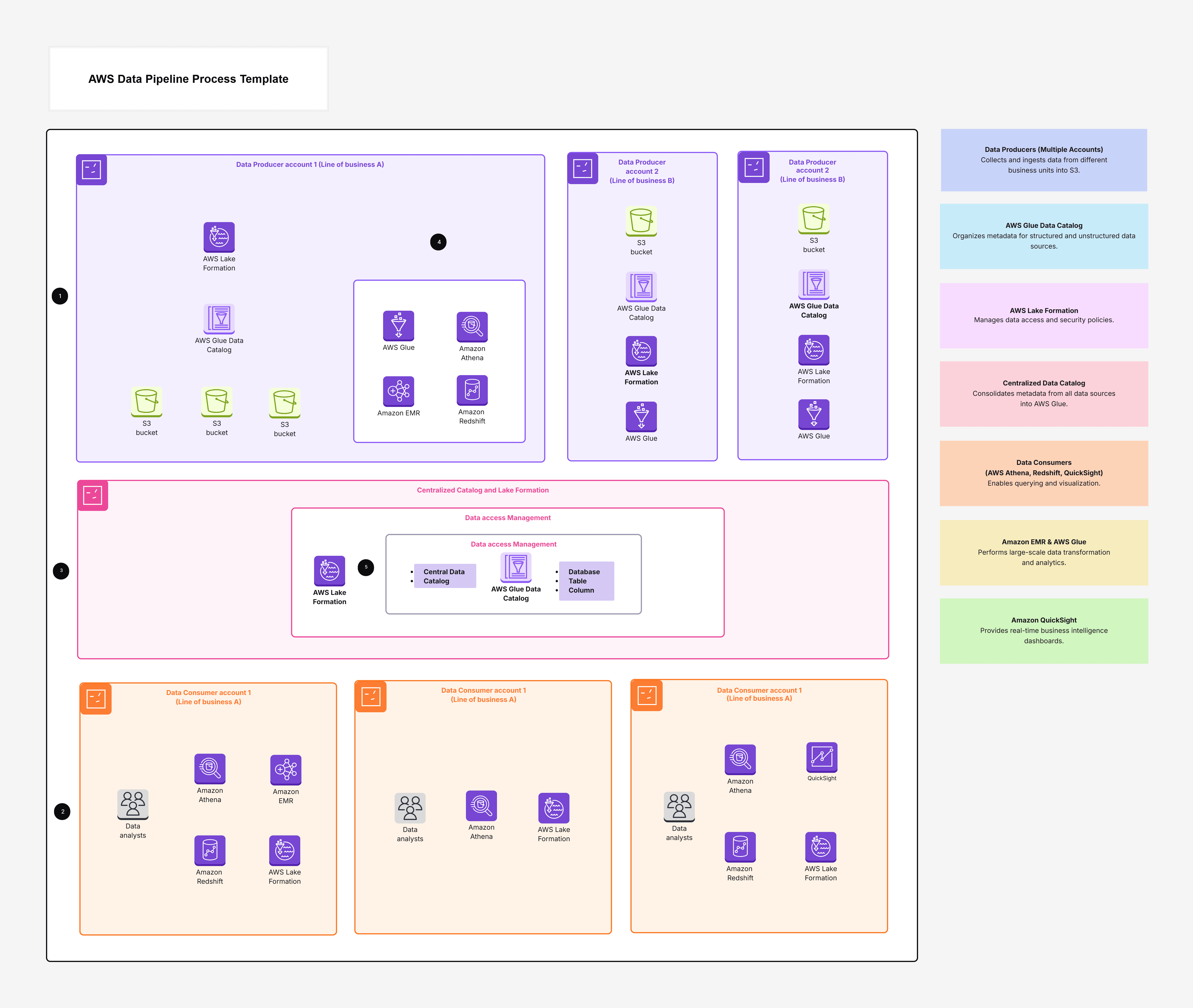
AWS Data Pipeline Process Template

Cloudairy
 Copy link

Get your team started in minutes
Sign up with your work email for seamless collaboration.
Whiteboard
Copy link

Learn the AWS Data Pipeline process to automate and manage data workflows seamlessly across AWS services, ensuring high reliability, smooth execution, and scalable performance.
Learn the AWS Data Pipeline process to automate and manage data workflows seamlessly across AWS services, ensuring high reliability, smooth execution, and scalable performance.
The AWS Data Pipeline Process Template is like a big, easy-to-understand map that shows how your data moves inside AWS. It helps you see:
This template helps you create a clear picture of your whole data journey from data coming in, to data getting cleaned, to data being used for reports and analysis.
This AWS Data Pipeline Process template makes your work easier because it helps you:
It’s useful whether you are starting a brand-new pipeline or fixing an old one.
This template is great for:
Use it when:
This keeps everyone on the same page.
1. Data Producers (Where data begins)
2. Centralized Management (Security & control center)
3. Data Consumers (Where data gets used)
1. Open the Template
2. Customize Your Pipeline
3. Build Your Flow Visually
4. Collaborate and Refine
5. Finalize and Share
The AWS Data Pipeline Process Template makes building data pipelines simple and clear. With Cloudairy, you can design, plan, and see every step of your cloud data workflow. It helps your team avoid confusion, stay aligned, and scale your pipeline with confidence. Explore how UML Sequence helps design, debug, and document system behavior.
Whether you're creating a new pipeline or improving an existing one, this template gives you a clean, easy way to understand and manage your AWS Data Pipeline Process. It’s the perfect starting point for any team that works with data in AWS.
Loading subcategories...
 Manage all your work in one place
Collaborate with your team
Use Cloudairy for FREE—forever
Explore More