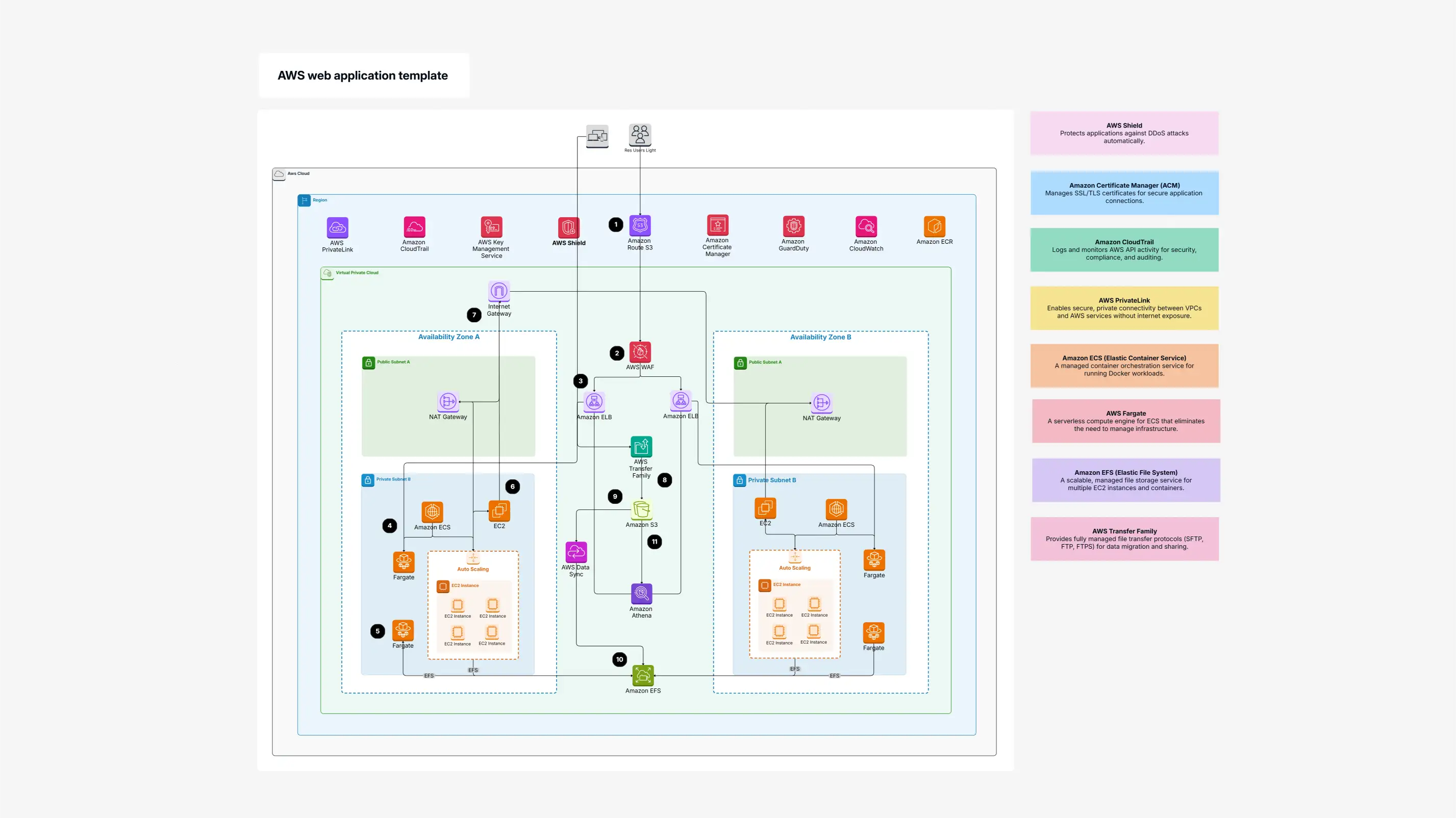
AWS Web Application Template

Cloudairy
 Copy link

Get your team started in minutes
Sign up with your work email for seamless collaboration.
Whiteboard
Copy link

Easily design, visualize, and plan your AWS web application with Cloudairy’s template. Quickly manage EC2, RDS, Lambda, S3, CloudFront, and more, ensuring your app is secure, scalable, and optimized for high performance in the cloud.
Easily design, visualize, and plan your AWS web application with Cloudairy’s template. Quickly manage EC2, RDS, Lambda, S3, CloudFront, and more, ensuring your app is secure, scalable, and optimized for high performance in the cloud.
AWS Web Application template provides an excellent base for teams collaborating in the design of web applications. It shows the essential elements that you will need such as load balancers (to manage traffic), web servers (where your site is), databases (where your data is saved), and security services (the bodyguards of your app!).
This template is wonderful for enterprises that desire their web applications to be continuously available, quick, and extremely secure. It is suitable for both simple and complex configurations.
Using Cloudairy's web application template, you can effortlessly plan, record, and implement the right practices for any AWS Web App Architecture, even if you are considering an AWS CloudFormation Template or Serverless Application Model (SAM) for deployment.
Considering this AWS Web Application Template here are some clear reasons why it’s a smart move for building your cloud app:
Visualize Your Cloud Clearly: Get a straightforward visual overview of your entire AWS web application, making complex parts easy to understand.
Smart Security Planning: Visually place important security features like firewalls to protect against common threats.
Track Data Flow: See exactly how information travels between different parts of your web app.
Enhanced Communication: Make it much easier to explain your web app's design to developers, security teams, or even your boss.
Ready for Anything: Helps you design your app to handle lots of users and grow bigger when needed, preparing for your AWS Deployment Template.
This AWS Web Application Template is perfect for anyone building, managing, or learning about web applications on AWS. It's incredibly handy when you're:
Starting a new cloud app: Use it to sketch out your initial AWS Web App Architecture.
Improving an existing web app: Visualize your current setup to find areas for optimization or refactoring.
Learning AWS web services: Provides a practical, visual way to understand how services connect.
Planning your AWS Deployment Template: Get a clear picture before you push to production.
Here are the main parts of AWS Web App Architecture template that comes loaded with helpful icons and concepts:
Elastic Load Balancer (ELB): Spreads out incoming website visitors evenly so your site never gets overloaded and stays online.
EC2 instances: These are like your virtual servers in the cloud where your actual web application code runs.
Amazon RDS: A fully managed database service (like MySQL, PostgreSQL) that handles all the heavy lifting for your app's data, even making copies for extra reliability.
AWS Lambda: A "serverless" service that lets you run small pieces of your app's logic without needing to manage any servers yourself.
Amazon S3: Your go-to storage for simple files like images, videos, or website code (CSS, JavaScript).
CloudFront: A super-fast delivery network that brings your website content closer to your users around the world for quicker loading times.
AWS WAF: A special firewall that protects your web application from common online attacks (like hackers trying to inject malicious code).
AWS PrivateLink: Lets your different AWS services talk to each other privately, without going over the public internet, keeping things extra secure.
AWS KMS: Helps you securely manage and use encryption keys to protect your sensitive data.
Amazon EFS: A scalable file system that multiple EC2 instances can share, handy for shared files across your web servers.
Application Networking: How different parts of your app talk to each other behind the scenes to work smoothly.
Route 53: AWS's scalable service for managing your website's domain names and directing traffic to the right places.
IAM (Identity and Access Management): Controls who can do what with your AWS web application resources, keeping access secure.
Ready to design your amazing AWS Web App Architecture? Just follow these simple steps using Cloudairy.
Find Your Template:
Log into your Cloudairy account.
Head to the "Templates" section.
Search for "AWS Web Application."
Click on the template to open it.
Make It Your Own:
Customize the template to perfectly fit what your application needs.
Or, for a super quick start, just click 'Use Template' directly!
Build Your Diagram Visually:
Select the AWS web application template to start designing your cloud architecture.
Use the easy drag-and-drop feature to place icons for things like EC2 instances, load balancers, and RDS databases to build your web app diagram.
Team Up & Perfect It:
Collaborate with your team right inside Cloudairy to make sure your architecture design is as good as it can be.
Use Cloudairy to add notes and explanations, making your designs even clearer.
Share Your Awesome Plan:
Export your finished architecture diagram. It's perfect for sharing with your team or using it as a guide to build your real-world application!
Your ultimate solution for building better web applications is this AWS Web Application Template! With Cloudairy’s architecture diagram maker, you will be able to design and build your AWS Web App Architecture, and ensure security, reliability, scalability, and performance. Cloudairy's tools are great for team collaborations and ensuring your applications are set up to be successful! It helps businesses seamlessly plan and structure their web applications using all the essential AWS building blocks and is the perfect AWS Deployment Template whether you want to use an AWS CloudFormation Template or Serverless Application Model (SAM)! Use the Web Diagram Template to design and visualize website structures, user flows, and navigation paths in a clear, easy-to-understand layout for better planning and collaboration.
Loading subcategories...
 Manage all your work in one place
Collaborate with your team
Use Cloudairy for FREE—forever
Explore More