Get your team started in minutes

Sign up with your work email for seamless collaboration.

What Is Deploy CloudWatch Synthetics Canaries Template?

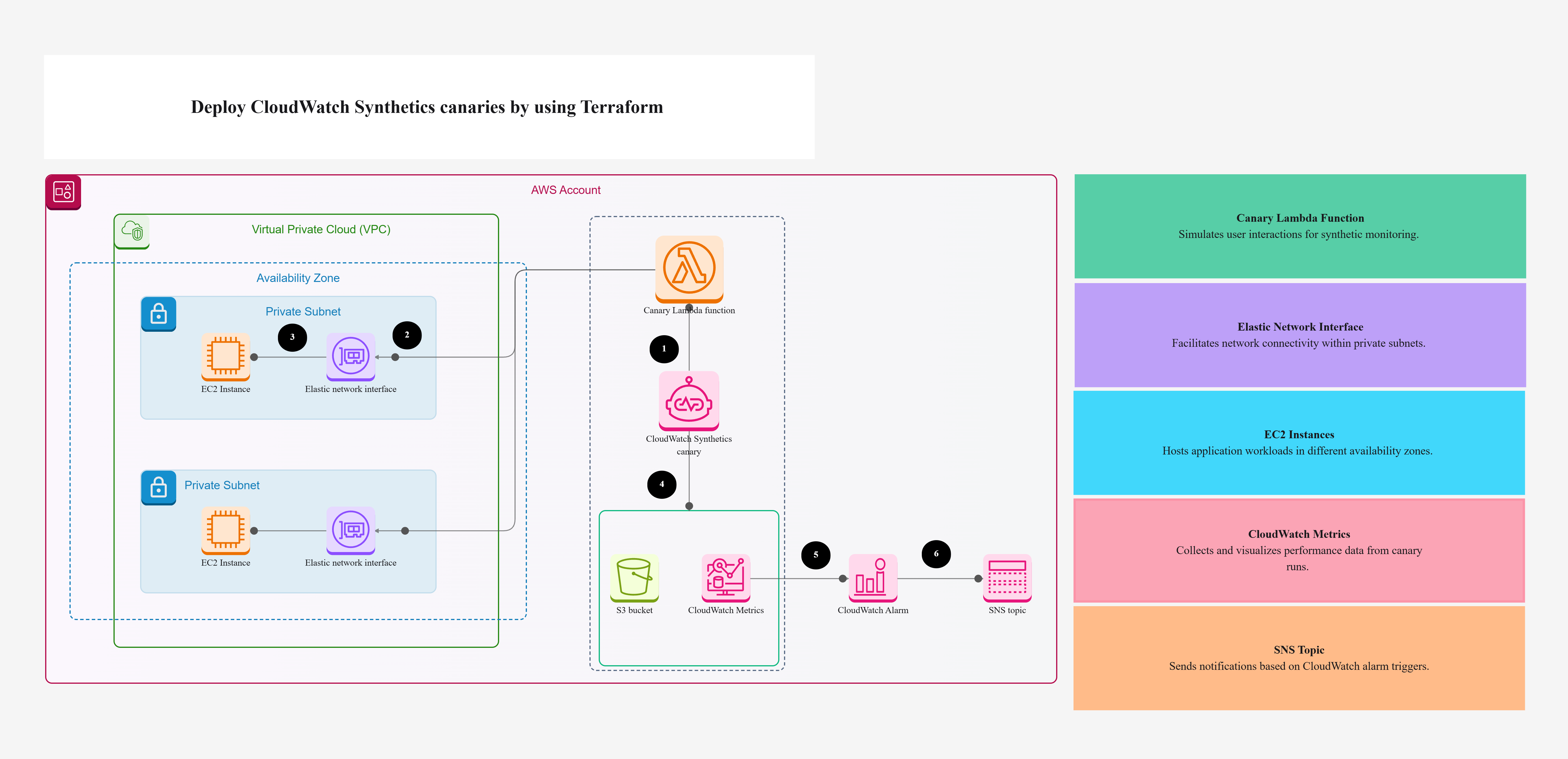
The Deploy CloudWatch Synthetics Canaries template gives you a simple, ready-to-use setup for checking if your apps and APIs are working all the time. It uses Terraform to automatically create things like Lambda functions, Amazon S3 buckets, CloudWatch alarms, and more.
This means your system gets watched and tested nonstop without anyone needing to set it up by hand.

It helps catch problems early, whether you have a busy API or an important application running.

Why Is Deploy CloudWatch Synthetics Canaries Template a Game-Changer?

  • Automation at Its Peak: Everything is created for you automatically. Terraform builds IAM roles, canaries, and more so you don’t have to.
  • Proactive Issue Detection: The canaries act like tiny robot users checking your system all day. They find problems before real users notice anything.
  • End-to-End Visibility: These tests copy real user actions, so you can see if your API is fast, healthy, and available.
  • Customizable & Scalable: Test one API or many. This template grows with your system, big or small.
  • Seamless Alerting: SNS sends instant alerts if something breaks, so your team knows right away.

This template doesn’t just monitor your app it helps keep it strong and reliable.

Who Needs Deploy CloudWatch Synthetics Canaries Template, And When?

This template is best for:

  • DevOps engineers who want AWS monitoring done automatically
  • Cloud architects building reliable systems
  • SRE teams who need fast alerts
  • Developers checking API health
  • Startups and big companies launching new features

Best time to use it

  • When launching new services
  • After deployments to make sure everything is working
  • For nonstop production monitoring to meet uptime goals

If uptime matters, the Deploy CloudWatch Synthetics Canaries template is exactly what you need.

What Are the Main Components of the Template?

Here are the main parts, explained simply:

  • AWS Account: The main home for all resources.
  • VPC (Virtual Private Cloud): A safe, private space for your canaries.
  • Private Subnet: Keeps your monitoring tools hidden and protected.
  • Elastic Network Interface (ENI): Helps canaries make safe API calls.
  • EC2 Instance: Runs tests if your setup needs it.
  • Lambda Function: Runs the scripts your canaries use.
  • CloudWatch Synthetics Canary: A tiny robot tester that runs checks for you.
  • S3 Bucket: Stores logs, results, and files from tests.
  • CloudWatch Metrics: Shows how your app is doing—latency, success, failures.
  • CloudWatch Alarm: Alerts you when something looks wrong.
  • SNS Topic: Sends alerts to your email or phone.
  • Terraform Configuration: Builds everything automatically using code.
  • IAM Role: Gives safe permissions to AWS services.
  • Internet Gateway: Lets canaries reach the internet safely.
  • Secrets Manager: Keeps things like API keys safe and hidden.

All these work together to give you strong, end-to-end monitoring.

How to Get Started with Cloudairy?

Starting is easy:

  1. Log in to Cloudairy
  2. Go to Templates
  3. Search “CloudWatch Synthetics Canaries”
  4. Click Open Template
  5. Review the Terraform setup
  6. Adjust it for your AWS environment
  7. Set up your monitoring
  8. Watch results and get alerts

Cloudairy helps you set everything up quickly.

Summary

The Deploy CloudWatch Synthetics Canaries template brings AWS CloudWatch Synthetics and Terraform together in a simple, powerful way. With this template, you don’t just react you stay ahead of problems. Setup is quick, easy, and perfect for any cloud team.

Start using the Deploy CloudWatch Synthetics Canaries template today and keep your applications running smoothly.

Explore More

Similar templates