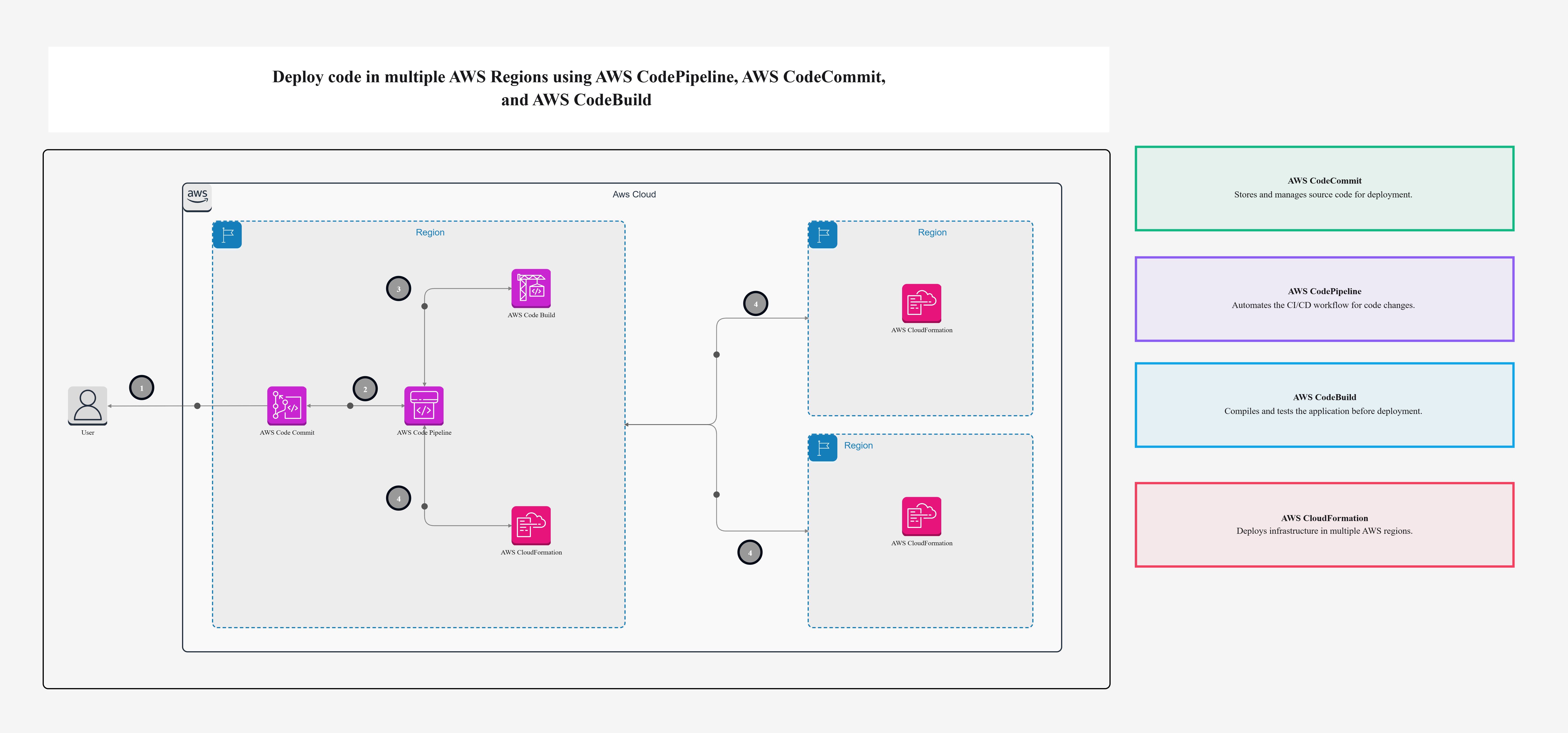
Deploy code in multiple AWS Regions using AWS CodePipeline, AWS CodeCommit, and AWS CodeBuild

Cloudairy
 Copy link

Get your team started in minutes
Sign up with your work email for seamless collaboration.
Whiteboard
Copy link

Easily deploy code across environments with automation and consistency. Streamline updates, reduce errors, and accelerate delivery with reliable workflows.
Easily deploy code across environments with automation and consistency. Streamline updates, reduce errors, and accelerate delivery with reliable workflows.
The Deploy Code Across AWS Regions template is a multi-region distribution pipeline built using AWS tools. You get version control (CodeCommit), automatic builds (CodeBuild), and a full distribution flow (CodePipeline) that works astride regions.
Basically, you push code once, and the system makes sure that same version goes live in all the places your app is running. The Deploy Code process ensures seamless synchronization between multiple AWS regions.
No jumping between regions. No repeating the same steps. Just one flow that handles everything through an automated Deploy Code pipeline.
This is for anyone working with AWS who needs to run their app in more than one region. Whether you are a solo developer or part of a team, if you’re tired of doing manual deployments or worried about breaking things this Deploy Code setup will help.
Some real-world situations where this is useful:
Here’s what’s included:
The Deploy Code system ties these services together, creating a smooth, consistent deployment experience.
This Deploy Code workflow in Cloudairy simplifies version control and regional rollout with a clear visual interface.
Managing deployments in multiple AWS regions feels far less complicated for our engineers when leveraging Deploy Code Across AWS Regions via AWS CodePipeline, AWS CodeCommit, and AWS CodeBuild. In this informative guide, we walk through how Deploy Code Across AWS Regions workflows help our teams deliver dependable, consistent, and repeatable deployments across the AWS accounts we regularly operate. By leveraging Deploy Code Across AWS Regions, our teams can meaningfully reduce downtime, maintain compliance standards, and preserve strong version control. Using this deployment setup also boosts DevOps efficiency, ensuring excellent availability and scalable performance for modern applications. Explore how Replicate filtered Amazon improves performance and reduces unnecessary data transfer.
This smart approach allows organizations to automate deployments effortlessly, minimize potential manual errors, and fine-tune delivery pipelines all while supporting multi-region, cloud-native environments. Explore how DevSecOps for Infrastructure improves resilience, speed, and risk management.
Loading subcategories...
 Manage all your work in one place
Collaborate with your team
Use Cloudairy for FREE—forever
Explore More