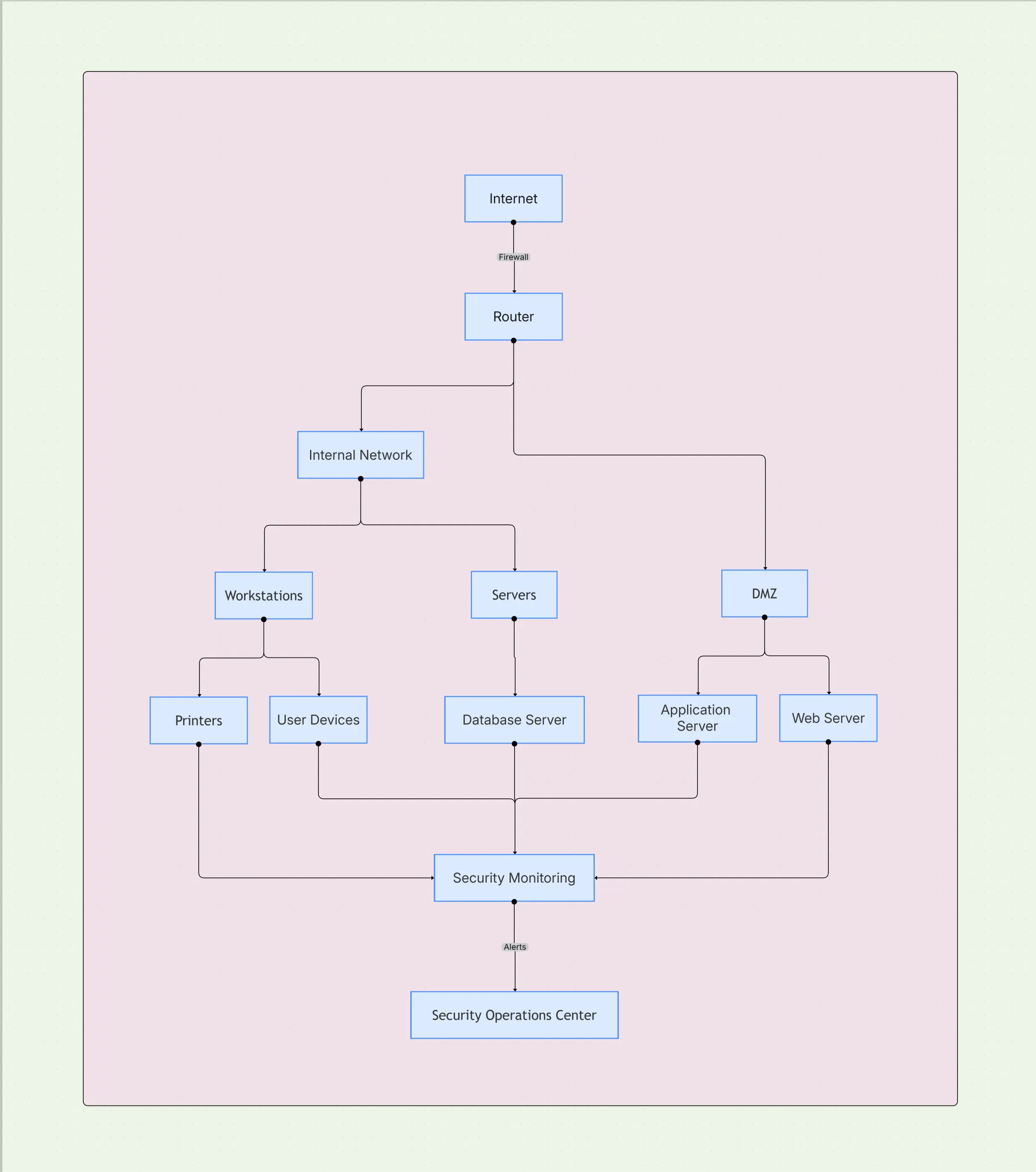
Network Security Architecture Diagram Template

Cloudairy
 Copy link

Get your team started in minutes
Sign up with your work email for seamless collaboration.
Whiteboard
Copy link

Design secure, compliant network systems using this Network Security Architecture Diagram Template. Visualize segmentation, remote access, zero trust layers, policies, and threat boundaries clearly.
Design secure, compliant network systems using this Network Security Architecture Diagram Template. Visualize segmentation, remote access, zero trust layers, policies, and threat boundaries clearly.
When I first used a Network Security Architecture Diagram Template, it offered an impressive, hands-on visual framework to plan, secure, and manage network systems across blended hybrid, multi-cloud, and on-prem environments. It helped my organization see more clearly how security zones, access layers, and communication paths align and interact. Instead of fixing issues reactively, our team adopted a proactive blueprint to pinpoint vulnerabilities early, right before any deployment. This template now drives real collaboration between network engineers, security analysts, and compliance officers to ensure every packet, protocol, and path remains in line with enterprise-grade security best practices.
Simplify cloud security planning with Cloudairy’s visual security diagram template.
A thoughtfully developed Network Security Architecture Diagram visually demonstrates how various devices, intelligent firewalls, identity layers, and monitoring systems coordinate within your company to protect enterprise networks. This layered design personally helps block unauthorized access, manage potential lateral traffic, and preserve overall data integrity across all boundaries. Each distinct part performs a meaningful role, ranging from network segmentation designs to disciplined identity enforcement. In unison, they create an integrated, dependable ecosystem that enhances visibility, operational resilience, and policy control without condoning the overall user experience.
See below for what’s included in this network security architecture diagram template:
Modern Zero Trust Network Architecture (ZTNA) removes assumptions of internal safety. It redefines perimeters around users, devices, and applications—requiring continuous validation rather than implicit trust. This framework visualizes boundaries not as static walls but as adaptive rings around resources. By blending macro segmentation for broad layers and micro-segmentation for specific workloads, you maintain strong security while keeping operations agile. It’s a living model that evolves with emerging risks and dynamic user contexts.
See below for how this zero trust network architecture fits into your diagram:
As workforces spread globally and applications run across multiple clouds, secure remote access and edge protection become core pillars of network security. This section ensures teams can enable mobility without creating vulnerabilities. By mapping connectivity methods, inspection points, and traffic routing, you can visualize how users securely connect to resources from anywhere while maintaining performance and audit readiness. It bridges the gap between flexibility and governance.
See below for how secure connectivity is structured within this template:
A Network Security Architecture Diagram is essential whenever your organization redesigns infrastructure, merges environments, or implements zero trust. It offers a shared, visual foundation for collaboration between operations, security, and compliance teams. With this diagram, you can document baseline controls, prepare for audits, train new hires, or test resilience through simulations. It’s most valuable during architectural transformations where visibility, alignment, and risk awareness are critical to success.
See below for when to use this network security architecture template:
Every organization’s network security architecture design should mirror its operational landscape, threat model, and compliance expectations. Customizing ensures your diagram represents real-world topologies, identities, and data paths. It helps teams visualize specific tools and processes rather than generic frameworks. As your environment evolves, keeping this design updated becomes key to maintaining trust and audit readiness across global operations.
See below for how to customize this network architecture design effectively:
A Network Security Architecture Template supports multiple industries and technology stacks. It helps translate complex network configurations into understandable layers for all teams—technical or non-technical. From regulated sectors like finance and healthcare to fast-moving SaaS platforms, this diagram brings consistency, simplifies compliance, and accelerates secure transformation initiatives across distributed networks.
Explore secure and scalable cloud design with AWS Network Architecture.
See below for real-world examples where this network security diagram drives value:
1. What is the main purpose of a Network Security Architecture Diagram?
Its primary objective is to offer a cohesive visual framework that outlines security controls, trust boundaries, and verification levels—helping internal teams like ours manage, design, and evolve enterprise network security effectively.
2. How does this diagram align with Zero Trust?
It fully reflects the Zero Trust Network Architecture model by embedding identity-based governance, real-time monitoring, and adaptive verification to prevent any assumptions of trust within the organization’s network.
3. Can this template support multi-cloud environments?
Yes, the structure works seamlessly across hybrid and multi-cloud models, allowing your IT department to view routing paths, integration points, and firewall inspection zones throughout your cloud network security ecosystem.
4. Is this useful for compliance and audits?
Absolutely. It records relevant security controls, compliance evidence, and complete data flow authentication—simplifying audit arrangement for leading frameworks like SOC 2, ISO 27001, and NIST cybersecurity standards.
5. How can I start building this diagram?
Begin your project within the Security Architecture Diagram Tool, choose the “Network Security Architecture” template, and design a personalized layout aligned with your enterprise or secure remote access environment.
Loading subcategories...
 Manage all your work in one place
Collaborate with your team
Use Cloudairy for FREE—forever
Explore More