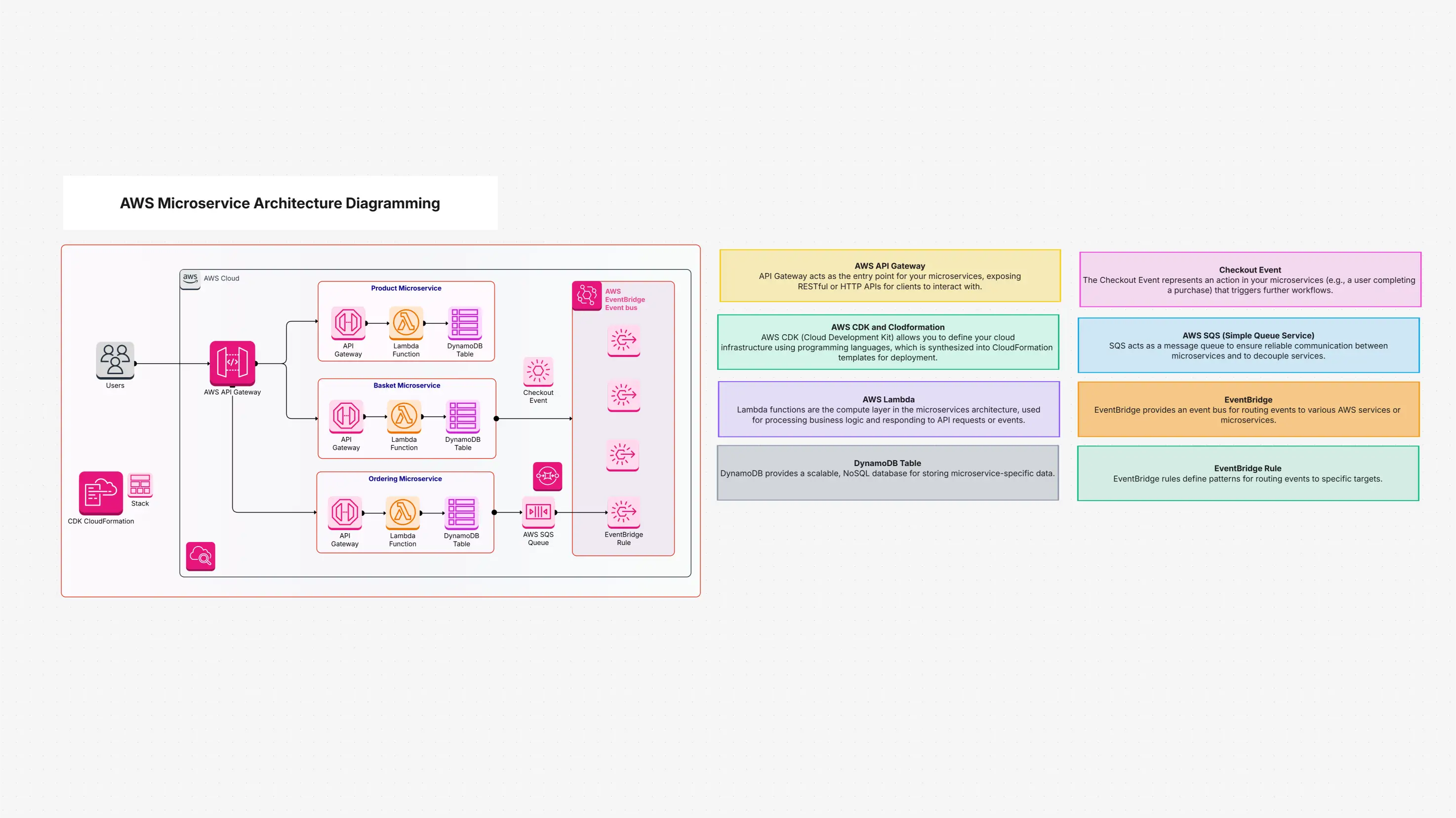
What Is This Template AWS Microservice Architecture?
The AWS Microservice Architecture template shows you how to set up a super-flexible microservices application by using important AWS serverless services. You can imagine your app as many small, independent teams that each do their own job, instead of one giant team doing everything at once.
- API Gateway acts like the big friendly front door of your app. It welcomes all incoming requests and makes sure they reach the right place safely.
- Lambda functions are like tiny, very smart workers. They run small pieces of code quickly, and you don’t need to worry about servers at all because AWS takes care of everything.
- DynamoDB works like a super-fast storage box that keeps information safe and ready whenever your app needs it.
- AWS EventBridge is the talking system that helps all your microservices communicate with each other smoothly through events.
This design helps you build apps that are easy to grow, easy to change, and simple to manage as your needs get bigger.
When and How to Use AWS Microservice Architecture Template?
The AWS Microservice Architecture template is helpful in many situations, from the very beginning of planning to when you are actively developing and improving your application.
When to Use It:
- Starting a New Serverless Project:
When you begin making a new microservices application on AWS, this template gives you a clear and ready architecture so you don’t have to start from scratch.
- Visualizing Complex Architectures:
When your system has many moving parts, this helps you easily see and explain how API Gateway, Lambda, DynamoDB, and EventBridge work together in an event-driven setup.
- Transitioning from Monoliths:
When your old app is one large block, you can use this template as a guide to break it into smaller, easier microservices.
- Standardizing Deployments:
This template helps you create the same structure again and again so every microservice is deployed in a consistent and reliable way.
- Team Collaboration & Onboarding:
It helps your team understand the system, work together more clearly, and makes it easy for new team members to learn the microservices design.
- Stakeholder Communication:
You can use this visual template to show non-technical people how the architecture works in a simple, understandable way.
How to Use It in Cloudairy?
1. Find the Template:
- Log in to your Cloudairy account.
- Go to the Templates section.
- Search for “AWS Microservice Architecture Diagram” or pick “AWS Microservices” from the categories.
- Click to open the preview of the template.
2. Explore and Understand:
- Look at the pre-built diagram to see how API Gateway, Lambda, DynamoDB, and EventBridge connect.
- Follow the arrows to understand how a user request moves through your system from start to finish.
3. Customize for Your Needs:
- Select Use Template to open it and start editing.
- Define your APIs by adjusting API Gateway endpoints and methods.
- Add the logic and details for your AWS Lambda functions.
- Set your DynamoDB table structures or connect other data stores.
- Build your event-driven flow by making custom events and rules in EventBridge.
- Add or remove components so the architecture matches your real project.
4. Collaborate and Plan:
- Use the diagram during team meetings so everyone understands the same plan.
- Share the template with teammates so everyone can review and give feedback together.
5. Prepare for Deployment & Monitoring:
- Use this design as a blueprint when you deploy to AWS with tools like CDK.
- Look at the CloudWatch monitoring areas in the template to plan how you will keep an eye on your system.
The Main Components Inside the AWS Microservice Architecture Template
- AWS API Gateway:
The main entrance where all your web requests arrive.
- Lambda Functions:
Small serverless workers that run your app’s logic without needing servers.
- DynamoDB Tables:
Very fast storage used to hold your important app data.
- Example Microservices:
Such as Basket, Product, and Ordering Microservices that show how common microservice patterns look.
- Checkout Event:
Shows how one action, like finishing an order, can trigger other services to react.
- AWS EventBridge:
The message system that lets all your services talk through events.
- SQS Queue:
A simple place where messages wait to be processed later.
- CDK CloudFormation:
Tools that help you automatically build your AWS setup.
- Users:
The people who interact with your application.
- Security Groups:
Rules that protect your services and control who can connect.
- IAM Roles:
Permissions that tell each service what actions it can and cannot do.
- CloudWatch Monitoring:
Tools that help you watch your system's health, errors, and performance.
- Load Balancer:
Helps spread incoming traffic evenly across your services when needed.
AWS Microservice Architecture Summary
This template lets you easily map your microservices in one clear place. You can see how services like API Gateway, Lambda, and DynamoDB connect, talk to each other, and scale when needed. The AWS Microservice Architecture template helps you create strong, smooth, and cost-effective applications that communicate well and work reliably. Explore how a scalable microservice adapts to changing workloads efficiently. Explore potential financial losses by learning how to calculate Value at Risk (VaR).

 Copy link


 Manage all your work in one place