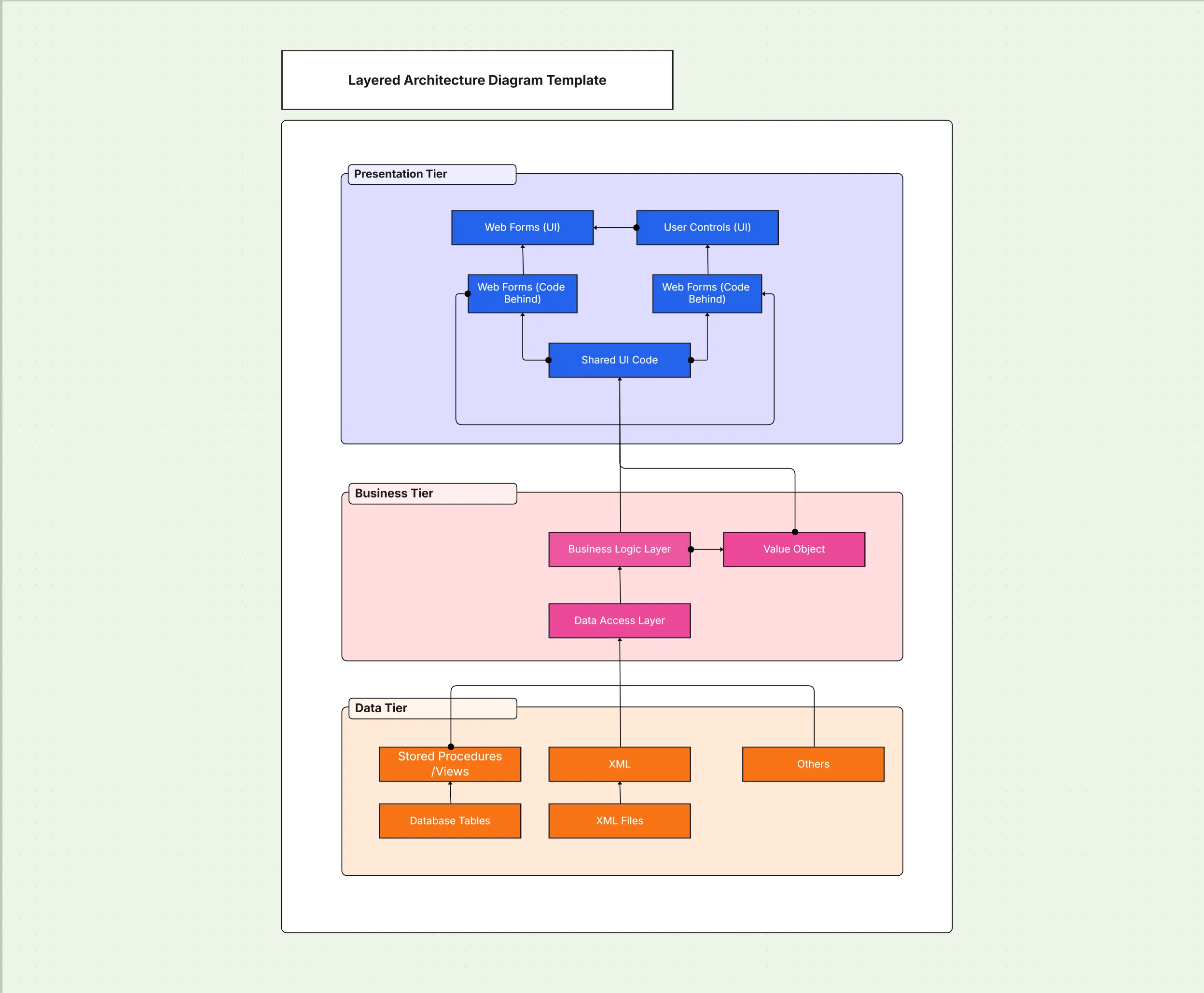
Layered Architecture Diagram Template

Cloudairy
 Copy link

AI Workspace for Diagrams & Collaboration
Get your team started in minutes
Sign up with your work email for seamless collaboration.
Whiteboard
Copy link

Create a layered architecture diagram to represent presentation, business, data, and infrastructure layers. Use this editable template to design scalable, well-structured systems, clearly showing responsibilities, dependencies, and interactions across each layer.
Create a layered architecture diagram to represent presentation, business, data, and infrastructure layers. Use this editable template to design scalable, well-structured systems, clearly showing responsibilities, dependencies, and interactions across each layer.
The provided layered architecture diagram template helps to systematically structure software or system design representation by breaking it down into sensible layers, i.e., presentation, business logic, data, and infrastructure dimensions. There is an assigned responsibility for each layer, and this helps tremendously in keeping the system sorted in an orderly, maintainable, and scalable manner. Presenting these boundaries in graphical form aids teams in reducing the system’s complexity, promoting communication efforts, and retaining shared architectural guidelines in all project developments.
The below provides an exhaustive list of what this multi-layered architecture diagram template contains.
Whether you call it a layered system architecture diagram, a layer architecture diagram, or simply a layered diagram, the objective stays the same – a clear, tiered view of how every part of your system fits together.
This layered architecture diagram clearly separates different system functions into structured, logical tiers to improve readability and understanding. The template thoughtfully provides predefined layers and connectors that allow teams to visualize dependencies and information flows throughout the system stack.
Explore below the main components included in this specific layered architecture diagram template.
Together, these architecture diagram layers give every team member a shared, consistent reference point for design discussions.
This particular template is ideal for projects where clarity and modularity really matter. It greatly helps teams define clear boundaries, reduce unwanted interdependencies, and communicate design consistently throughout the process.
See below for exactly when to use this layered architecture diagram template.
Across all of these scenarios, well-structured architectural layer diagrams keep complex systems easy to read and maintain over time.
Cloudchart makes it easy to adapt layered diagrams to specific project needs while keeping them clear and professional.
Here are the steps to customize this layered architecture diagram template.
By following these steps, you can prepare diagram versions that are review-ready in minutes.
Layered architecture diagrams are versatile and applicable across multiple industries and system types. They provide structure and clarity in both technical and business contexts.
See below for examples of how this layered architecture diagram template can be used, with each one serving as a ready-to-adapt layered architecture diagram example.
1. What is a Layered Architecture Diagram?
It is a diagram that organizes system design into tiers such as presentation, business, data, and infrastructure, each with defined responsibilities.
2. Why Is Layered Architecture Truly Important?
It significantly improves scalability, ease of maintainability, and overall clarity by effectively reducing dependencies while enforcing strict separation of concerns between layers.
3. How Exactly Does Layered Architecture Differ From the Clean Architecture Style?
Layered architecture structures the system by clear tiers, whereas clean architecture enforces a strict rule where dependencies always flow inward to the central core logic of the application.
4. What Advantages Does Cloudchart Offer for Layered Architecture Diagrams?
With Cloudchart, you get access to prebuilt templates for layered architectures, AI-powered layout suggestions, and real-time collaboration tools designed to speed up and perfect your diagram creation.
Loading subcategories...
 Manage all your work in one place
Collaborate with your team
Use Cloudairy for FREE—forever
Explore More