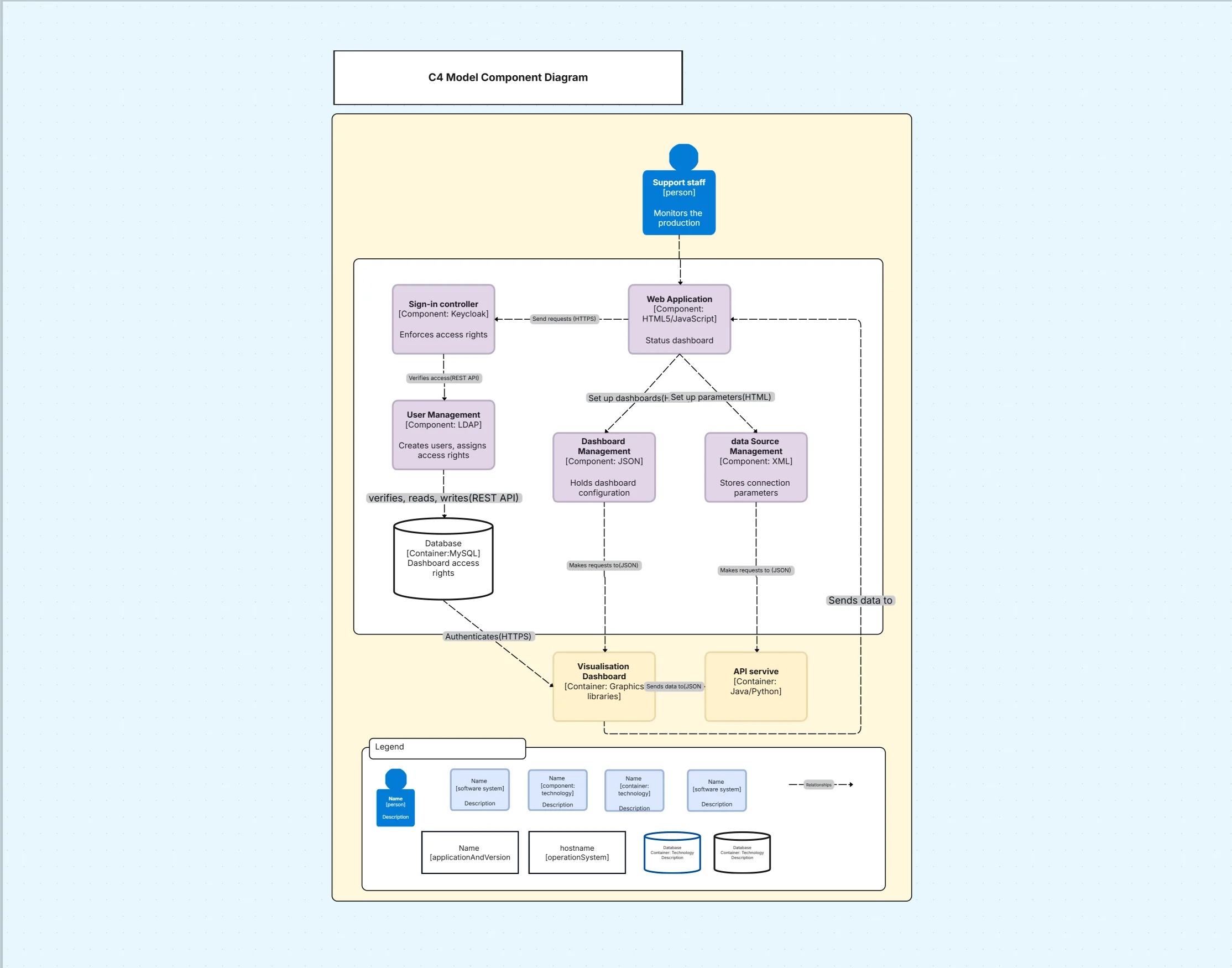
C4 Model Diagram Template

Cloudairy
 Copy link

Get your team started in minutes
Sign up with your work email for seamless collaboration.
Whiteboard
Copy link

Create a C4 model diagram to visualize software architecture across context, containers, components, and code. Use this editable template to document systems with Cloudchart.
Create a C4 model diagram to visualize software architecture across context, containers, components, and code. Use this editable template to document systems with Cloudchart.
The C4 Model Diagram Template is a powerful way to describe software architecture across multiple levels of detail: context, container, component, and code. It enables teams to move from a high-level view of a system down to detailed technical design while keeping the same consistent modeling approach. By using this template, teams can communicate software design effectively to both business stakeholders and developers.
See below for what’s included in this C4 model diagram template.
A C4 Model Diagram divides software architecture into four hierarchical levels that progressively add detail. This template includes all the elements needed to capture each level of the model.
See below for the main elements included in this C4 model diagram template.
Context diagrams : Show how the system fits within its environment, including users and external systems. This gives stakeholders an overview of boundaries and dependencies.
Container diagrams : Break down the system into applications, databases, or services. This illustrates how different containers interact to deliver functionality.
Component diagrams : Provide detail on the internal structure of containers. This highlights the key components, their responsibilities, and dependencies.
Code diagrams : Represent implementation details such as classes or functions. This ensures developers have precise technical guidance when writing code.
Standardized notation : Use consistent symbols and shapes to improve clarity. This makes diagrams easier to read and maintain across projects.
This template is ideal when teams need to communicate software architecture at different levels of abstraction. It bridges the gap between business and technical audiences by scaling from big-picture views to detailed design.
See below when to use this C4 model diagram template.
Architecture documentation : Use C4 to provide a complete, layered description of systems for reference. This ensures new team members quickly understand the architecture.
System design reviews : Present context and container diagrams to stakeholders during design phases. This keeps everyone aligned before implementation.
Developer guidance : Apply component and code diagrams to guide engineers on responsibilities and coding patterns. This improves consistency and reduces errors.
Compliance and governance : Demonstrate architecture layers to auditors and review boards. This provides transparency and accountability.
Cloudchart makes it simple to build C4 diagrams across all four levels, offering a structured yet flexible approach. The template can be adapted to any software system or team workflow. Explore innovative ideas using the SCAMPER Model for creative problem-solving.
Open the template in Cloudchart : Start with prebuilt layouts for context, container, component, and code levels. This provides a structured framework for your diagrams.
Add system boundaries : Define external users and systems at the context level. This clarifies the environment your application operates in.
Insert containers and interactions : Replace placeholders with your actual applications, services, and databases. Show how they communicate to provide system functionality.
Detail components inside containers : Break down containers into smaller components and add their responsibilities. This helps clarify dependencies and logic.
Refine with code-level diagrams : Add classes, functions, or scripts to illustrate implementation. This ensures developers have concrete technical references.
Collaborate and export : Share diagrams across teams in real time and export for documentation or reviews.
C4 Model Diagrams are widely applicable across software projects, making them useful for both enterprise and startup environments.
Microservices design : Use context and container diagrams to describe service interactions. Component and code diagrams ensure each service is implemented correctly.
Enterprise applications : Apply C4 to document ERP or CRM solutions, showing both business context and technical components. This improves understanding across teams.
API platforms : Use container and component diagrams to visualize API gateways and services. This clarifies integration points for partners and consumers.
Agile development : Incorporate C4 diagrams into sprint planning. This ensures user stories align with the system’s architectural vision.
1. What is a C4 model diagram?
It is a framework for describing software architecture at four levels: context, container, component, and code.
2. Why is the C4 model useful?
It provides consistent notation across abstraction levels, making it easier for different stakeholders to understand architecture.
3. Can C4 replace UML diagrams?
Not entirely. C4 complements UML by providing simpler, more scalable architecture views, while UML is better for detailed modeling.
4. Why use Cloudchart for C4 diagrams?
Cloudchart offers prebuilt C4 templates, AI-assisted layouts, and collaborative editing to make architecture documentation faster and easier.
Loading subcategories...
 Manage all your work in one place
Collaborate with your team
Use Cloudairy for FREE—forever
Explore More