Get your team started in minutes

Sign up with your work email for seamless collaboration.

What is a Cyber Security Architecture Template?

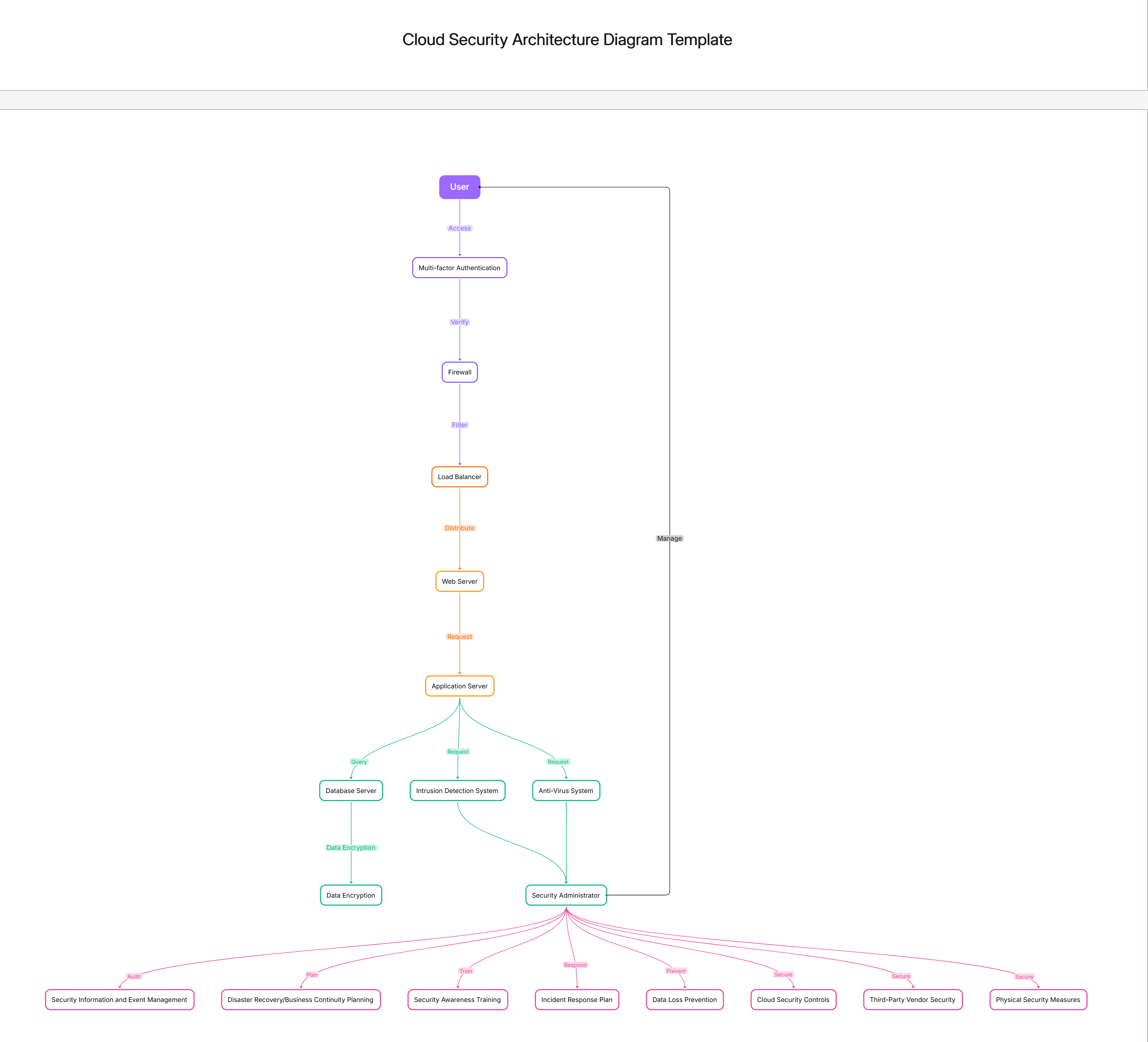
A Cyber Security Architecture Template is a single plan that guides the creation, administration, and development of your company's security strategy.Such a document shows the various changes in technology, operations and regulations that are necessary to ensure the security of digital assets and that security is not maintained in separate layers of your system.By mapping out potential threats, monitoring activities, and incident response strategies, the company can align the security framework with the actual control on the ground.

This graph is instrumental in a company's journey from the stage of security measures taken only after an attack to a situation where a security intelligence led model is employed prospectively.

Key Components of Cyber Security Architecture

An efficient cybersecurity framework involves various defensive strategies that are intertwined through identity, data, applications, and networks to be sturdy against the constantly changing threats. It forms a multi-layered system that stops, identifies, and lessens the effects of attacks in any way. The part here is to assist the security architects in seeing the main control points and the interactions between them, thus making the management and audit processes easier. By linking the top- level policies to the tactical defense layers, the teams can still guarantee that the security measures are properly implemented in the hybrid infrastructures as well as in cloud, native applications.

 See below for what’s included in this cyber security architecture template:

  • Identity and Access Management (IAM): Show the components of a typical centralized authentication system, MFA, and privilege enforcement. IAM guarantees that every access request is verified and recorded, thereby creating a traceable chain of events, while also enabling integration with an IAM Architecture Diagram Template for the whole identity governance flow.

  • Network and Endpoint Security: Illustrate the locations of firewalls, IDS/IPS systems, and endpoint protection tools that defend the organization's assets against intrusions. Each layer is implementing least privilege access, isolating the threat at the early stage, and maintaining the visibility of the lateral movements inside the enterprise networks.

  • Data Protection and Encryption: Demonstrate the encryption processes for data in transit and storage. Show the key management, tokenization, and masking that are the control mechanisms. This is done to protect the sensitive data while the organization's operations are in line with data privacy regulations such as GDPR or CCPA.

  • Threat Intelligence and Detection: Depict the integration points for SIEM, EDR, and XDR platforms. These give a unified view of the alerts, anomalies, and vulnerabilities thus, the teams can detect threats at the very moment in which they occur, long before they have the chance to escalate to breaches.

Core Layers of Cyber Defense

A cyber defense architecture is composed of the different layers that are connected to each other, each layer functioning as a different prevention, detection, and response unit. Instead of depending on one control only, it spreads the protection to the different identity, application, network, and endpoint tiers. The main idea of this organization is to lessen the risk exposure and, at the same time, make a backup system, thus, the defense will be still ongoing in case another component is out of order. Together, these layers make up a defense, in depth strategy specifically designed for today's hybrid environments.

See below for the foundational cyber defense layers covered in this template:

  • Perimeter and Boundary Defense: Specify external gateways, firewalls, and secure access proxies. The outermost layer here is the one that filters out the malicious traffic and checks the source authenticity. It is the first shield that stops unauthorized access, thus, the threats do not get a chance to go deeper into the core networks.

  • Detection and Response Layer: Describe the coupling of SIEM, SOAR, and EDR tools for threat detection 24/7. This layer ensures that every abnormality is automatically correlated and triaged by the system, thus, the mean time to detect and respond in different locations is greatly reduced.
  • Application Security Layer: Outline the implementation of secure coding, vulnerability scanning, and runtime protection. After integration with the Application Security Architecture Template, teams can secure the software lifecycle coding through to deployment.

  • Identity and Privilege Management Layer: Demonstrate how IAM frameworks that control access, enforce MFA, and manage admin privileges. By limiting elevated permissions, this layer lessens the risk of insiders and credential based attacks.

  • Business Continuity and Recovery Layer: Illustrate the presence of backups, disaster recovery zones, and incident playbooks. This is what guarantees operational resilience whereby organizations can bounce back from breaches with very little downtime or data loss.

Security Controls, Monitoring, and Governance

Strong cybersecurity architecture extends beyond tools — it’s reinforced by governance, visibility, and accountability. Continuous monitoring ensures that every control is not only implemented but functioning effectively. Governance defines ownership, escalation, and reporting structures to maintain consistency. When these elements work together, organizations gain a security posture that evolves with threats and supports measurable improvements through analytics, KPIs, and compliance alignment.

 See below for how security controls and monitoring appear in this template:

  • Framework Alignment: Incorporate standards such as NIST CSF, CIS Controls, and ISO 27001 into architecture layers. These frameworks create structured baselines that translate technical measures into business outcomes and audit-ready evidence.

  • Continuous Telemetry and Log Management: Capture logs from applications, endpoints, and cloud systems. Aggregate them into a SIEM dashboard that delivers real-time situational awareness, ensuring visibility into every user action or policy deviation.

  • Risk and Compliance Governance: Define how risks are scored, reported, and tracked. Assign clear owners for mitigation actions and link them to enterprise objectives. This transparency ensures accountability and supports executive reporting.

  • Automated Control Validation: Use orchestration workflows to test control performance regularly. Automation validates patching, privilege management, and alert responsiveness, keeping security consistent without manual bottlenecks.

When to Use a Cyber Security Architecture Template

A Cyber Security Architecture Diagram is a must have tool when companies want to see their protection plan or match the technical steps with the priorities of the executives. Such a diagram is perfect when creating security programs, organizing compliance activities, or connecting cloud, native systems. The diagram is a medium of communication among the management, auditors, and engineers thus it becomes simple to show the coverage, recognize the redundancies, and schedule the upgrades at any layer of the defense.

 See below for when this cybersecurity architecture template is most valuable:

  • Security Program Design: During initial planning, it helps define scope, dependencies, and milestones. Teams can align tactical efforts with strategic vision before tool selection or rollout.

  • Cloud Migration Initiatives: Use it when extending defense models into hybrid or multi-cloud infrastructures. The diagram ensures parity in controls between on-prem and virtual environments.

  • Regulatory Readiness: Before certifications or external audits, use this architecture to showcase framework alignment and policy enforcement, simplifying evidence collection and stakeholder review.

  • Incident Simulation and Response Testing: Incorporate this diagram in tabletop exercises to validate detection paths, alert escalation, and response timing under simulated threat conditions.

How to Customize Your Cyber Security Architecture Design

Different organizations have distinct risks, rely on different technologies, and have different compliance requirements, hence, the design of your cybersecurity architecture should be in line with this fact. By customizing, you can demonstrate which assets are most valuable, include your own, developed tools, and show the management that is specific to your operations. This chart can change with your security maturity level, thus, it can ensure that there is a connection with business goals and the defense posture is getting improved continuously.

 See below for how to tailor this cyber security architecture design:

  • Define Business-Critical Assets: Identify and label systems that handle sensitive data or revenue-generating processes. Mapping these first ensures protection aligns with business value.

  • Integrate Existing Toolsets: Represent legacy and cloud-native tools accurately. Visualizing interoperability between platforms prevents control overlaps and simplifies modernization planning.

  • Add Threat Intelligence Pipelines: Incorporate live threat feeds that inform detection logic. This enables predictive defense, allowing your architecture to counter emerging attack trends proactively.

  • Align Roles and Responsibilities: Assign ownership for every control — from IAM policies to monitoring dashboards. This clarifies accountability and strengthens governance reporting structures.

  • Embed Automation and AI Analytics: Show where orchestration or machine learning enhances detection or response. These integrations reduce manual workload while boosting precision and scalability.

Example Use Cases for Cyber Security Architecture

The Cyber Security Architecture Template applies across sectors that demand visibility, compliance, and resilience. It empowers teams to turn security objectives into visual frameworks that executives, auditors, and engineers can understand. From regulated finance to fast-scaling SaaS, it ensures security remains systematic, evidence-based, and adaptable.

 See below for practical cybersecurity architecture use cases:

  • Financial Sector Compliance: Map PCI DSS-aligned encryption, access monitoring, and fraud detection paths. This helps meet regulator expectations while safeguarding payment workflows.

  • Healthcare & Life Sciences: Secure patient data with layered identity controls, encryption, and audit trails. Combine with Data Security Architecture for end-to-end compliance under HIPAA and GDPR.

  • Government and Critical Infrastructure: Visualize defense-in-depth across air-gapped, classified, and cloud systems. This helps align operations with federal zero-trust and resilience mandates.

  • SaaS and Cloud Service Providers: Document multi-tenant isolation, automated patching, and behavioral analytics. These ensure platform-level defense while maintaining performance and uptime commitments.

FAQs

1. What is a Cyber Security Architecture Template used for?
It helps organizations visualize how security controls, policies, and processes integrate to defend digital assets across hybrid and on-prem systems.

2. How is it different from network or IAM diagrams?
While network diagrams show connectivity, and IAM focuses on identity, this template unifies every control — from access and detection to response and governance.

3. Can it align with NIST or ISO standards?
Yes, it is built to map against NIST CSF, ISO 27001, and CIS Controls, simplifying readiness for audits and certifications.

4. Does it support Zero Trust integration?
Absolutely. It integrates seamlessly with the Zero Trust Architecture Template to visualize adaptive access and continuous verification models.

5. How can I start building it?
Use the Security Architecture Diagram Tool to select this template, customize controls, and generate a shareable architecture map.

Explore More

Similar templates