IAM Architecture Diagram Template

Cloudairy
 Copy link

Get your team started in minutes
Sign up with your work email for seamless collaboration.
Whiteboard
Copy link

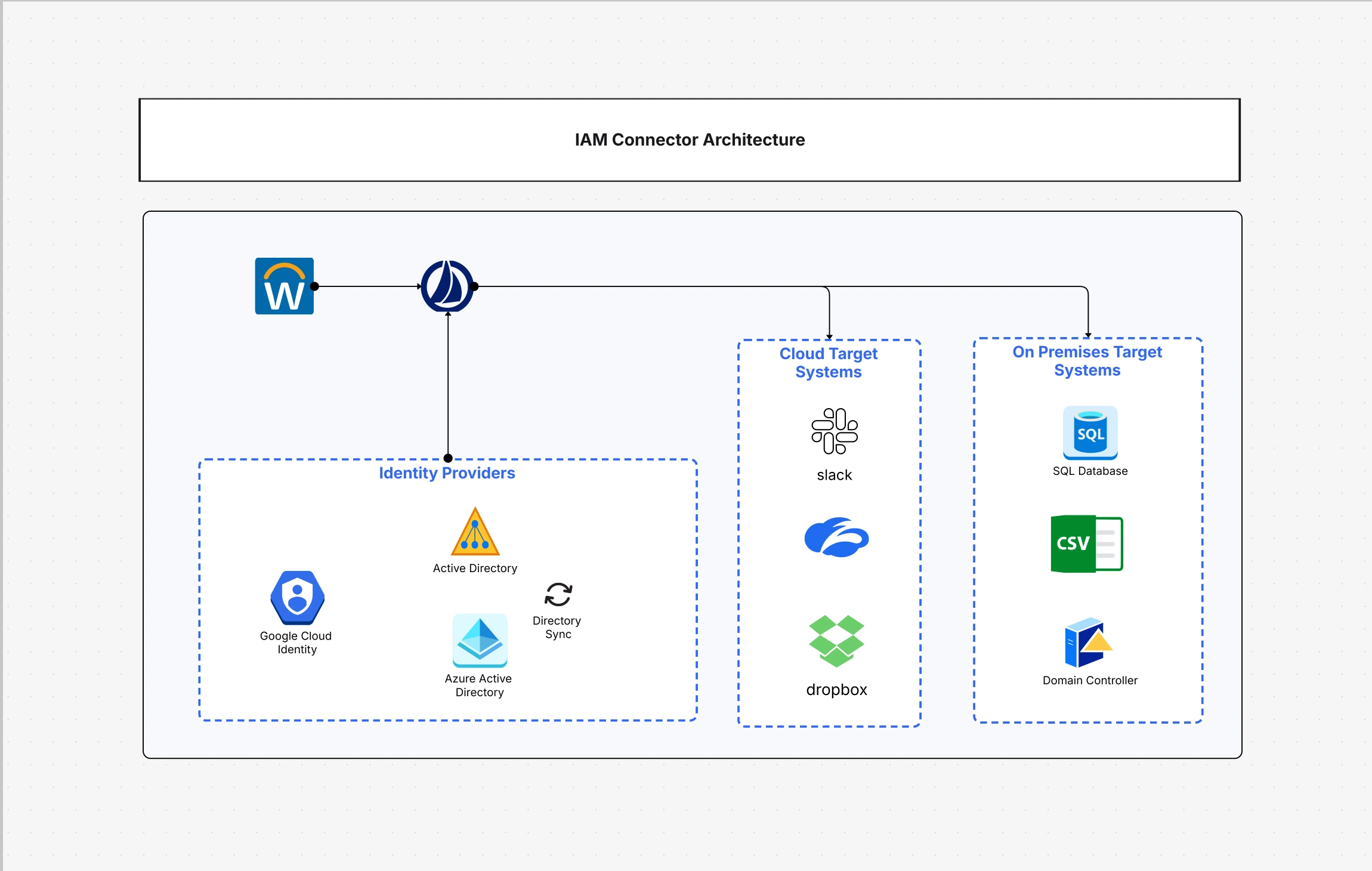
An IAM Architecture Diagram Template visually represents identity, authentication, authorization, roles, policies, users, and access flows across systems, helping teams design secure and scalable access management.
An IAM Architecture Diagram Template visually represents identity, authentication, authorization, roles, policies, users, and access flows across systems, helping teams design secure and scalable access management.
An IAM architecture diagram Template illustrates in detail the flow of identities, access, and security permissions in the different IT systems of an organization's network. In this means, the enterprises can gather in one place the management of user authentication, policy enforcement, and privilege delegation. The picture, compared to numerous scenarios, pretty much shows the interaction of users, applications, and resources in a way that is easy to understand. In such a way, companies become able to guarantee the least necessary rights of access, simplify user provisioning, and link IAM policies to the requirements of the regulations that give them the power to be able to carry out identity governance in a uniform manner in hybrid and multi-cloud environments.
Also called an identity and access management diagram or an identity management architecture diagram, this IAM architecture diagram gives a single, clear view of how access flows across your systems.
An efficient IAM architecture cabling the identity stores, the verification methods, the policy decision points, and the listening devices into a single ecosystem provides safe access to on-premises systems, cloud applications, APIs, and third-party integrations. Mapping these connections makes it possible to identify the gaps, apply uniform policies, and track the usage across the digital estate. The result is a governance model that comfortably increases its potential and at the same time reduces the administrative burden and the risks of non-compliance that usually accompany manual access management.
See below for what’s included in this IAM architecture diagram template:
Whether you need a simple IAM architecture diagram for a single application or a full enterprise IAM architecture diagram spanning many directories, the template scales to fit.
An efficiently planned IAM framework essentially includes various interdependent layers: identity creation, authentication, authorization, and auditing. Each level knows its own specific tasks, and together they also communicate the data for consistency purposes. The layer system continues to work if one layer is down; it does not have security silos, and it can also be easily extended with additional users or services. The greatest benefit is that the flow of trust can be easily visualized starting from user validation to resource assignment, thus giving the user the opportunity to see at which points the policies and verifications intersect in the case of hybrid networks and SaaS platforms.
See below for the foundational IAM layers represented in this template:
Authenticating, authorizing, and federating are the core features of any IAM system that is based on the cloud. These are the factors that are mainly responsible for ensuring that users are given access only to the necessary things, at the required time, and through trusted channels. Actually, these operations are the ones that verify identities, enforce access restrictions, and facilitate the integration of different identity domains. Therefore, these three operations provide companies with the freedom to employ cloud services under the condition that they still keep control from the center and have a clear view, which is the main idea of a ZT security model.
See below for how these IAM components operate within your diagram:
An IAM architecture diagram is a must-have tool when you are setting up secure access for hybrid environments or upgrading old identity systems. It is very helpful for the different teams that move to a centralized IAM or carry out the implementation of Zero Trust frameworks. Additionally, the IAM architecture diagram is a great tool during compliance audits, mergers, and cloud migrations, which are the scenarios where access stability is very important. The main function of this diagram is to aid the involved persons in comprehending the interrelation of authentication, provisioning, and authorization and in realizing their agreements as being enforceable, measurable, and easy to maintain.
See below for when this IAM architecture diagram template adds maximum value:
An organization's identity and access management (IAM) plan should demonstrate the organization's business model, the people it serves, and the amount of risk it is willing to take. Customizing is what saves IAM from being only a concept; it is a delicate balance between security and user experience. The initial step is to identify the primary user personas, authentication flows, and application dependencies. Then align these with the policies and monitoring points in the diagram. Continuously updating your design to reflect the new connections, automated workflows, and changes in compliance requirements is what you do when the systems get larger.
See below for how to personalize this IAM architecture diagram:
An IAM architecture diagram template is flexible enough to cover various scenarios such as an enterprise workforce onboarding process or a customer identity platform. It forms the basis of secure authentication, easy user experiences, and uniform policy implementation in all systems. Companies use this setup to lower the chances of risks coming from inside the company, stop any unauthorized access, and at the same time, allow internal teams and external partners to collaborate without any kind of friction.
For cloud-first teams, the same template also serves as an AWS IAM diagram, mapping roles, policies, and trust relationships inside AWS.
See below for common IAM architecture use cases:
It visually represents how identities are created, authenticated, and authorized across systems, helping teams maintain control over access and governance in complex environments. In short, this IAM architecture diagram doubles as an identity and access management diagram for the whole organization.
It ensures continuous validation of users and devices, enforcing least privilege and adaptive access aligned with the Zero Trust Architecture Template.
Yes. The diagram supports federated architectures, showing how IdPs connect to service providers through secure protocols like SAML and OIDC. It works for both a simple IAM architecture diagram and a larger enterprise IAM architecture diagram.
Absolutely. It offers visual proof of how identities and permissions are managed, supporting audits for ISO 27001, SOC 2, and HIPAA.
Use the security architecture diagram tool to select the IAM template, connect your directory models, and visualize policy enforcement across all layers. You can begin from a blank canvas or an existing AWS IAM diagram or identity management architecture diagram.
Loading subcategories...
 Manage all your work in one place
Collaborate with your team
Use Cloudairy for FREE—forever
Explore More