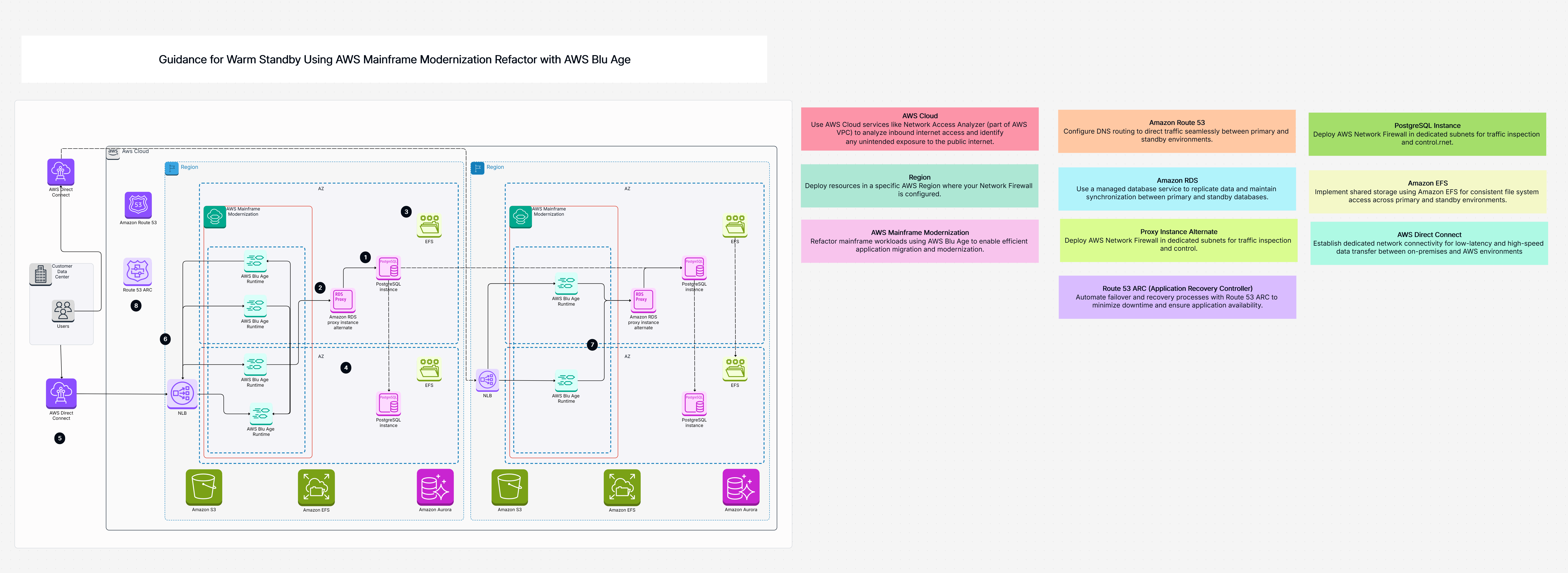
Guidance for Warm Standby Using AWS Mainframe Modernization Refactor with AWS Blu Age

Cloudairy
 Copy link

Get your team started in minutes
Sign up with your work email for seamless collaboration.
Whiteboard
Copy link

Modernize legacy mainframe applications with AWS Mainframe Modernization. Migrate, refactor, and run workloads securely and efficiently in the AWS Cloud.
Modernize legacy mainframe applications with AWS Mainframe Modernization. Migrate, refactor, and run workloads securely and efficiently in the AWS Cloud.
This template gives you an evident step-by-step guide to relocate SAP HANA to AWS (Amazon Web Services).
It covers key parts of your AWS migration strategy for SAP:
By taking care of your old system's name, you avoid big changes and make sure your SAP HANA workload on AWS has slightest interruptions. This helps ensure your SAP to AWS cloud migration is successful and follows AWS SAP HANA best rehearsals.
It's easy to get started:
Cloudairy makes planning your SAP HANA cloud move simple:
Here are the main parts involved in this cloud migration setup:
This Cloud strategy template offers powerful benefits for your SAP cloud journey:
This template is ideal for:
This AWS Cloud Migration Strategy template makes exciting your SAP HANA to the cloud simple. It gives you a structured AWS migration scheme for SAP for setting up secure connections and real-time data imitating, all while keeping your old hostname. This ensures your SAP to AWS cloud migration goes efficiently, minimizing downtime for your SAP HANA workload on AWS, and helps you follow AWS SAP HANA best practices for your new SAP HANA cloud infrastructure.
This template provides a clear AWS Cloud Migration Strategy and a step-by-step Cloud migration plan to help your business smoothly move SAP HANA databases and related applications to AWS.
This template covers common migration paths, including rehosting (moving as-is), refactoring (changing for cloud), replatforming (adapting for cloud), and even replacing with SaaS solutions.
It serves as a comprehensive AWS cloud planning tool and a Cloud strategy template. It helps you assess your current SAP systems, choose the best migration paths, and plan out your entire cloud transition.
This template is designed to support Enterprise cloud adoption for businesses of all sizes, offering a structured approach suitable for even complex SAP migrations.
Yes, it includes clear steps and components that can serve as an AWS migration checklist. This helps ensure you cover all important aspects from discovery to deployment and optimization.
It guides you through critical decisions that shape your AWS cloud architecture during the SAP migration. By choosing appropriate methods, you can build a more modern and efficient cloud environment for your SAP HANA workload on AWS.
Absolutely. By providing structured paths, validation steps, and focusing on careful planning, this Cloud migration plan helps you minimize risks and ensure a smoother, more successful transition for your SAP HANA systems to the cloud.
Loading subcategories...
 Manage all your work in one place
Collaborate with your team
Use Cloudairy for FREE—forever
Explore More