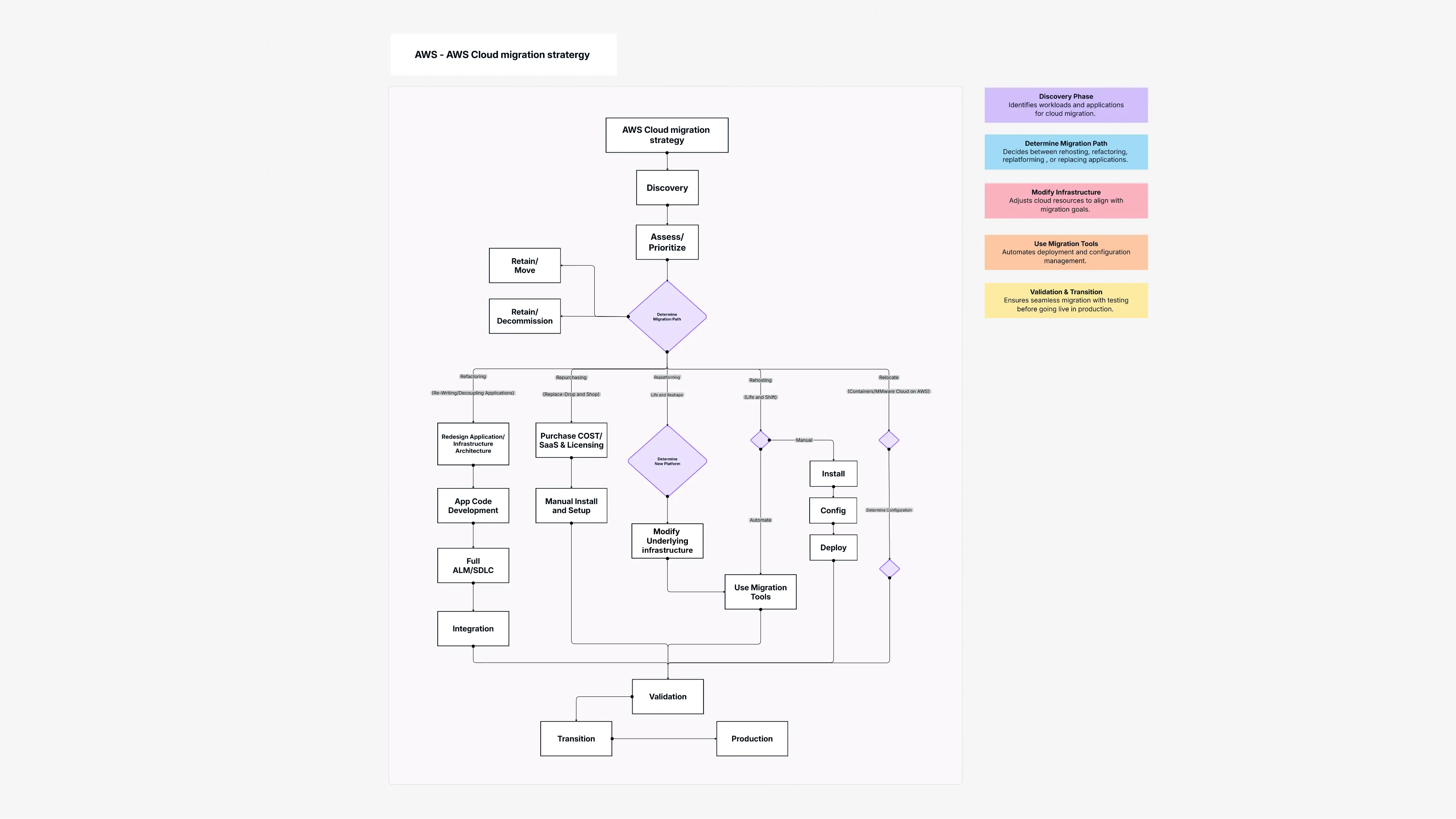
About AWS Cloud migration strategy Template: Your Simple Cloud Move Plan
This template is a simple guide that shows your full AWS Cloud Migration Strategy. It helps you understand how your apps can move safely and smoothly to the AWS cloud.
It shows different ways you can move your apps:
- Rehost (Lift & Shift): Move your app just as it is.
- Refactor: Change the app to work better in the cloud.
- Replatform: Make small upgrades to get cloud benefits.
- SaaS Replacement: Replace your app with ready-made online software.
This AWS Cloud Migration Strategy template also includes steps for checking your apps, connecting pieces, and launching everything safely. It helps you lower risks, grow your apps, and reach your cloud goals. It also guides your AWS cloud architecture decisions for a smooth move.
How to Open AWS Cloud migration strategy Template in Cloudairy
It’s very easy:
- Log in to your Cloudairy account.
- Go to the Templates section.
- Search for “AWS Cloud Migration Strategy.”
- Click to open and see how the migration works.
- Click Use Template to start making your own cloud-move plan.
How to Use Cloudairy for Your AWS Cloud Migration Strategy
Cloudairy makes cloud planning simple:
- Pick the AWS Cloud Migration Strategy template to start.
- Change the migration paths to match your apps.
- Add extra steps like checks and automation tools.
- Work with your team to shape the plan.
- See how your apps connect and how each step flows.
- Export or share your final AWS migration checklist with your team.
Template Components: The Steps in Your Cloud Journey
Here are the main parts of this cloud migration setup:
- Discovery: Checks if your systems are ready for the cloud.
- Assess & Prioritize: Decides which apps move first.
- Determine Migration Path: You choose the best way to move each app.
- Rehost (Lift & Shift): Move the app without changing it.
- Refactor: Change parts of the app to work better in AWS.
- Replatform: Make small upgrades for cloud benefits.
- SaaS Replacement: Use an online service instead of your old app.
- Validation: Make sure everything works after moving.
- Integration: Connect all cloud parts together.
- Automated Migration Tools: Tools that help move apps automatically.
- Deployment: Launch your apps in the AWS cloud.
- Monitoring & Optimization: Watch how apps run and make them better.
- Cloud Security Measures: Keep everything safe in the cloud.
Benefits of AWS Cloud migration strategy Cloud Strategy Template
This AWS Cloud Migration Strategy template gives you:
- Clear Roadmap: A step-by-step plan you can follow easily.
- Reduced Risk: Fewer problems and a smoother cloud move.
- Enhanced Scalability: Build AWS cloud architecture that grows with your business.
- Efficient Adoption: Supports fast and simple Enterprise cloud adoption.
- Tailored Approach: Each app gets the migration path that fits it best.
- Cost Savings: Helps you make smart choices to control cloud spending.
Ideally, Who Can Use AWS Cloud migration strategy Template
This template is great for:
- IT Leaders & CIOs: Planning Enterprise cloud adoption.
- Cloud Architects & Strategists: Designing AWS cloud architecture.
- Project Managers: Managing the cloud migration plan.
- DevOps Teams: Using the AWS migration checklist to execute moves.
- Businesses of All Sizes: Wanting a clear AWS cloud planning tool.
Summary
The AWS Cloud Migration Strategy template makes your cloud move simple and clear. It gives you a full cloud migration plan with easy steps to follow. Your apps move safely, stay fast, and stay secure.
With this AWS cloud planning tool, businesses can plan, run, and check their cloud migration smoothly. It supports Enterprise cloud adoption and helps build a strong AWS cloud architecture.

 Copy link


 Manage all your work in one place