50,000 + Trusted Users with
star-img star-img star-img star-img star-img

Trusted by Professionals at Leading Companies

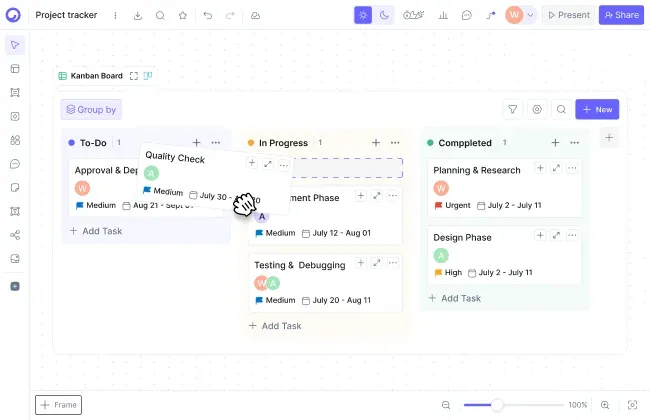
Project tracker - a kanban task board in Cloudairy

What Is the Best Project Tracker?

The best project tracker is the one your team actually opens. For most teams that's Cloudairy: create a task board, drag cards through stages, switch to timeline when deadlines stack up, and share a dashboard everyone can read - free for unlimited members, with paid plans from $8 per member per month.

Project tracking tools fall into two camps. Dedicated project management suites - Asana, monday.com, and at the lightweight end Trello - go deep on tasks: dependencies, portfolios, automations. All-in-one visual workspaces like Cloudairy pair the tracker with whiteboards, diagrams, and docs, so the work and the plans behind it live in one place.

If you run complex programs with cross-project dependencies, a heavyweight suite earns its price. If you want a project tracker for teams that also sketch plans, map processes, and write docs, one workspace beats three subscriptions. Start with the task boards feature to see how the views fit together.

Cloudairy vs Trello vs Asana vs monday.com for Project Tracking

Four trackers cover most teams. Here's how they differ on the things buyers actually ask about - and where each free project tracker tier tops out.

Verdict: Trello is the budget pick when kanban cards are the whole job. Asana and monday.com go deepest on work management - dependencies, workload, automations - and charge for it, especially past ten seats. Cloudairy is the strongest pick when tracking is part of a bigger picture: boards, timelines, and dashboards next to the whiteboards, diagrams, and docs the project actually runs on - free to start, $8/member/mo after.

Why Teams Pick Cloudairy as Their Project Tracker

Most trackers show you a board and stop. Cloudairy is a project tracker for teams that plan visually - the board, the deadlines behind it, and the whiteboard it was scoped on live in one workspace.

Task boards with kanban, list, and timeline views

One Board, Three Views

Set up a kanban board for the launch, scan it as a list at standup, and flip to timeline view when someone asks about dates. Same tasks, same board - no copying work between tools.

Team dashboards and goals for project status

Dashboards and Goals Instead of Status Meetings

Team dashboards chart progress as cards move, and goals tie the boards to outcomes. Share one link with stakeholders and skip the Friday status deck.

AI helps plan projects and draft boards

AI Helps You Plan

Describe the project and Cloudairy's AI drafts the structure - tasks, stages, even the sprint plan and backlog. The free plan includes 25 AI credits a month, so you can test it on a real project.

Tracker, whiteboards, diagrams, and docs in one workspace

The Tracker Lives With the Plans

Your board sits next to the whiteboard where the project was scoped and the Gantt chart that schedules it. One workspace, unlimited members on Free - no tab-switching tax.

Project Tracking Templates & Examples

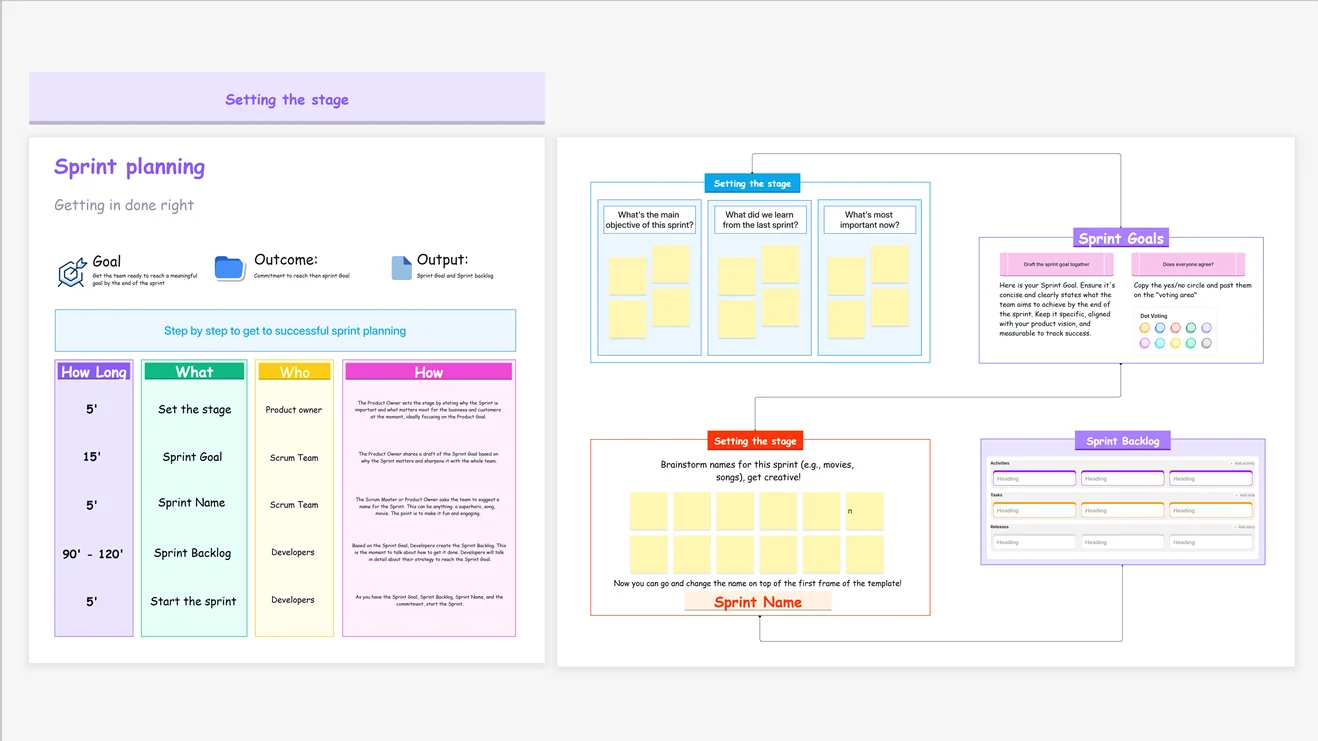
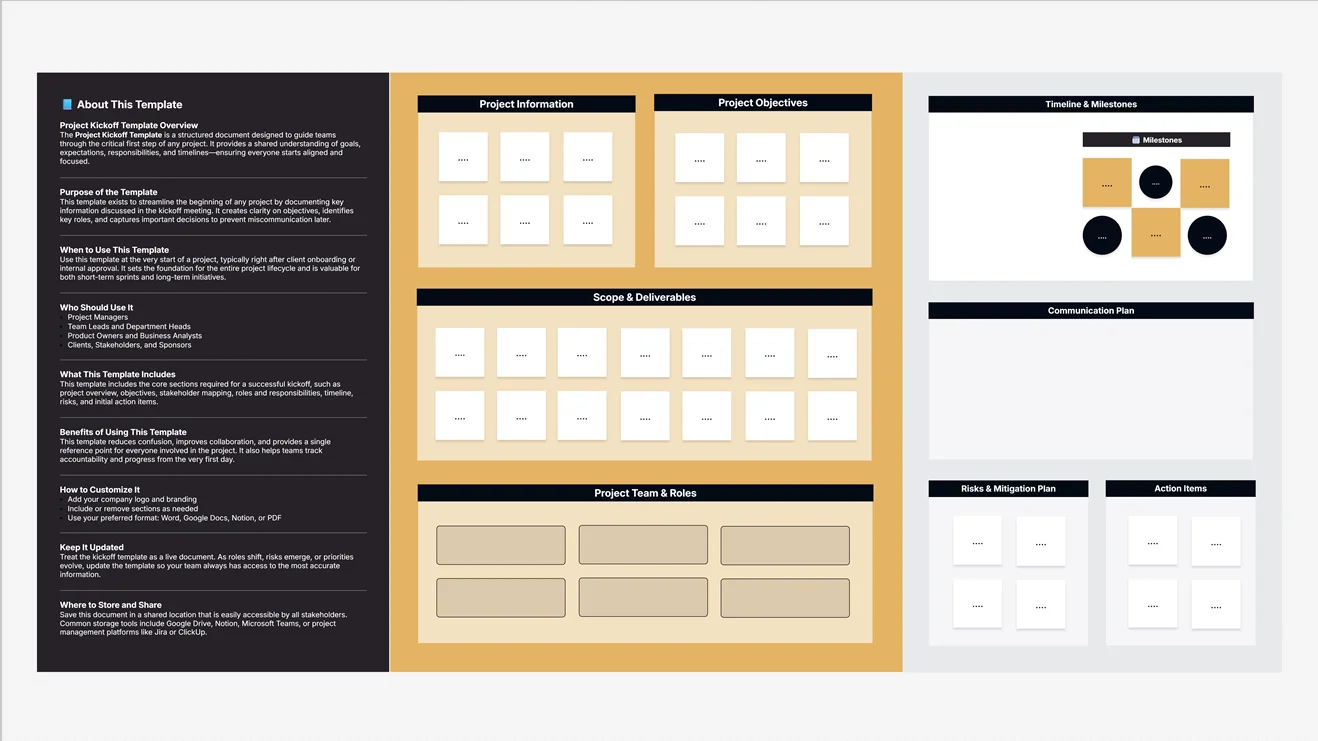
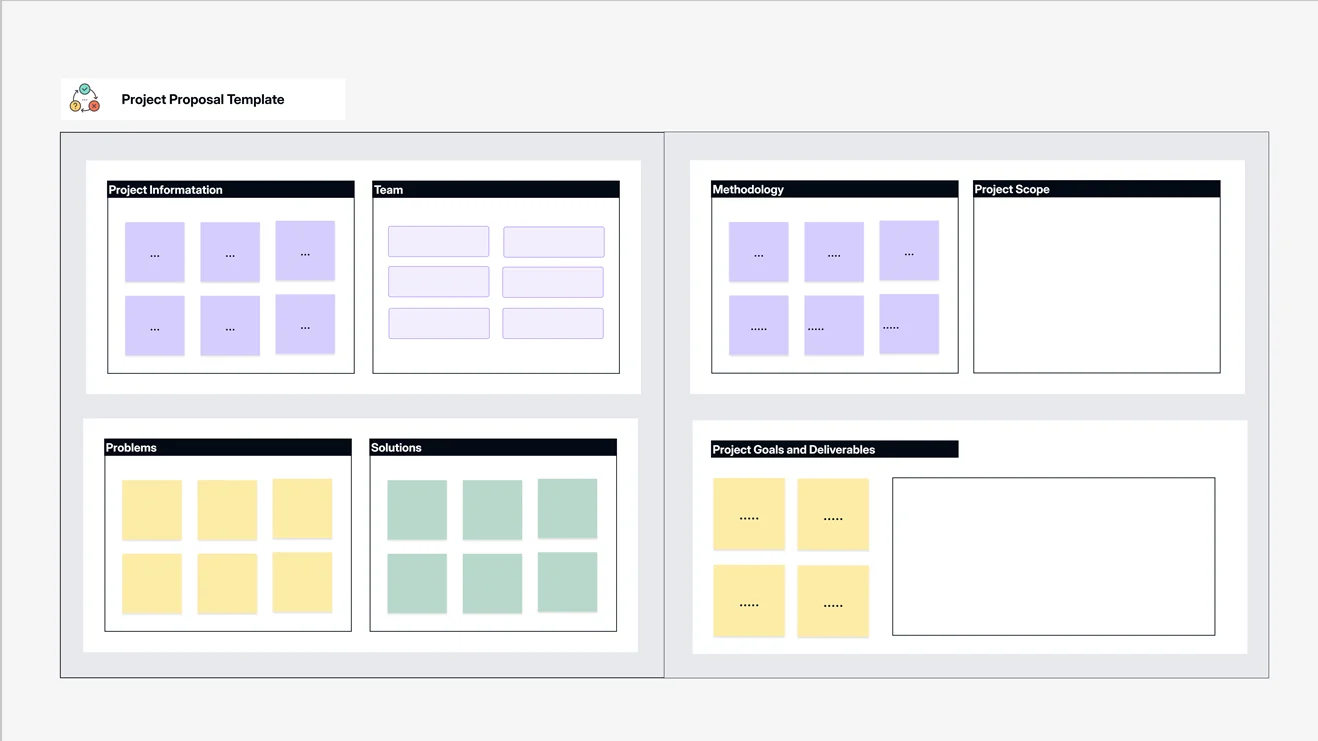
Skip the blank board. These templates are the fastest way to see a working setup - open one and swap in your team's tasks.

Track a Project in 3 Steps

From a pile of tasks to a board the whole team reads - without a rollout project or an admin manual.

Step 1 - Create a board: Start from a template or a blank kanban board and add your tasks - or describe the project and let the AI draft the first pass. Owners, due dates, and priorities sit right on each card.

Step 2 - Drag work through stages: Move cards from To do to Done as work happens, and switch the same board to list or timeline view when standup or a deadline demands it. Statuses update for everyone instantly.

Step 3 - Share the dashboard link: Send stakeholders one dashboard link instead of a weekly status email. Charts update as the board changes, so the answer to "where are we?" is always current.

Want to see the board mechanics first? The kanban board tool page walks through columns, WIP limits, and swimlanes.

How to track a project in 3 steps with Cloudairy

Who Uses a Project Tracker?

The same board does very different jobs. These are the four buyers we see most - and what each one actually needs from a project tracker:

Team leads running a launch

Twenty tasks, five owners, one date that can't slip. Run the work on a board, check the deadline on the timeline, and give the exec sponsor a dashboard so status questions stop landing in your DMs.

Ops managers tracking recurring work

Monthly close, onboarding checklists, vendor renewals - the same cards on repeat. Duplicate a proven board each cycle, assign owners once, and catch the step that always used to fall through.

Agencies juggling client projects

One board per client, one dashboard across all of them. When a client asks where things stand, share a live link instead of assembling a status slide the night before the call.

Founders keeping the whole company visible

Six people, thirty threads. Track everything on a handful of boards next to the roadmap sketches and docs, and read the week's progress off one dashboard instead of asking around.

Who uses a project tracker - team leads, ops managers, agencies, founders

Project Tracker FAQs

Yes. Cloudairy's free plan includes 3 boards, 25 AI credits per month, and unlimited members, so the whole team can move cards and check the timeline at no cost. Trello's free tier allows 10 boards per workspace, Asana's covers up to 10 people, and monday.com's stops at 2 seats.

A project tracker shows status: tasks on boards, dates on a timeline, progress on a dashboard. Project management software like Asana or monday.com layers on dependencies, workload balancing, and portfolios - powerful, but heavier and pricier per seat. Cloudairy sits in between: full tracking plus whiteboards, diagrams, and docs, without the work-OS overhead.

For tracking work, yes - and it fixes the parts spreadsheets get wrong. Each task carries an owner, status, and due date; drag it across the board instead of editing a row, then read progress off the dashboard. Keep the spreadsheet for budgets and calculations, and let the tracker handle who is doing what by when.

Task boards come with kanban, list, and timeline views, so the same tasks read as cards, a checklist, or a schedule. Calendar, timeline, and Gantt charts handle date-driven planning, and team dashboards chart progress across boards. Sprint planning and goals round out the set for agile teams.

Trello is the lightweight kanban classic - if all you need is cards moving across columns, its free tier is generous and the Atlassian ecosystem is deep. Cloudairy costs more at entry but includes timeline views, dashboards, goals, and the whiteboards and diagrams Trello leaves to Power-Ups. Pick by whether tracking is the whole job or part of it.

Yes. Team dashboards chart task status and progress across boards, and they update as people move cards - share one link instead of writing a Monday status email. Goals sit alongside the dashboards, so you track outcomes, not just activity. Both live in the same workspace as the boards they report on.

Yes. Start from the sprint planning, project kickoff, project proposal, or retrospective workshop templates and swap in your own tasks - each one is fully editable. The templates library also covers roadmaps, timelines, and kanban boards, so recurring work starts from a proven layout instead of a blank board.

Yes. Cloudairy is certified for SOC 2 Type II, ISO 27001, GDPR, and PCI DSS. Enterprise features include SAML SSO (via Okta, OneLogin, Auth0), SCIM provisioning, audit logs, custom data residency (US or EU), and a 99.9% uptime SLA.

Cloudairy is free for 3 boards, 25 monthly AI credits, and unlimited members; Pro is $8 per member per month and Business is $16. Trello starts at $5 per user, Asana's Starter runs $10.99 per user, and monday.com's Basic is $9 per seat with a 3-seat minimum - all billed annually.

Success Stories from Our Community

See how professionals and learners across industries use Cloudairy to transform ideas into results. From students and educators to architects and managers, our users achieve more with the power of AI-driven creativity.

As a cloud architect, I need precision and speed. Cloudairy helps me design complex multi-cloud architectures in minutes without losing detail or accuracy.

Cloudairy makes solution design so simple. I can create client-ready diagrams instantly and focus on delivering value instead of spending time on formatting.

As a student, Cloudairy makes my assignments so much easier. I can generate flowcharts and mind maps instantly, which helps me study smarter.

I use Cloudairy in my classes to teach system design. It's intuitive for students and powerful enough for real-world projects.

Cloudairy has completely changed how I manage projects. The AI-driven diagrams save me hours every week, and my team collaborates more efficiently than ever.

Secure, compliant, and enterprise-ready

Cloudairy safeguards your work with enterprise-grade security, compliance, and access controls -so your teams can create, collaborate, and scale with confidence.

SOC 2 Type
SOC 2 Type Ⅲ

Cloudairy is SOC 2 Type Ⅲ and penetration tested annually, ensuring your data meets the highest standards for security and reliability.

SSO Image
GDPR

We comply with the European Union General Data Protection Regulation (GDPR) and extend it to all our customers even those outside of the EU

Access Controls
ISO 27001

Our Information Security Management System is ISO 27001 certified the leading global standard for information security.

Flexible Pricing for Every Team

Free

Discover what Cloudairy can do for you. Start for free

$0

for unlimited members
Try for free

Upgrade now

Show key features

up-arrow

Includes:

Starter

Unlock unlimited and private boards with important features

$4

per member / month

billed annually

monthly

Show key features

up-arrow

Includes everything in Free, plus:

money-back

Business

MOST POPULAR

Ideal for agencies or growing businesses managing multiple projects.

$5

per member / month
billed annually

Show key features

up-arrow

Includes everything in starter, plus:

Enterprise Plan

For large organizations needing scalability, control, and security.

contect-pricing
Contact for pricing
Contact us

Upgrade now

Show key features

up-arrow

Includes everything in Business, plus:

The short version: Free is $0 - 3 boards, 25 AI credits a month, unlimited members. Paid plans run $8 per member/month and $16 per member/month for Business, billed annually. Enterprise is custom.

More Project Tracking Resources

Ready to Track Your Next Project?

Set up a board, drag the first card, and share the dashboard - your tracker, plans, and diagrams finally in one place.

No credit card required · Free plan: 3 boards + 25 AI credits/month · SOC 2 Type II & GDPR compliant