Zero Trust Architecture Diagram Template

Cloudairy
 Copy link

Get your team started in minutes
Sign up with your work email for seamless collaboration.
Whiteboard
Copy link

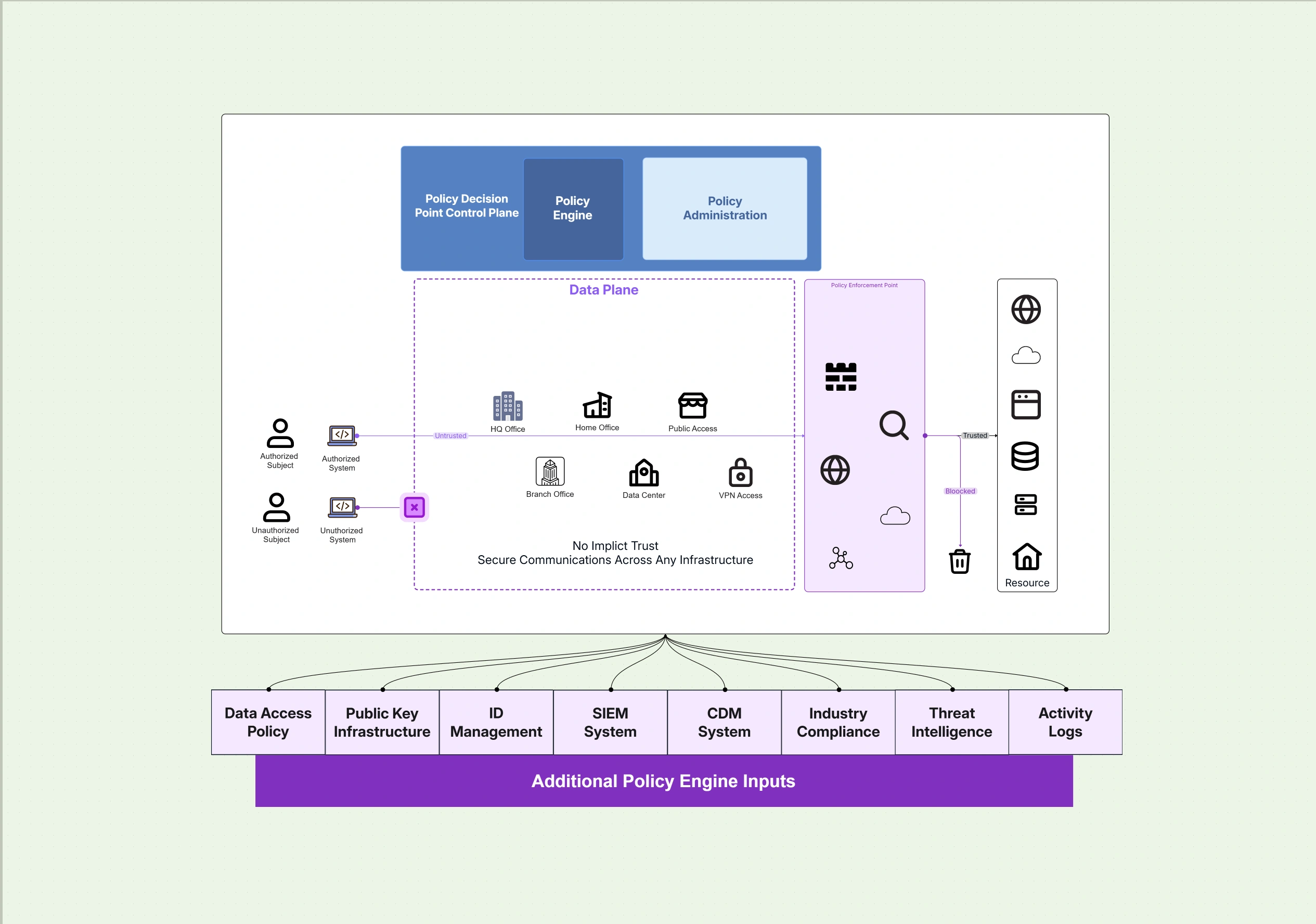
A Zero Trust Architecture Diagram Template illustrates secure access based on continuous verification, showing users, devices, networks, identity controls, and policies to prevent unauthorized access.
A Zero Trust Architecture Diagram Template illustrates secure access based on continuous verification, showing users, devices, networks, identity controls, and policies to prevent unauthorized access.
A Zero Trust Architecture Diagram Template offers a pictorial outline of how to build security systems that check every link, user, and device, no matter where they are or who owns them. The model doesn't trust internal networks but rather ensures that every access attempt is checked. With this template, companies are able to map out the different authentication layers, data flows, and locations where policies are enforced. It is a great tool for teams to move towards an identity, focused, context, aware security approach that is suitable for today's hybrid and remote settings.
A Zero Trust Architecture (ZTA) is a perimeterless one, thus it does not have a perimeter as traditional models have. The main idea of ZTA is to apply "never trust, always verify" principles even for the smallest interaction. The system is based on verifying identities, protecting data transmission and monitoring constantly the activity in search for anomalies. The picture here is a support tool to understand the different layers of control, starting from trusted identity and devices to network segmentation and continuous analytics. Utilizing these elements together, enterprises limit their attack surfaces and implement least, privilege access which guarantees that each user and workload is checked at every stage.
Create clear cloud security diagrams fast with Cloudairy’s ready-to-use template.
See below for what’s included in this zero trust architecture diagram template:
Zero Trust Architecture that accomplishes its goal relies on fundamental principles identity verification, least privilege, segmentation, and continuous monitoring. These different levels work together dynamically to confirm each access in real time. There are no fixed borders as policies accompany the user or service over clouds and devices. This layer, by, layer method gives the organization the power to change access rules on the spot according to the changing risks thus security being turned into an adaptive protection that does not obstruct the work flow from the organization's static defense.
See below for foundational zero trust layers within this template:
In a Zero Trust Security Architecture, enforcement and observability are always there, not occasionally. Policies constantly adjust to changes in the attack scenarios, as they include automation that takes away manual operations, thus there is no delay in detection and response. This part demonstrates the way policy engines check the conditions and decide whether access is allowed, and how the analytics feedback helps in making the decisions stronger with time. These networks thus form a smart security cycle that ensures compliance, reduces the possibility of mistakes, and quickens the time to error correction when there are fraudulent events.
See below for how policy enforcement and monitoring are represented in this template:
A Zero Trust Architecture Diagram works best when you are moving away traditional network perimeters and towards identity, based security. It is a scenario that benefits most from a ZTAD is a digital transformation, cloud migration, or the growth of a hybrid workforce, instances where old models are not able to adequately protect distributed systems. Using a chart like this, companies are able to understand how trust flows, to coordinate their policies with their risk profiles, and to inform different departments about the changes of the architecture in a way that is simple and uniform.
See below for when to use this zero trust diagram template:
Each and every business need ought to be reflected in the design of a Zero Trust architecture. Understanding your business operations, user behavior, and compliance priorities will help you tailor your ZTA accordingly. By tailoring the ZTA to their needs, companies can use the tools and processes they already have in place instead of starting from scratch. The idea is to have a system that knows the context and still it is able to verify the user's identity without any kind of interruption of the normal work processes.Such an architecture, when properly represented, is a living security framework it is, in fact, adaptive, measurable, and compliant with the overall objectives of the enterprise.
See below for how to personalize this zero trust diagram template:
A Zero Trust Architecture Template is adaptable to various circumstances such as securing hybrid enterprises or facilitating secure third, party collaboration. It supports companies in lessening the chances of breaches, integrating identity governance, and retaining high levels of security even if they are changing frequently. Through the depiction of trust relationships, access flows, and control points, different teams can be in coordination with the work done by the engineering and compliance sections and at the same time creating security consciousness in other departments.
See below for where this zero trust security template applies best:
1. What is a Zero Trust Architecture Diagram?
It’s a visual representation that shows how users, devices, and services are continuously verified before accessing resources, eliminating implicit trust across networks.
2. How does Zero Trust differ from traditional models?
Unlike perimeter security, Zero Trust validates every request, regardless of origin. Trust is earned dynamically, not assumed, and continuously monitored.
3. Can this template be used for hybrid cloud environments?
Yes. It’s designed to unify IAM, endpoint, and network policies across on-prem, multi-cloud, and SaaS ecosystems with consistent enforcement.
4. Is this aligned with NIST and CISA frameworks?
Absolutely. It aligns closely with NIST 800-207 and the CISA Zero Trust Maturity Model, supporting both federal and enterprise implementations.
5. How can I build this architecture?
Use the Security Architecture Diagram Tool to select this template, integrate identity layers, and visualize adaptive policy logic for your environment.
Loading subcategories...
 Manage all your work in one place
Collaborate with your team
Use Cloudairy for FREE—forever
Explore More