hero-bg-pricing

Get your team started in minutes

Sign up with your work email for seamless collaboration.

architecture diagrams cloud migration
Technical Diagramming

How Architecture Diagrams Accelerate Cloud Migration
Author
Cloudairy
By Cloudairy Team
January 10, 2026
10 min read

Based on hands on lessons from my own projects, I know cloud migrations usually bring improved agility, greater scalability, and noticeable financial savings. Even so, they often introduce new struggles: unexpected system downtime, painful data loss, stretched-out budgets, and tricky compliance weaknesses. The most practical way I have personally reduced these risks is by using visually clear architecture diagrams. Without such diagrams, projects quickly drift into disarray teams lose track of what is migrating, the timelines involved, and the system linkages.
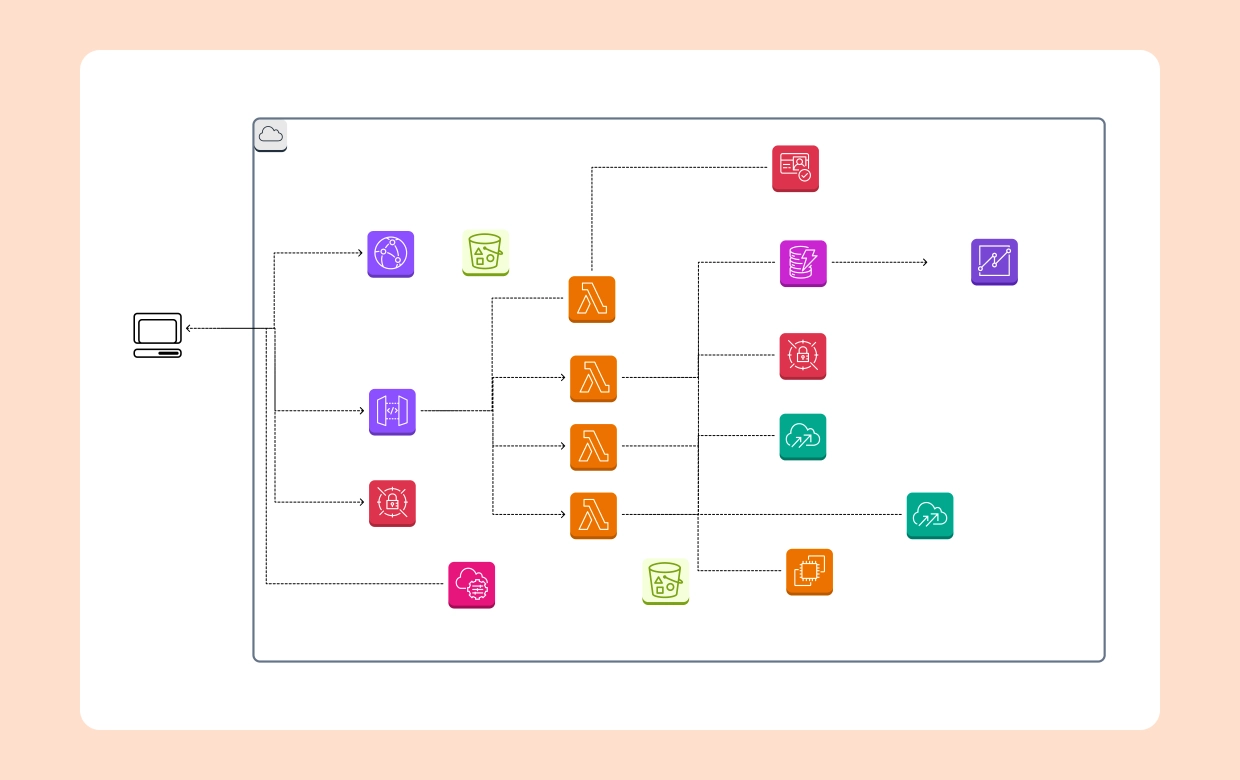
Want a helpful place to start? You can use the Hybrid Cloud Architecture Template to easily visualize hybrid environments while planning migration.

Why Architecture Diagrams Are Critical in Migration Projects

Architecture diagrams are more than visuals they are working blueprints for discovery, alignment, and execution. In cloud computing architecture projects, diagrams ensure that everyone from executives to engineers understands what is changing and why. They reduce risk by clarifying dependencies, sequencing migrations, and capturing compliance overlays.

  • Discovery. Diagrams map your current on-premises systems, databases, and integrations, creating a baseline before migration begins.
  • Alignment. Executives get the big picture view, while engineers see technical dependencies that impact scope and sequencing.
  • Planning. Migration waves can be logically grouped and sequenced with dependencies highlighted visually.
  • Execution. Diagrams guide cutovers, testing, and validation by making flows explicit.
  • Audit. Security and compliance teams use diagrams as part of their review and approval process.

Current-State vs Target-State Architecture

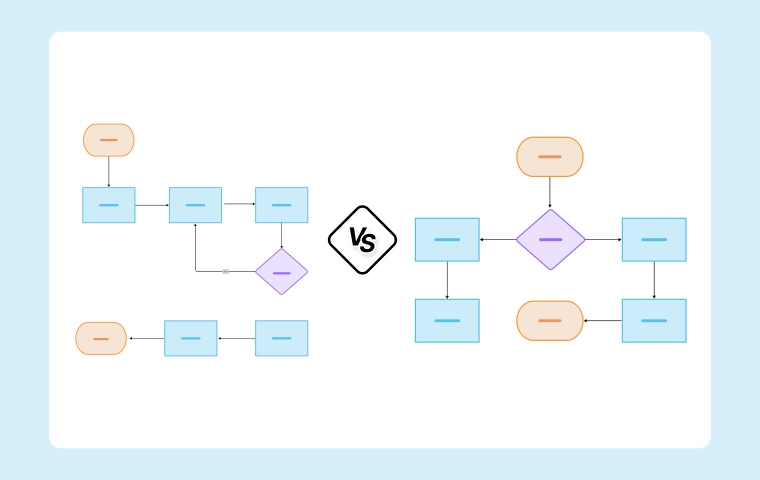
Before any migration, it is essential to review two key drawings: the current state (present setup) and the target state (future architecture). Current state diagrams represent all servers, databases, applications, and integrations currently in place. Target state diagrams outline cloud-native platforms, managed databases, and microservices that will define the new environment.

Make use of the Cloud System Architecture Template to capture your target cloud environment clearly.

By comparing both diagrams, migration teams clearly pinpoint what will change, what remains, and what systems need modernization or removal as part of the transition.

Designing Hybrid and Multi-Cloud Architectures During Migration

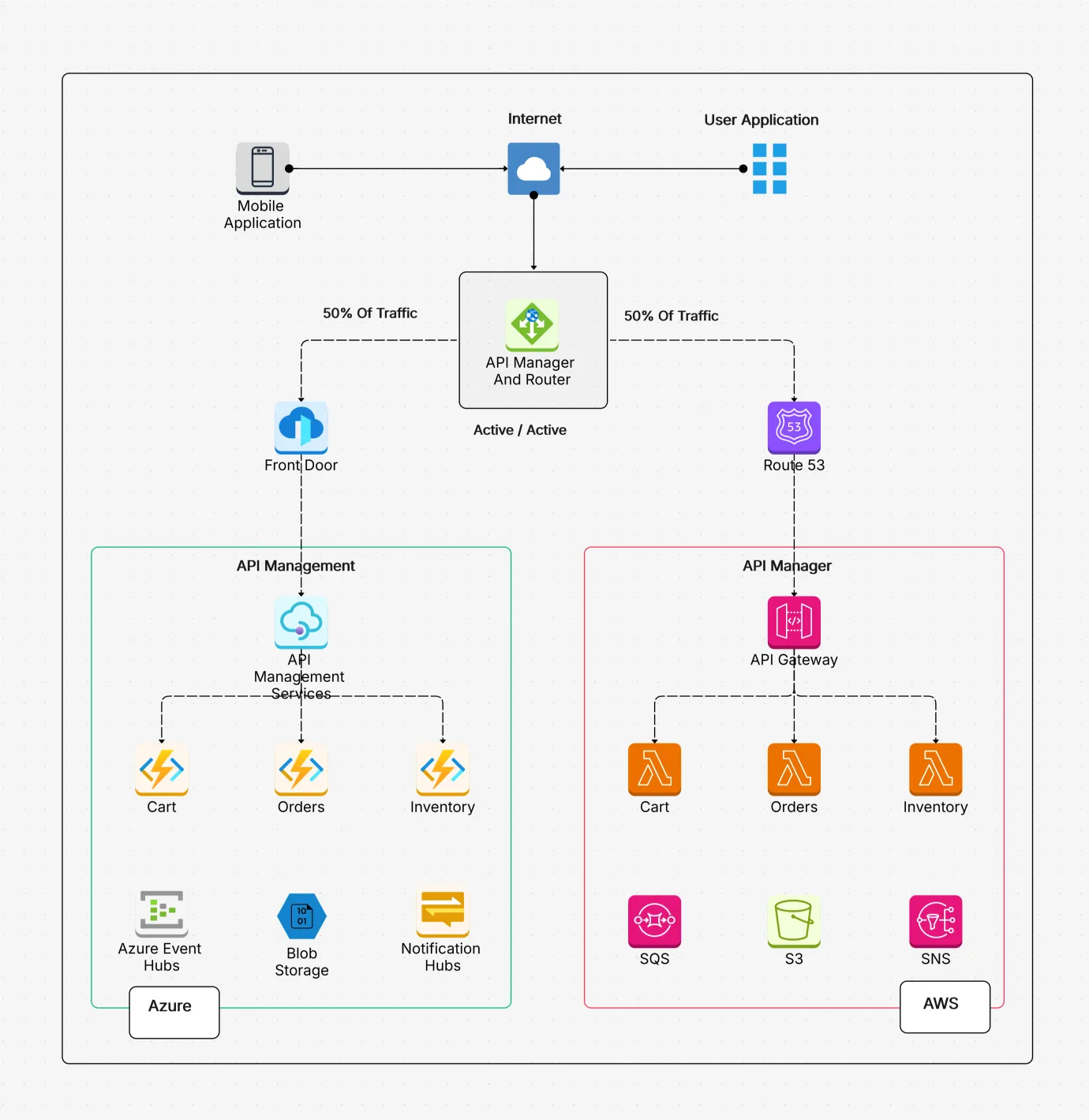
Most migrations are phased, which means systems run in a hybrid cloud architecture for a period of time. Hybrid diagrams show how data centers connect to AWS, Azure, or GCP while workloads are split.
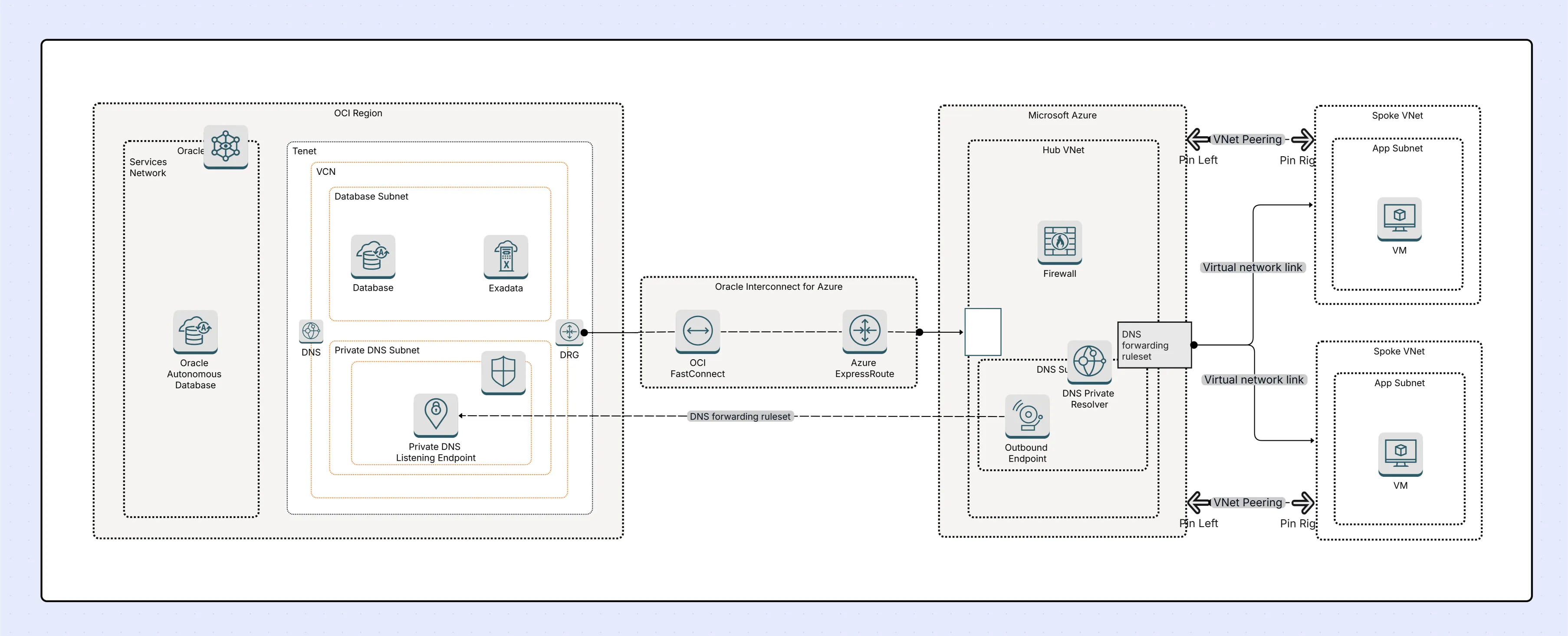
  • Hybrid cloud diagrams.Show VPNs, direct connects, and my on-prem systems working side by side with diverse cloud workloads.Start today with the Hybrid Cloud Architecture Template.
  • Multi-cloud diagrams. clearly illustrate distribution across my trusted providers, such as AWS for compute, Azure for identity, and GCP for advanced analytics.Try using the flexible Multi-Cloud Architecture Template.

These practical diagrams genuinely reduce daily operational confusion and help me avoid harsh vendor lock-in while boosting overall resilience.

Adding Security and Compliance Overlays

Security must migrate alongside workloads, not as an afterthought. Cloud system architecture diagrams should highlight security and compliance overlays so risks are addressed early.

  • IAM roles and policies. Show which accounts and users have access to specific cloud services.
  • Network security groups and firewalls. Depict trust boundaries, ingress/egress rules, and zones.
  • Encryption layers and key management. When documenting this setup, kindly point out in detail where the data encryption applies at rest, where it is safeguarded in transit, and mention which particular service manages and controls the cryptographic keys.
  • In addition, include the relevant compliance zones that must be covered PCI, HIPAA, as well as GDPR.Shade areas of the diagram that fall under strict regulation to simplify audit readiness.

Start with the Cloud Security Architecture Template.

Using Diagrams in Migration Planning (Waves, Phases, Cutovers)

Migrations are typically split into waves or phases to reduce risk. Architecture diagrams help define sequencing and dependencies clearly.

  • Which apps move in each wave. Group systems by dependencies and business criticality to minimize downtime.
  • What dependencies migrate together. For example, moving CRM without its database leads to failure. Diagrams make these dependencies obvious.
  • What integration bridges are temporary vs permanent. Show APIs, VPN tunnels, or sync tools that exist only during cutover phases.

Example: A Wave 1 diagram may show CRM + database moving together, while ERP remains on-prem with temporary API bridges.

Case Study Example: E-Commerce Cloud Migration

Diagrams make abstract migration plans tangible. Here’s how an e-commerce company used them during a cloud migration:

Current-state

  • Monolithic web app carefully hosted in our trusted on-premises data center.
  • MySQL database currently running smoothly on reliable bare‑metal servers.
  • Legacy payment gateway integration.

Target-state

  • Microservices deployed on AWS ECS for scalability.
  • RDS (managed MySQL) replacing self-managed database.
  • AWS API Gateway managing secure connections to modern payment providers.

Diagrams used:

  • System Architecture Design Template for current state.
  • AWS Architecture Diagram Template for target state.

Result: Migration executed in 3 waves with minimal downtime and faster scaling post-migration.

Common Mistakes When Migrating Without Diagrams

Skipping diagrams often leads to costly mistakes. Common pitfalls include:

  • No current-state diagram. Teams don’t know what’s moving, leading to missed dependencies and surprise outages.
  • Over-detailed early diagrams. Stakeholders get lost in technical details instead of understanding big-picture migration strategy.
  • Not updating diagrams. Stale diagrams confuse teams mid-migration, causing rework and delays.
  • Ignoring security overlays. Missing IAM, firewall, or compliance zones often leads to failed audits or security incidents.

Best Practices for Using Architecture Diagrams in Cloud Migration

Strong diagramming practices keep migrations on track. Use the following guidelines to align stakeholders and reduce risk:

  • Always start with current vs target-state views. This clarifies gaps and migration objectives from day one.
  • Use hybrid diagrams for phased migrations. Document co-existence scenarios until cutovers are complete.
  • Overlay security/compliance requirements early. This avoids late-stage surprises with audits and approvals.
  • Keep diagrams simple for execs, detailed for engineers. Tailor versions of the same diagram for different audiences.
  • Version diagrams after each migration wave. This ensures documentation stays accurate as systems evolve.

👉 For a broader perspective, see Types of Architecture Diagrams Explained.

Tools and Templates for Cloud Migration Architecture

Using the right templates and tools accelerates migration planning and ensures diagrams stay consistent across phases.

Templates

  • Hybrid Cloud Architecture Template. Show how on-prem and cloud environments connect.
  • Multi-Cloud Architecture Template. Visualize cross-provider strategies.
  • Cloud Security Architecture Template. Overlay IAM, encryption, and compliance requirements.
  • AWS Architecture Diagram Template. Capture target-state designs using official AWS icons.
  • System Architecture Design Template. Document current on-premise architecture before migration.

Tool

The Cloudchart Architecture Diagram Maker lets you:

  • Generate hybrid and multi-cloud diagrams with AI.
  • Customize using official AWS, Azure, and GCP icons for your unique workflow.|
  • Collaborate with local teams in real-time to easily avoid frustrating silos.
  • Export diagrams for executive decks, quick audits, or essential documentation.

Conclusion: From Chaos to Clarity With Diagrams

Cloud migration doesn’t really have to feel chaotic at all. Well-crafted architecture diagrams bring true clarity, thoughtful structure, and strong alignment across different stakeholders. They smartly transform migrations from risky, unpredictable projects into well-sequenced, highly predictable transitions. By documenting current vs target states, layering hybrid and security overlays, and using diagrams in every wave, organizations reduce downtime, avoid compliance gaps, and accelerate delivery.

Use the Hybrid Cloud Architecture Template in Cloudchart to kickstart your migration planning today.

FAQs for Cloud Migration Architecture Diagrams

1.Why are architecture diagrams important in cloud migration?

In our real-world cloud projects, architecture diagrams clarify the current and target states, highlight dependencies, and document compliance requirements, which helps reduce risks during complex migration efforts.

2.What’s the difference between current-state and target-state diagrams?

From our practical experience, a current-state diagram explains existing on-prem systems, while a target-state diagram illustrates the future cloud system architecture with properly modernized services.

3.How do hybrid cloud architecture diagrams help migration?

They illustrate coexistence between on-prem and cloud workloads, highlighting networking, dependencies, and temporary bridges during phased migrations.

4.What are common mistakes in cloud migration without diagrams?

Teams often skip current-state mapping, over-detail early diagrams, ignore updates, or miss security overlays, leading to outages and compliance failures.

5.What tools are best for cloud migration architecture diagrams?

Cloudchart is ideal with its AI-driven architecture diagram generator, hybrid/multi-cloud templates, and collaboration features. Draw.io and Lucidchart are alternatives but lack deep migration-focused templates.

Ready to create smarter with AI?

Start using Cloudairy to design diagrams, documents, and workflows instantly. Harness AI to brainstorm, plan, and build—all in one platform.

Recommended for you
Using Flow Diagrams in Agile Teams
Technical Diagramming