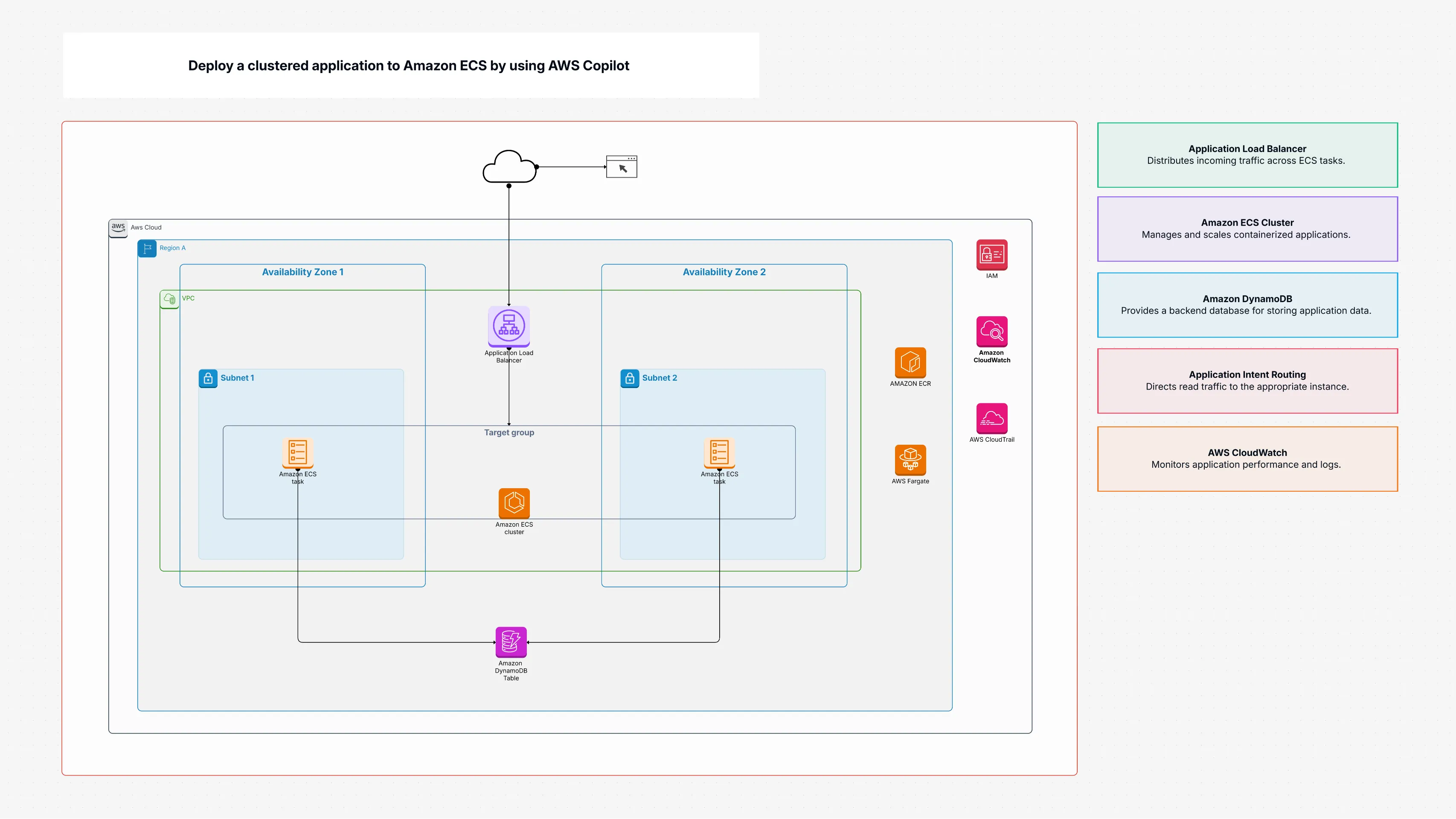
Deploy a clustered application to Amazon ECS by using AWS Copilot

Cloudairy
 Copy link

Get your team started in minutes
Sign up with your work email for seamless collaboration.
Whiteboard
Copy link

AWS Copilot simplifies deploying and managing containerized applications on AWS. It automates setup, scaling, and CI/CD for ECS and Fargate with ease.
AWS Copilot simplifies deploying and managing containerized applications on AWS. It automates setup, scaling, and CI/CD for ECS and Fargate with ease.
The Deploy a clustered application to Amazon ECS with AWS Copopt template helps you deploy an app on Amazon ECS with the help of AWS Copopt. Rather than determining each little detail yourself, you get organized instructions through this template.
It instructs you on how to deploy an ECS cluster, keep your images in Amazon ECR, handle permissions with IAM roles, and set up your VPC and subnets. It also instructs you on how to deploy an Application Load Balancer (ALB) to route traffic in, how to monitor your app with CloudWatch, and how to do the best security and high availability practices. You would not be an expert AWS Copilot makes it easy to deploy for anyone who needs to stand up an app fast.
Having tried cloud setups myself a few times, I know deploying an application can take ages. Without some expert direction, you may spend unnecessary hours setting up resources, figuring out integrations, and fixing issues that could’ve been avoided. The AWS Copilot template flips this experience by providing an elegant, structured framework that simplifies the deployment journey entirely.
No need to script endlessly or build every component manually anymore. AWS Copilot conveniently automates ECS services, ALB configuration, networking, and IAM policies through just a few concise commands. It’s also fully aligned with Amazon ECS best practices such as multi AZ deployments for reliability, stronger IAM security setups, and proactive logging and monitoring. In my actual experience, it’s a real boost to efficiency, clarity, and confidence during deployment.
This AWS Copilot template is ideal for:
You should use this template when:
Here’s what you will be working with when following this AWS Copilot deployment guide:
To apply this template in Cloudairy using AWS Copilot, follow these simple steps:
You can also review the diagram with your team and make adjustments before deploying. This helps everyone understand how the services interconnect and how traffic flows through your system with AWS Copilot managing deployment automation.
Running a clustered app on Amazon ECS with AWS Copilot does not have to be stressful. This template is presented in an effortless, step-by-step starting point. It beset the necessary AWS services like ECS, ECR, IAM, ALB, VPC, and CloudWatch in simple terms. By this AWS Copilot guide, you can create scalable, secure, and production deployment containerized deployments. Whether you are new to the world of AWS ECS or already seasoned, this template makes the deployment easier and imposes the best practices of AWS provided by it from the beginning. Explore ECS Anywhere to run Amazon ECS containers on on-premises and edge environments.
Loading subcategories...
 Manage all your work in one place
Collaborate with your team
Use Cloudairy for FREE—forever
Explore More