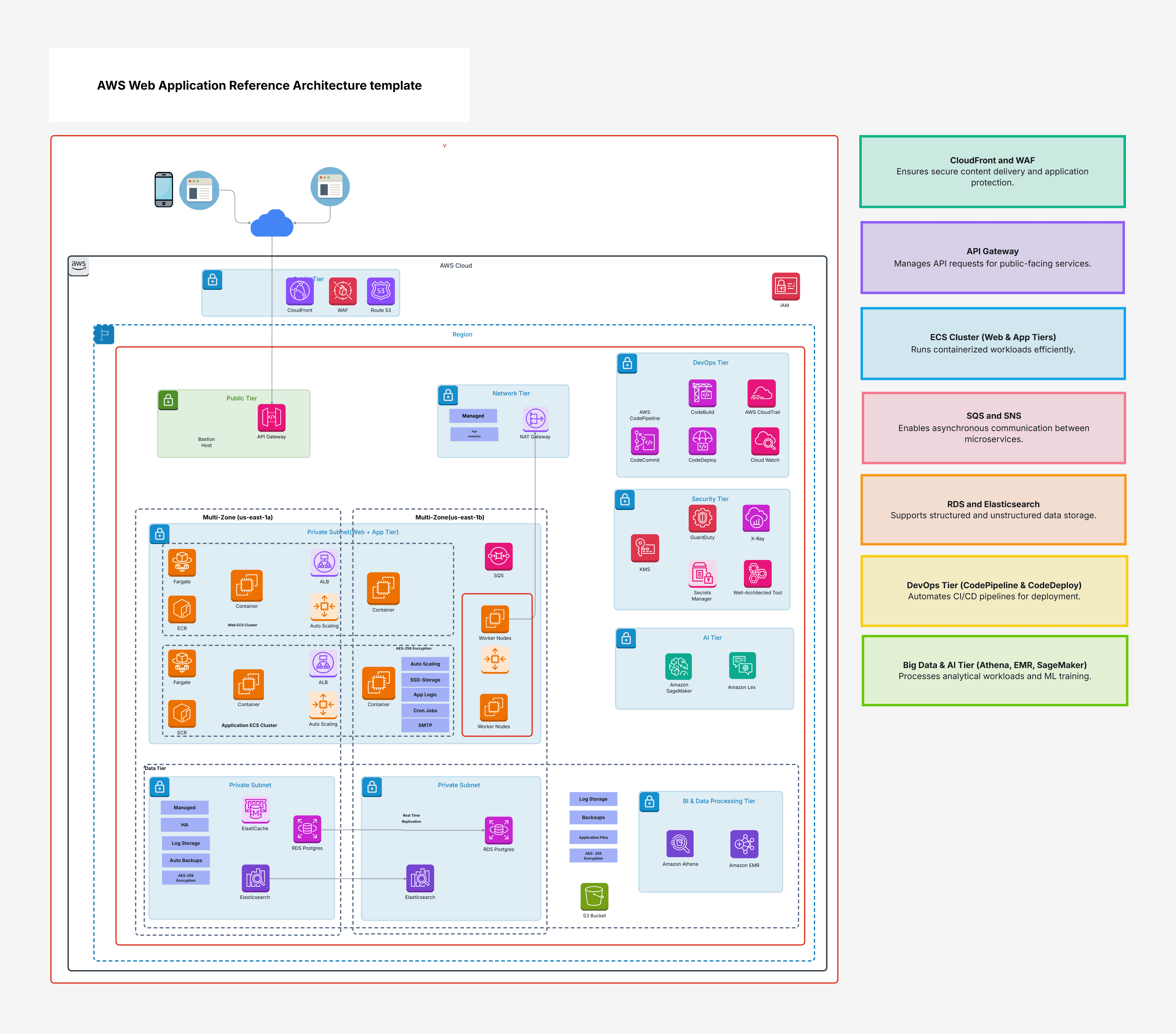
AWS Web Application Reference Architecture template

Cloudairy
 Copy link

Get your team started in minutes
Sign up with your work email for seamless collaboration.
Whiteboard
Copy link

A complete AWS Web Application Reference Architecture template designed to help you build secure, scalable, and high-availability web applications using API Gateway, ECS, ALB, RDS, WAF, IAM, and fully optimized cloud best practices.
A complete AWS Web Application Reference Architecture template designed to help you build secure, scalable, and high-availability web applications using API Gateway, ECS, ALB, RDS, WAF, IAM, and fully optimized cloud best practices.
This ready-made AWS Web Application Reference Architecture template helps you quickly develop a secure web application on AWS. It guides you on how to set up your application so it remains secure, scalable, and highly available. Instead of spending weeks choosing the right AWS services and figuring out their placement, this template provides a clear, step-by-step structure. It includes essential components like API Gateway, Application Load Balancer (ALB), ECS clusters, and worker nodes, all organized to support microservices, containerized workloads, and managed services.
It also covers key security layers such as AWS WAF, Route 53 for DNS, and IAM for access control. The data layer uses Amazon RDS to ensure fast, consistent database performance. To maintain strong security and proper isolation, the architecture separates resources into public subnets for load balancers and private subnets for databases and internal services.
In general, creating an architecture for a web application involves fixing a lot of small pieces. The application should be able to handle increasingly larger numbers of users over time, it should be able to operate when it breaks, and it should be protected from attacks on the internet. This can be a lot of effort and planning. AWS Web Application Reference Architecture template facilitates planning by handling much of it in advance. It applies proven best practices from the outset. For instance:
With this type of format, time is saved, and error reduction is assured. This is due to more focus being directed to the application itself and not the development of the entire infrastructure.
This template is useful for everyone:
The best time to do it is when you start your project. Instead of trying to fix design problems later, you can begin working with a system in place that can grow and be secure.
Following are the major characteristics of AWS Web Application Reference Architecture template and what they are applied for:
Both of these elements work together at the same time to create a strong, adaptable, and secure structure.
It is simple to use this template in Cloudairy. Just follow these instructions:
Instructions for implementing Cloudairy with the provided template:
AWS Web Application Reference Architecture is a simple and easy-to-use template for building web applications on the AWS platform. It helps you to build architecture that is secure, scalable, and future proof. Using tools like API Gateway, ECS clusters, ALB, Amazon RDS, and native security tools gives you all the tools that you need to start your project with confidence. With Cloudairy, you can start from the template, customize to suit your project, and deploy without having to begin from scratch. It saves time, eliminates common errors, and provides you with a good starting point for your web application.
Loading subcategories...
 Manage all your work in one place
Collaborate with your team
Use Cloudairy for FREE—forever
Explore More