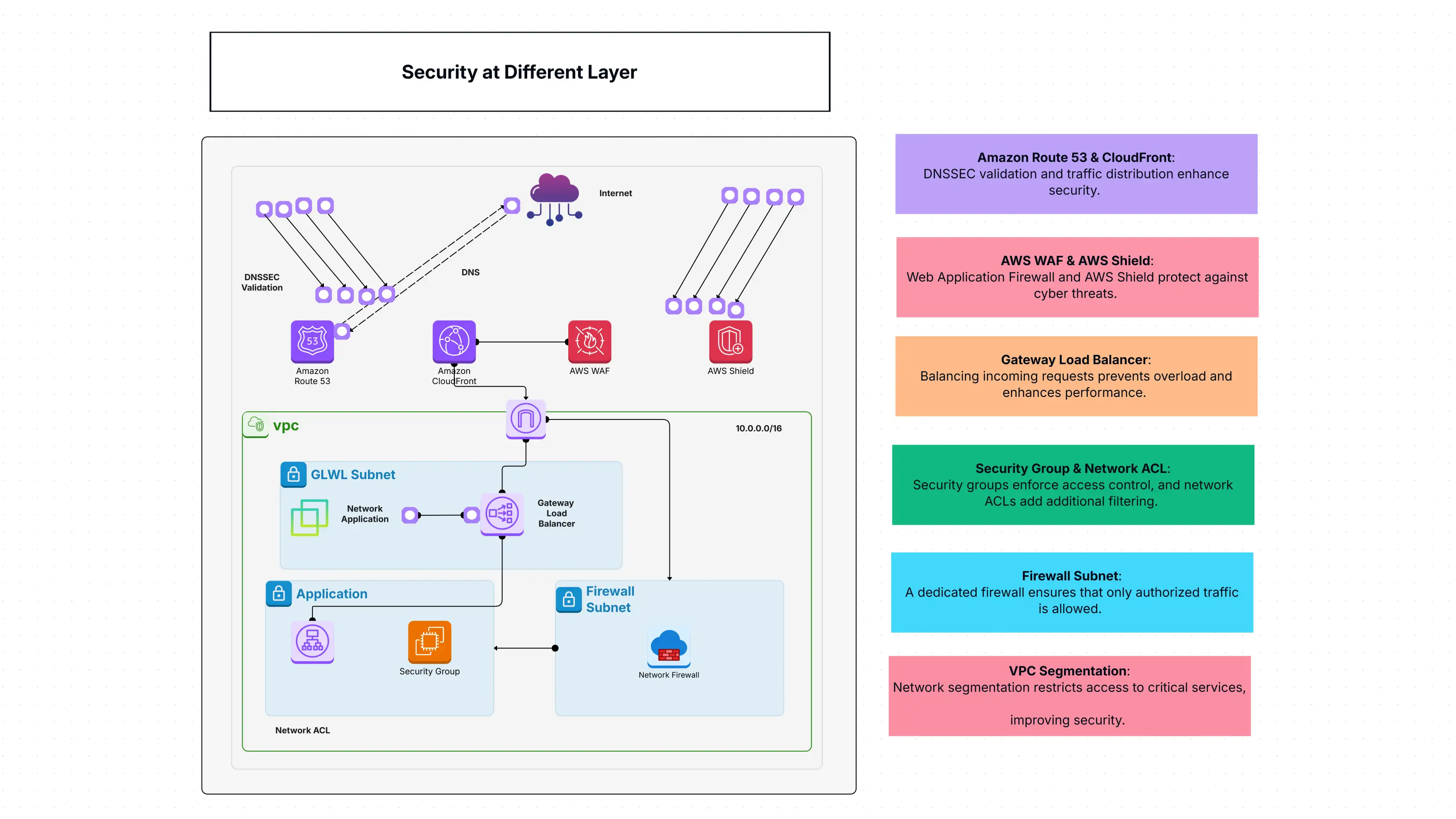
What Is Security at Different Layer Templates All About?
This Security at Different Layer Introduction is perfect for firms that intend to develop a robust security system with different layers for their cloud applications.
In this manner, the various security measures are correlated e.g. the firewall (which rejects the intrusions), access control list (which defines user rights), DNS security (which keeps the domain names safe), and application-level security are illustrated. None of them can succeed in breaking into your system if the whole team works properly against attacks.
Talking in plain words, with this template, you are able to draw up a layered security plan, letting you know precisely how to keep your cloud applications safe.
Why Is a Template Helpful?
Implementing this Security at Different Layer template along with Cloudairy offers a lot of advantages:
- See Your Defenses Clearly: Complex layers of your security can be tangled, but Cloudairy's visuals assist you in mapping out your whole security setup, thus making it very easy to understand at a glance.
- Prevent Unauthorized Access: Create the scenario where firewalls and access controls are working hand in hand to prevent the entry of intruders.
- Fight Off Threats: Learn how different instruments can be combined to protect you from different types of assaults.
- Collaborate on Security: The security and development teams in your organization can use the same diagram to work together which means that everyone is on the same page regarding your Layered security approach.
- Strengthen Your Posture: Assists you in locating the areas of weakness and constructing a stronger Data protection framework.
Who Needs This Template, and When?
This Security at Different Layer template is perfect for anyone building, managing, or auditing cloud applications, especially when security is a top priority. It's super useful for:
- Security Architects: To design and visualize comprehensive Network security layers.
- DevOps Teams: To integrate security into their cloud application deployment processes.
- Compliance Officers: To ensure cloud applications meet security standards and regulations.
- IT Managers: To understand and enforce a strong Data protection framework across their cloud environment.
You'll find it incredibly handy when you're:
- Designing a new cloud application and want to build security in from the start.
- Reviewing an existing application's security to find and fix weaknesses.
- Trying to explain your security strategy to team members or auditors.
- Implementing a Multi-layered security template across your organization.
The Main Components Inside the Template
Here are the main parts you'll find in this template, showcasing different Network security layers:
- Amazon Route 53: Helps secure your website addresses and connections.
- Amazon CloudFront: Keeps your content delivery safe and fast.
- AWS WAF: Protects your web applications from common online attacks.
- AWS Shield: Defends against very large-scale attacks (DDoS).
- VPC Security Groups: Controls who can connect to your servers and apps.
- Network ACLs: Adds another layer of access control at the network level.
- Firewall Subnet: Acts like a control point for traffic between different network zones.
- Gateway Load Balancer: Securely manages how traffic is sent to different services.
- Application Subnet: The secure area where your important applications live.
- Encryption Mechanisms: Make sure your data is scrambled and confidential, so only authorized people can read it.
- IAM Access Controls: Manages exactly who can do what within your cloud environment.
- Logging and Monitoring: Keeps detailed records of security events and watches for anything unusual.
- SIEM Integration: Connects with systems that analyze security information to spot big threats.
- Zero Trust Model: A principle that means no one is trusted by default, and every access request is verified.
- Cloud Security Posture: Helps you check and maintain your overall security health to meet standards.
How to Open This Template in Cloudairy?
Ready to design your robust Cloud Security model? Here’s how to open this Security at Different Layers template in Cloudairy:
- Log In: Log in to your Cloudairy account.
- Find Templates: Go to the "Templates Library" section.
- Search: Look for "Security at Different Layers" in the search bar.
- Preview: Click the template to see how its security structure is laid out.
- Open It: Select "Open Template" to start making changes.
- Customize: Adjust the security settings to match your company's rules.
How to Use Cloudairy for This Template?
Cloudairy makes it easy to design and visualize your Multi-layered security template:
- Open the Template: Start by selecting the Security at Different Layers template.
- Modify Configurations: It is very simple to alter firewall rules and network settings.
- Collaborate: Use Cloudairy to communicate with your security teams and confirm the correct execution of the policies.
- Visualize Risks: Identify the possible vulnerabilities and entry points in your layout.
- Export Your Plan: Make a copy of the security plan that you want to implement or audit.
Summary
This Security at Different Layer template is an extensive method to consider security by including several layers of protection for cloud applications. It assists companies in implementing top security measures, lessening vulnerabilities, and establishing robust regulations for determining who has access to what. Basically, it's the fundamental tool for creating a powerful Layered security system and a trustworthy Data protection model in your cloud environment.

 Copy link


 Manage all your work in one place