AWS
Software Architecture Diagram Guide to Optimize System Design


Get your team started in minutes
Sign up with your work email for seamless collaboration.
Apart from helping the project teams visualize how the different components work together, Software architecture diagrams support effective communication, cooperation, and proper planning. In this post, we will discuss the reasons for using these diagrams, the rules for their creation, and how to make the process easier with tools such as Cloudairy.
Software architecture refers to the high-level structure of a software system. It defines how different components, modules, and services interact to deliver functionality and support system performance, scalability, and security.
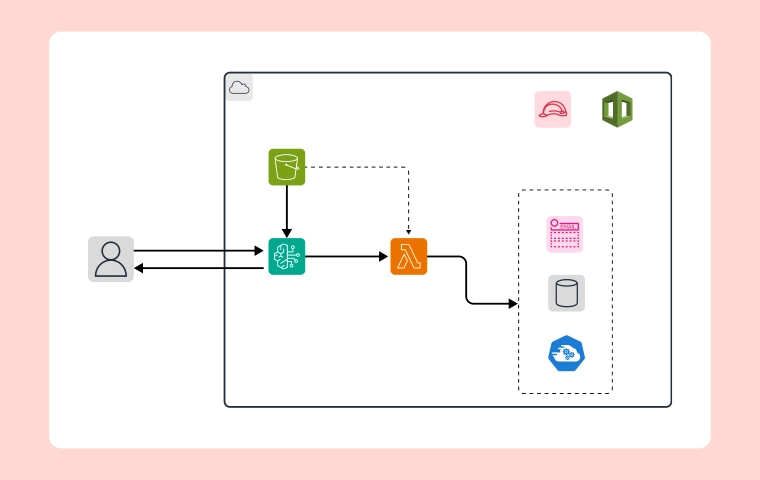
A software architecture diagram visually represents this structure, showing how elements such as databases, APIs, servers, and user interfaces are connected. If your system runs on cloud infrastructure, a cloud computing architecture diagram helps visualize services, storage, and networking across cloud platforms. This helps development teams understand system design, plan integrations, and maintain applications more efficiently.
.webp)
Good software architecture ensures that systems are organized, scalable, and easier to manage as applications grow and evolve.
Besides, as it has an elaborative platform, the team members can also give feedback on demand at every stage, fostering constant team involvement and allowing for any changes to the diagrams as the project develops.
There are several important aspects that need to be taken into account to construct software architecture diagrams competently:
Different types of architecture diagrams serve distinct purposes. Here are five common types, along with tips for creating them:
Tips for Creating It:
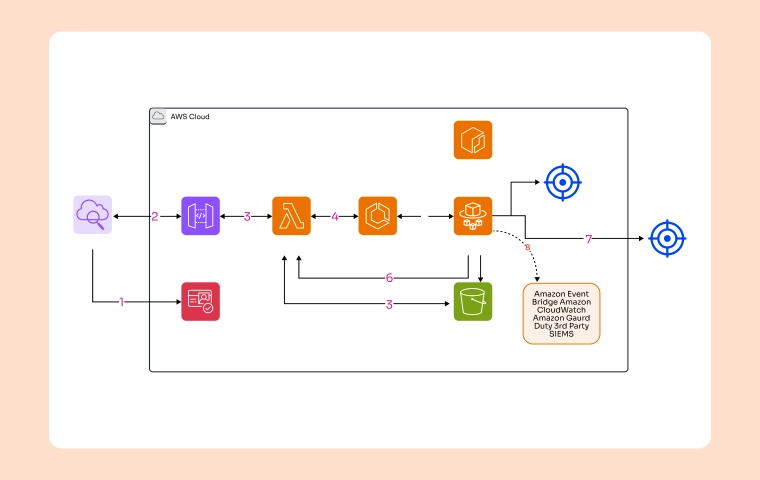
The integration architecture diagram focuses on how different components interact, particularly in terms of communication protocols. It provides clarity on how third-party systems integrate with your application, making it valuable for planning partnerships.
Tips for Creating It:
Show internal and external services and how they connect.
Indicate third-party system integration points and protocols.
Highlight security and management strategies.
Tips for Creating It:
Tips for Creating It:
Tips for Creating It:
Benefits of Cloudairy:
In today’s evolving software landscape, clear and accessible architecture diagrams are indispensable. They not only enhance team understanding and improve communication but also foster collaboration throughout all project stages. By leveraging tools like Cloudairy, teams can create and share architectural diagrams effortlessly, ensuring alignment and enabling systems to scale smoothly.
Start using Cloudairy to design diagrams, documents, and workflows instantly. Harness AI to brainstorm, plan, and build—all in one platform.
Table of Contents

Introduction
 Manage all your work in one placeCollaborate with your teamUse Cloudairy for FREE—forever


 Related Articles
.webp)