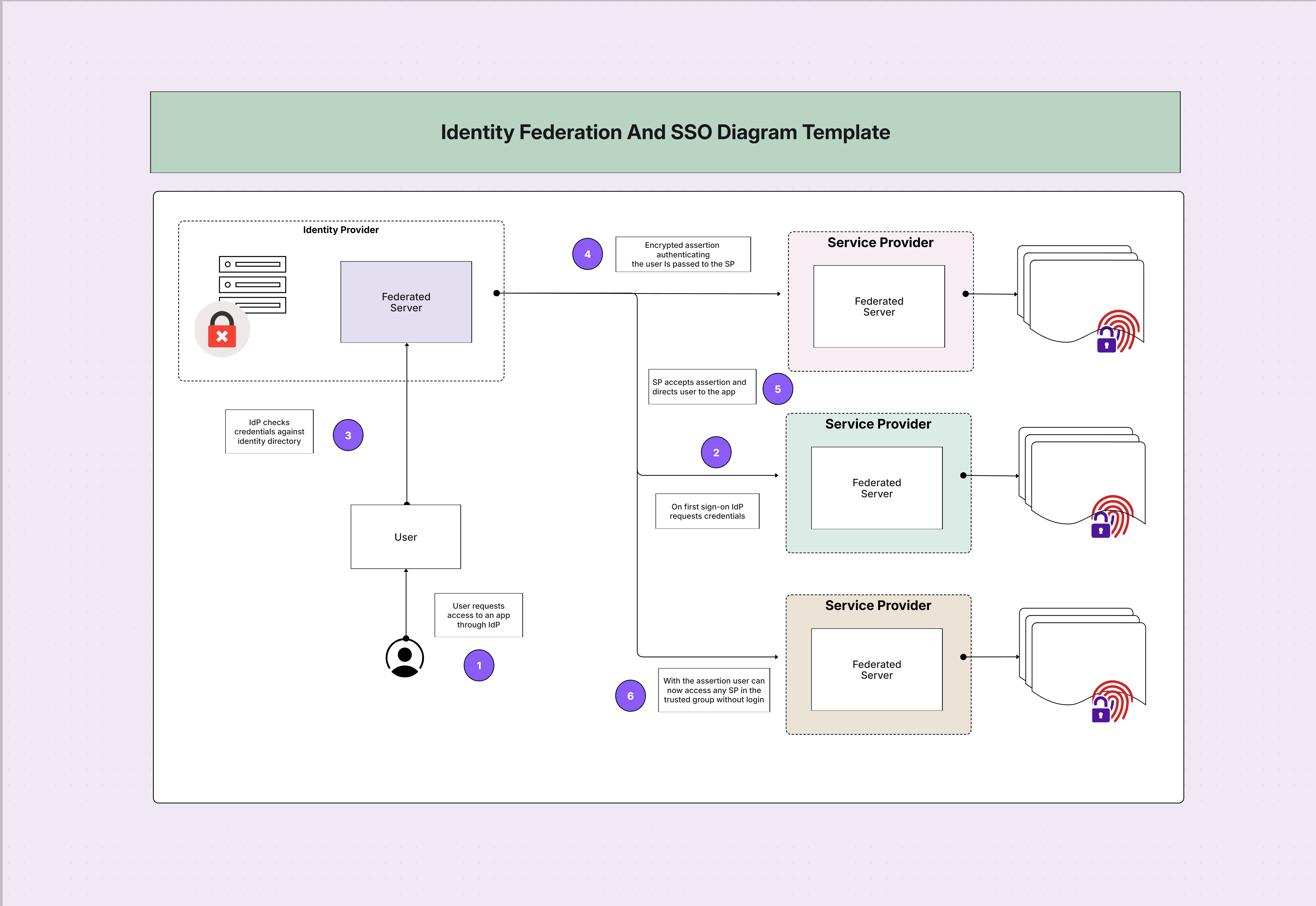
Identity Federation & SSO Diagram Template

Cloudairy
 Copy link

Get your team started in minutes
Sign up with your work email for seamless collaboration.
Whiteboard
Copy link

Map secure federation and single sign-on using this architecture template. Visualize IdP–SP trust relationships, tokens, risk signals, and identity lifecycles to design secure, scalable authentication for cloud and hybrid environments.
Map secure federation and single sign-on using this architecture template. Visualize IdP–SP trust relationships, tokens, risk signals, and identity lifecycles to design secure, scalable authentication for cloud and hybrid environments.
An identity federation & SSO diagram template visually explains how identities authenticate once and access many apps through trusted connections. It clarifies roles for the Identity Provider (IdP), Service Providers (SPs), brokers, and gateways while showing token issuance, session handling, and step-up authentication. With this blueprint, technical and business teams align on standards, user experience, and risk controls. It’s ideal for hybrid and multi-cloud programs where consistent access, auditability, and scalability truly matter.
A complete identity federation diagram and SSO architecture coordinates standards, tokens, and policies so users authenticate once and move securely between apps. It aligns IdP trust, SP integrations, and device signals with governance and privacy rules. The template shows how attributes flow, how consent is recorded, and where enforcement occurs. By visualizing these handshakes, you reduce misconfigurations, simplify audits, and deliver a seamless sign-in experience without sacrificing zero-trust verification at critical checkpoints.
See below for what’s included in this identity federation & SSO diagram template:
Federation protocols, trust relationships, and token flows define how two parties agree on identity truth and acceptable proof. The diagram clarifies metadata exchange, signing keys, and endpoint discovery. It also shows how IdPs issue tokens, how SPs validate them, and when refresh occurs. You’ll see where to anchor certificate rotation, what claims apps need, and how to limit scope safely. Clear flows reduce brittle exceptions and make audits predictable across complex app portfolios.
See below for how federation and tokens are modeled in this template:
Single sign-on sessions, risk signals, and lifecycle controls determine how long trust lasts and when it must be renewed. The diagram details cookie scoping, token TTLs, and silent reauth patterns alongside risk-based step-up MFA. It also shows joiner-mover-leaver workflows, periodic access reviews, and emergency break-glass. Together, these controls keep user experience smooth while tightening gates precisely where risk rises, aligning SSO convenience with measurable, zero-trust accountability.
See below for how SSO sessions and lifecycle appear in this template:
A federation & SSO architecture diagram is essential when consolidating logins across SaaS, custom apps, and partner portals. Use it during M&A, cloud migrations, or zero-trust rollouts to standardize policies, shorten audits, and cut help-desk resets. The diagram becomes your shared map: where tokens originate, where they’re validated, and how risk changes session strength. It’s equally useful for CIAM programs demanding consent, social login, and regional privacy alignment out of the box.
See below for the best moments to deploy this identity federation & SSO template:
Every federation and SSO architecture design should reflect your risk appetite, app mix, and user types. Start by grouping applications by sensitivity and audience, then tailor scopes, TTLs, and MFA accordingly. Decide where brokers simplify complexity and where direct trust is cleaner. Finally, wire telemetry to your SIEM so tokens, consent, and failures are observable. With a living diagram, you can evolve policies confidently as your portfolio and compliance landscape change.
See below for how to tailor this SSO and federation diagram:
An identity federation & SSO template supports B2E, B2B, and B2C programs that must be both effortless and provably secure. It standardizes trust for internal users, partners, and customers while documenting revocation, consent, and escalation paths. Whether reducing password fatigue or enabling compliant data access across borders, the same blueprint scales smoothly from a handful of apps to global portfolios with thousands of integrations and diverse assurance needs.
See below for practical federation & SSO use cases:
1. What is identity federation in SSO architecture?
Identity federation lets different domains trust each other’s authentication. Users sign in at an IdP, then access SP apps with tokens, avoiding new passwords while preserving centralized control and auditability.
2. Should I choose SAML or OIDC for new apps?
Prefer OIDC/OAuth 2.0 for modern web/mobile and API use. Keep SAML where vendors require it. Many programs run both during migration, normalizing claims at a broker for consistency.
3. How does this support Zero Trust?
Tokens are short-lived, scope-limited, and bound to device and risk. Step-up MFA, continuous evaluation, and rapid revocation align SSO convenience with Zero Trust verification at each sensitive action.
4. How do I handle partners securely?
Use brokered federation with strict scopes and time limits. Monitor anomalies, require contract-bound reviews, and revoke promptly when relationships end to prevent lingering access.
5. Where do I start building the diagram?
Open the Security Architecture Diagram Tool, select this template, add your IdP/SPs, protocols, scopes, and MFA flows, then link to logs and reviews for full observability.
Loading subcategories...
 Manage all your work in one place
Collaborate with your team
Use Cloudairy for FREE—forever
Explore More