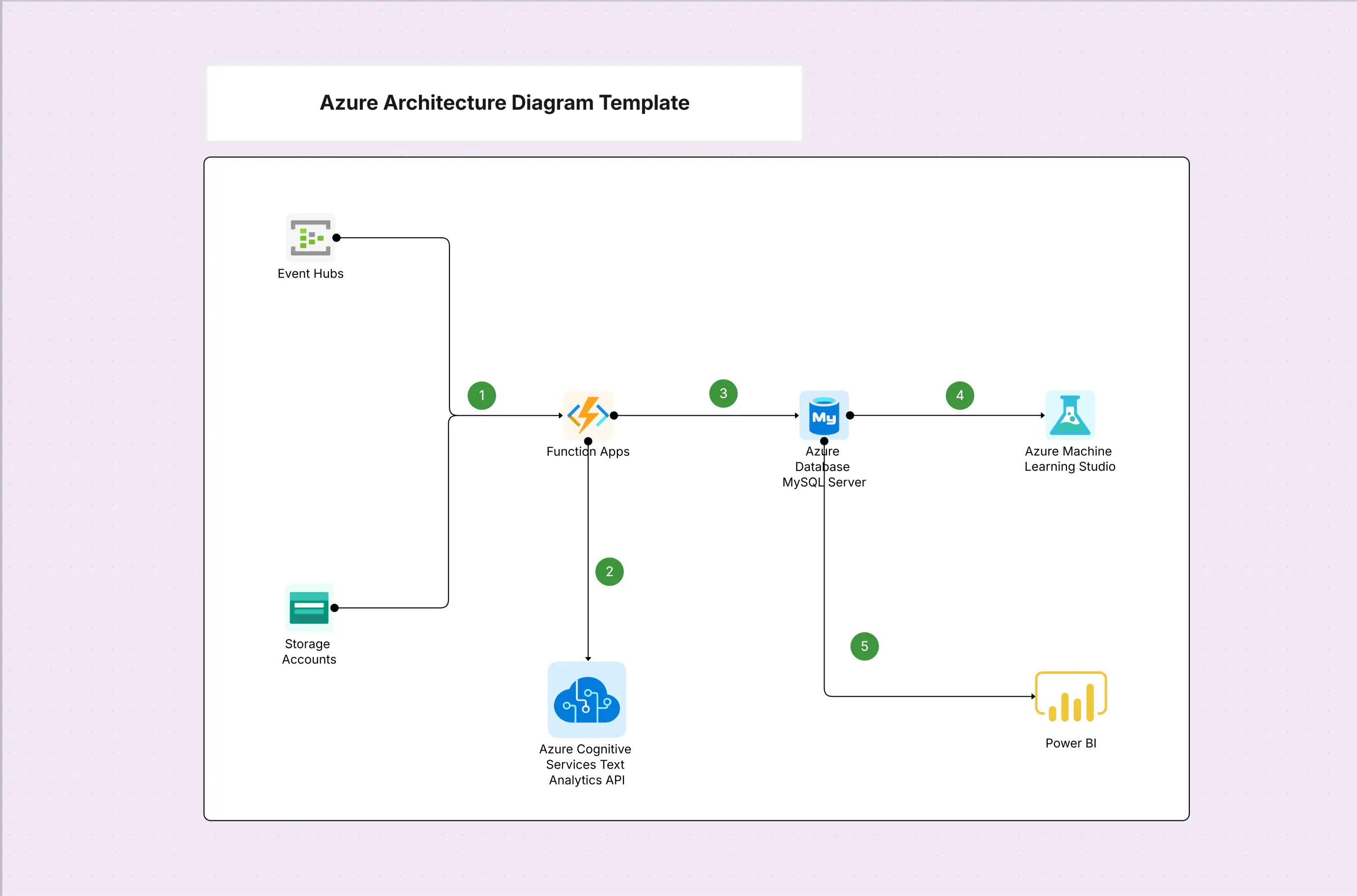
Azure Architecture Diagram Template

Cloudairy
 Copy link

Get your team started in minutes
Sign up with your work email for seamless collaboration.
Whiteboard
Copy link

Create Azure architecture diagrams with this editable template. Easily visualize Azure compute, networking, databases, and security services to design, plan, and present scalable, reliable, and secure cloud solutions for modern applications.
Create Azure architecture diagrams with this editable template. Easily visualize Azure compute, networking, databases, and security services to design, plan, and present scalable, reliable, and secure cloud solutions for modern applications.
An Azure architecture diagram is a visual representation that shows the deployment of Microsoft Azure services for delivering applications and infrastructure in the cloud. It also guides the teams in the designing of solutions that make the most of the Azure's excellent features like computed, stored, networked, and identified services along with scalability and resilience. This template gives the opportunity for the architects, engineers, and stakeholders to see the workloads visually mapped out for us, which is in the case of application hosting, hybrid deployments, or enterprise-scale cloud systems. Explore secure and scalable ways to replicate data on Azure with ease.
The template gives you access to the basic Azure service icons and design patterns that you need in order to make architecture diagrams very detailed. It is intended for use by both the technical teams and the decision-makers. Using the visuals and elements specific to the services that are already built for you, you can very quickly make diagrams that show dependencies, data flows, and governance layers, which will facilitate better communication between the IT and business teams.
Azure diagrams are ideal for organizations planning, deploying, or reviewing cloud solutions in Microsoft Azure. This template works across industries and project types. It allows teams to validate designs before implementation, streamline migration strategies, and maintain clear documentation of infrastructure decisions for audits, compliance, and future scaling needs.
This template is very adaptable to your needs and allows you to customize it for various use cases, industries, and workloads. You have the option of beginning with normal reference architectures or developing from the ground up by choosing only the Azure components that are essential. The addition of annotations, callouts, and hybrid/multi-cloud integrations makes sure that the diagram talks well to technical and non-technical stakeholders alike. Explore proven strategies and frameworks with a Disaster Recovery Reference.
Azure is widely used across industries for enterprise-scale deployments. These examples demonstrate practical scenarios where this template adds value.
1. Why should I use Azure-specific diagrams instead of generic cloud diagrams?
Azure diagrams use official service icons and layouts that match Microsoft’s reference architectures, making designs more accurate and easier to share with stakeholders.
2. Can this template be used for hybrid deployments?
Yes. It includes Azure hybrid tools like ExpressRoute and VPN Gateway, making it easy to show connections to on-premises or multi-cloud systems.
3. Does this template stay updated with new Azure services?
Absolutely. The template library is updated regularly to reflect the latest Azure service icons and patterns.
Loading subcategories...
 Manage all your work in one place
Collaborate with your team
Use Cloudairy for FREE—forever
Explore More