Access a bastion host by using Session Manager and Amazon EC2 Instance Connect

Cloudairy
 Copy link

Get your team started in minutes
Sign up with your work email for seamless collaboration.
Whiteboard
Copy link

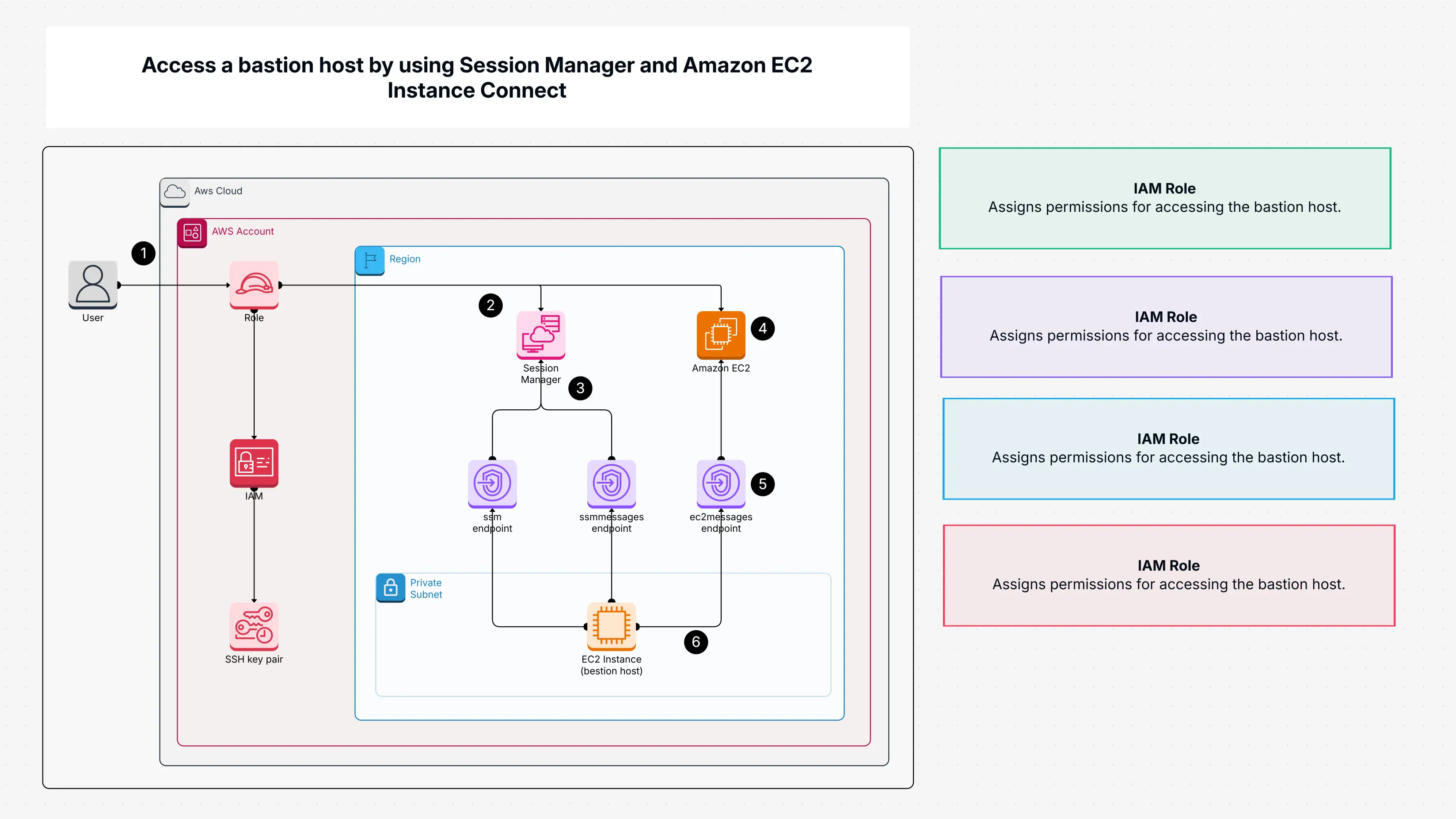
The template shows how to securely access a bastion host using Session Manager and EC2 Instance Connect without public IPs or SSH. It simplifies remote access, enforces IAM policies, supports MFA, and helps teams manage private EC2 instances with strong security and full audit visibility.
The template shows how to securely access a bastion host using Session Manager and EC2 Instance Connect without public IPs or SSH. It simplifies remote access, enforces IAM policies, supports MFA, and helps teams manage private EC2 instances with strong security and full audit visibility.
Accessing a bastion host with Session Manager template gives you a secure, no-SSH-needed way to access your AWS bastion hosts using Session Manager and E2C Instance Connect. It keeps your instance safe in private subnets, eliminating the need for public IPs. With support for IAM roles, SSH keys and encrypted endpoints, you get a structured, secure setup for managing remote access, without the usual risks.
Unlike traditional methods that rely on publicly exposed instances, this template:
It’s a modern, cloud-native solution tailored to today’s zero-trust security environments.
The access a bastion host with Session Manager template is ideal for:
Use this template whenever you need secure access to EC2 instances, especially in production environments or when working in private VPCs with no internet gateway.
This Cloudairy template gives you a smarter, safer way to access your AWS E2C bastion hosts- no SSH, no public IPs, and provides a secure network. With Session Manager and E2C Instance Connect working together, you get seamless access that’s fully private, compliant, and easy to manage. It’s a modern solution built for teams who want to keep things secure while staying future-ready in the clouds.
This guide provides a detailed walkthrough on how to access a bastion host with Session Manager and Amazon EC2 Instance Connect, enabling secure, auditable, and efficient access to private AWS resources without the need to expose SSH ports. Traditional bastion hosts require open inbound ports, which can increase your security risk. By using AWS Systems Manager Session Manager, you can initiate browser-based or CLI-based sessions that are encrypted, logged, and controlled via IAM policies. This method also allows integration with EC2 Instance Connect to provision temporary SSH keys, further reducing credential management complexity.
Loading subcategories...
 Manage all your work in one place
Collaborate with your team
Use Cloudairy for FREE—forever
Explore More