What is GCP Hub and Spoke Network Template?
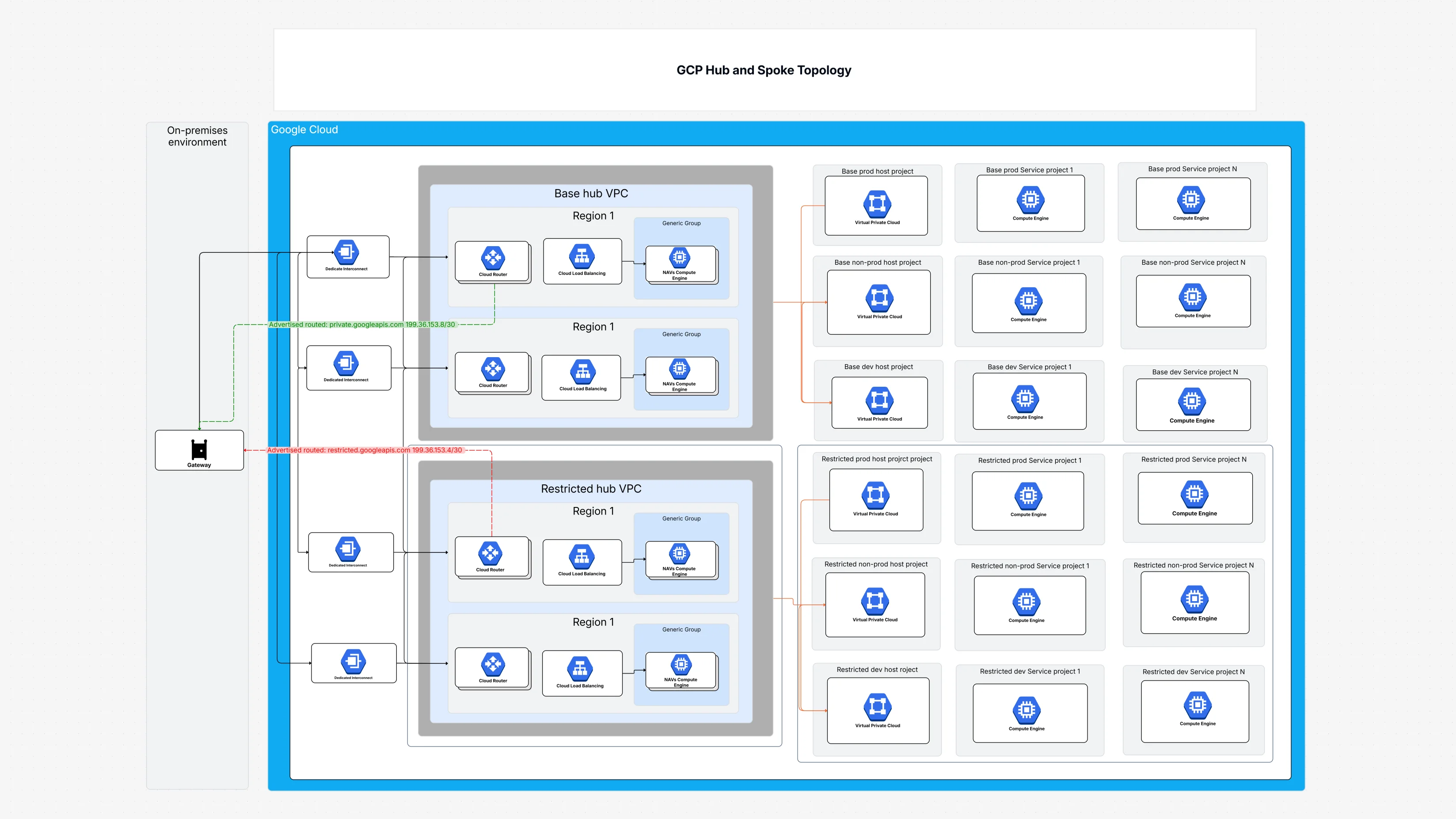
This Template is your visual guide to building a well-organized and secure network in Google Cloud. Imagine your company as a big wheel, with a strong central hub and many spokes reaching out to different teams and applications. This GCP Hub and Spoke Network Topology template shows you exactly how this works, illustrating:
- The Central Hub: It highlights the Base Hub VPC as the main control center for your network, where all traffic passes through. There might even be a Restricted Hub VPC for super sensitive connections.
- Connecting the Spokes: It shows how different "spoke" projects, like Service Projects (for your live applications) and Non-Prod Host Projects (for development), link back to this central hub. This design promotes clear network segmentation.
- Smart Traffic Flow: It details how Cloud Routers manage traffic and how Cloud Load Balancing helps distribute it smoothly.
- Security at the Core: It includes Firewall Policies to keep unauthorized traffic out, and how Google Cloud Identity helps manage who can access what.
- Seamless Connections: It shows how a Gateway can connect your existing on-premises networks to this cloud hub, fitting into a robust central connectivity model.
Why Embrace Hub and Spoke Template?
Using this template offers big advantages for managing your Google Cloud network:
- Organize Your Network: Visualize your GCP Hub and Spoke Network Topology in a clear and straightforward manner, thus simplifying and making more manageable the whole network that otherwise would be a difficult task.
- Boost Security: Provide better network segregation by separating different environments (like production from development) and implementing security measures at the main hub, which will give you much stronger protection overall.
- Simplify Connectivity: This central connectivity model simplifies the whole process by indicating that all the projects are connected with a common hub; thus, the need for complicated and messy connections between every single project is reduced.
- Efficient Traffic Flow: Knowing how traffic flows and is managed is a big help in the areas of performance optimization and troubleshooting.
- Scalable Design: Your network will be one that is capable of expanding to accommodate your needs for more projects and applications without creating a mess of connections.
- Leverage Shared VPC: It is very easy to see how the shared VPC can serve as the central point of your hub, enabling your organization to take control of the networking resources, thus allowing for a central management of the resources.
- Improve Governance: Network policies and security rules that are consistent throughout your organization can now be applied.
Who Benefits from This Network Blueprint?
This template is incredibly useful for:
- Network Engineers: To plan and implement network segmentation, routing, and firewall rules within the hub and spoke design.
- DevOps Teams: To understand how their applications connect to the shared network and how to manage services within the "spoke" projects.
- IT Managers: To oversee cloud network strategy, security, and resource allocation.
- Security Teams: To ensure strong network segmentation and implement robust Firewall Policies.
- Anyone Managing Large GCP Environments: Essential for bringing order and security to growing cloud setups.
How to Access This Template in Cloudairy?
- Log in to Cloudairy with your user details.
- Go to the "Template Library" from the main menu.
- Search for "GCP Hub and Spoke Topology" in the search bar.
- Click on the template to see a preview of the architecture.
- Choose "Open Template" to start making changes.
- Adjust the network sections and security rules as you need.
Putting This Template to Work in Cloudairy
- Open the "GCP Hub and Spoke Topology”.
- template in Cloudairy.
- Change the hub VPC settings to optimize how everything connects.
- Add or adjust base, restricted, and service projects to match your setup.
- Work with your network architects to fine-tune policies and security.
- Visualize the topology to make sure traffic flows efficiently.
- Export the finished design for putting it into action and for documentation.
Key Components of the Hub and Spoke
- Base Hub VPC – The main, central network for managing your cloud connections.
- Restricted Hub VPC – A more isolated central network for sensitive traffic.
- Service Projects – Projects that host your live production and development applications.
- Non-Prod Host Projects – Projects mainly for development and testing workloads.
- Restricted Dev Projects – Development projects with limited access, especially for sensitive data.
- Cloud Routers – Manages how network traffic moves between different parts of your cloud.
- Cloud Load Balancing – Distributes incoming network traffic evenly to your applications.
- Firewall Policies – Rules that control what kind of network traffic is allowed or blocked, ensuring network segmentation.
- Gateway – Connects your on-premises networks to the cloud, part of the central connectivity model.
- Virtual Private Cloud – Provides isolated network environments for your projects (shared VPC concept).
- Generic Groups – Represents different groups of applications or services.
- Google Cloud Identity – Manages who can access your cloud resources.
- Logging and Monitoring – Tracks network activity and overall health in real-time.
- Inter-Region Connectivity – Allows your cloud network to communicate globally across different areas.
Summary
The GCP Hub and Spoke Topology template gives you an optimized view of Google Cloud networking. It helps companies effectively divide their networks (network segmentation), manage security rules, and streamline traffic between many cloud projects. This ensures strong security and good governance, all based on a robust central connectivity model often leveraging a shared VPC.

 Copy link

 Manage all your work in one place