Google Cloud Network Architecture

Cloudairy
 Copy link

Get your team started in minutes
Sign up with your work email for seamless collaboration.
Whiteboard
Copy link

Explore Google Cloud Network Architecture to design secure, scalable, and high-performance cloud networks. Learn core components, topology, and best practices.
Explore Google Cloud Network Architecture to design secure, scalable, and high-performance cloud networks. Learn core components, topology, and best practices.
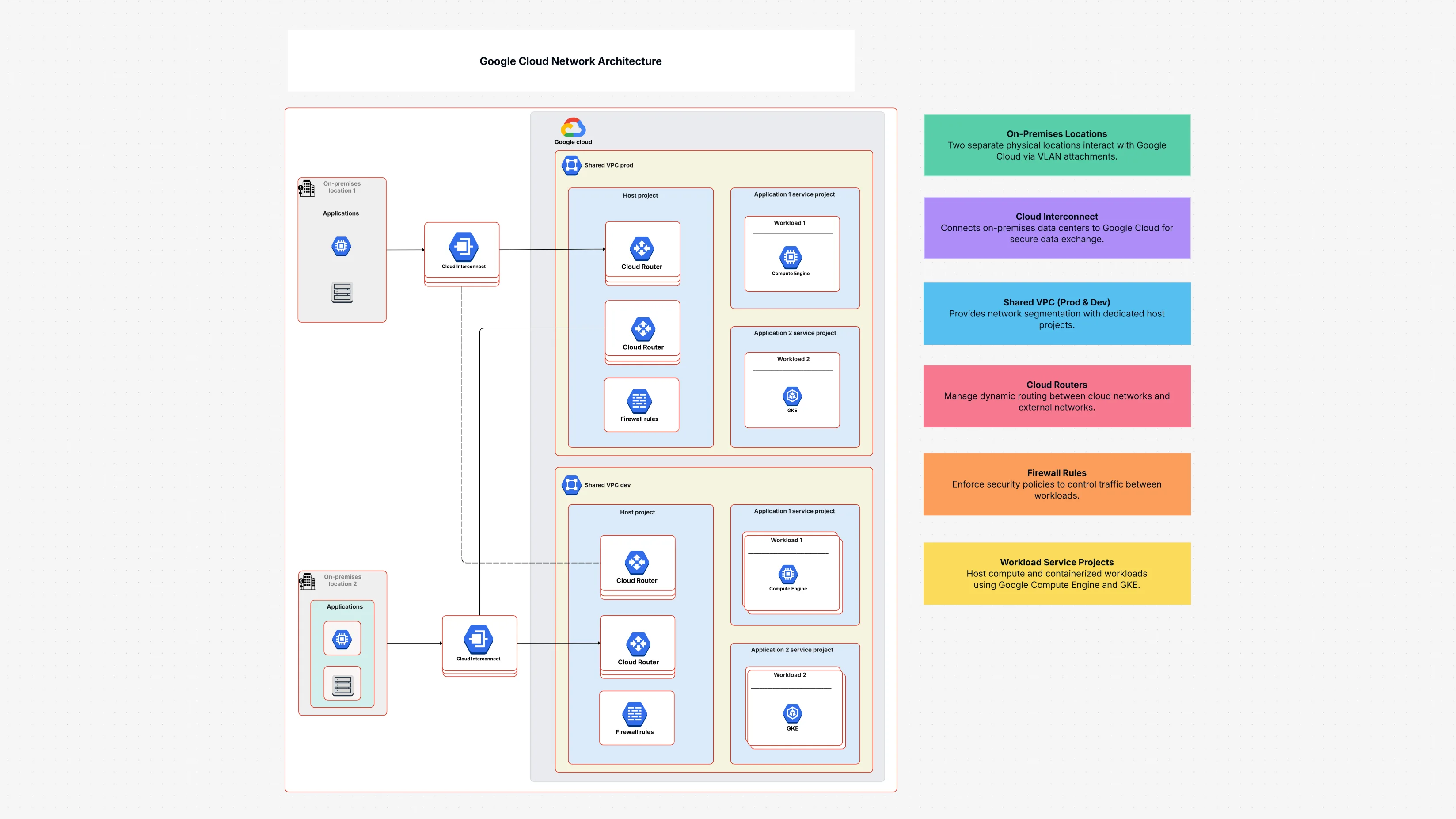
The Google Cloud Network Architecture Template serves as the graphical representation of your creation of a secure and scalable network in Google Cloud. It is like you are envisioning a complex city with different neighborhoods (cloud projects), common roads (VPCs), police officers (firewalls), and highways linking to the outside world (on-premises). This template shows a systematic view of these networking elements and gives an example:
Connecting Your Worlds: It emphasizes your hybrid network configuration, illustrating how Cloud Interconnect and VLAN Attachments provide safe, fast connections between your local sites and Google Cloud.
Smart Network Sharing: The spotlight is on Shared VPC architecture, which allows various project groups to share a single, centrally controlled network, thus making subnet organization and security straightforward.
Traffic Control: This explains the way Cloud Router operates with dynamic routing and how Firewall Rules allow only authorized traffic, thus giving you precise control over your GCP network design.
Application Deployment: It illustrates how Application Service Projects deploy workloads through a secure network that includes Compute Engine instances, often utilizing Load Balancers for smooth traffic handling.
Visibility and Security: The combination of these components provides Cloud Logging and Cloud Monitoring that allows to observe the network activities and performance, while at the same time security is ensured by Google Default Encryption and Access Transparency.
The Google Cloud Network Architecture Template offers unique benefits for handling your cloud networking:
Create a Durable Network Architecture in GCP: With this template, you will get a well-defined structure for creating a network that is not only secure but also scalable and efficient throughout your Google Cloud environment.
Optimize GCP VPC Design: It gives insights and makes it easier to apply the best practices for Shared VPCs thus allowing the management of the network from one central point while preserving the isolation of individual projects.
Subnet Planning can be made easier: The template helps in showing and arranging the parts of your network, making sure that the IP addresses are allocated efficiently and the resources are isolated.
Facilitate Hybrid Network Setup: The . It shows in a clear manner how to properly connect on-premises data centers to Google Cloud with the help of high security and performance, which is very important for hybrid setups.
Enhance Network Security: Through the implementation of Firewall Rules, Cloud Identity, and other security measures, the template leads you in establishing a secure network boundary.
Performance and Scalability Enhancement: Clarifying the role of Load Balancers and Cloud Router in the architecture enables to better manage the traffic and to be sure that the network is capable of serving increased demand.
Make Management Simple: A graphical display of your network facilitates the management of the network, the solving of problems in it, and the transfer of information on its configuration between the different teams.
Google Cloud Network Architecture Template is invaluable to the numerous roles involved in cloud networking and infrastructure.
Cloud Architect Roles: Researching the fundamental design of GCP's networking architecture and a GCP VPC design.
Network Engineers: Network Engineers are expected to plan and implement subnet designing, routing, and firewall rules suitable for a hybrid network structure.
DevOps Teams: To know the network dependencies for applications and services deployment.
IT Managers/Directors: To manage the overall cloud networking strategy, security, and connectivity.
Security Teams: To provide proper network segmentation and access controls enforcement.
Anyone Planning Hybrid Cloud: Necessary for visualizing and executing smooth connections between on-premises and GCP.
This Google Cloud Network Architecture template illustrates the network architecture design of GCP in a very understandable way. The organizations using it can create Shared VPCs for better GCP VPC design, set up security rules, and control connectivity with their data centers, thus getting a hybrid network that is both efficient and secure with smart subnet planning.
Loading subcategories...
 Manage all your work in one place
Collaborate with your team
Use Cloudairy for FREE—forever
Explore More