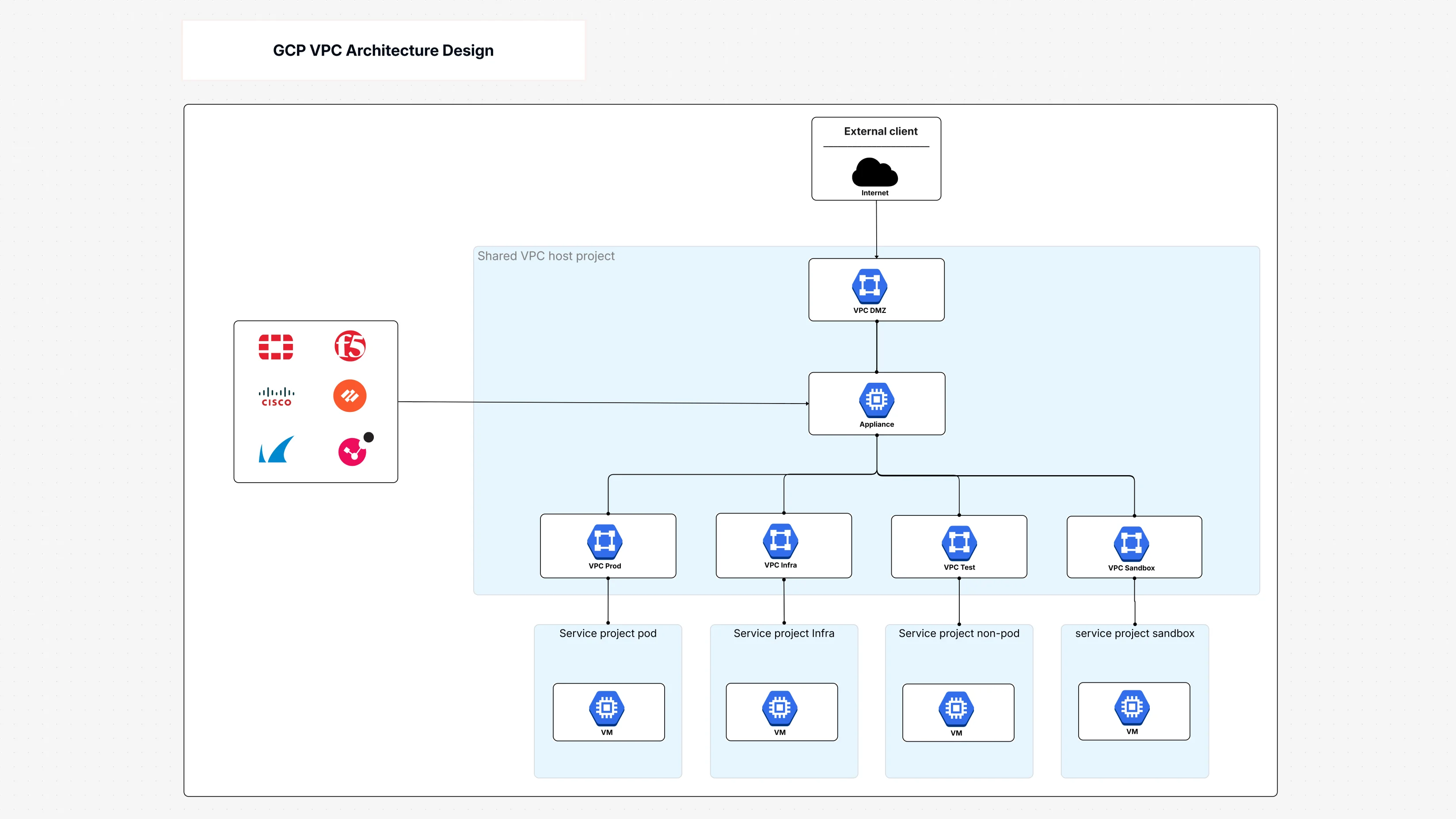
What is the GCP VPC Architecture Design Template?
This template is your go-to guide for building and understanding a well-structured network in Google Cloud. Think of it as mapping out different neighbourhoods in a city (your projects), each with its own local roads, but also connected to shared highways (your shared VPC). This diagram helps cloud architects truly grasp the design of both shared and standalone VPCs (Virtual Private Clouds), illustrating:
- Shared Networks (Shared VPCs): This shared network diagram directly illustrates the capability of a central VPC Host Project to control shared network resources, and it enables the linking and simultaneous operation of several Service Project Pods in a single managed network with absolute security.
- Segmenting Your Space: GCP network segmentation is emphasized by the template, which presents different VPCs for various purposes: VPC Prod (for production systems), VPC Test (for development), VPC Sandbox (for trials), and VPC Infra (for main infrastructure).
- Security at the Edges: It features a VPC DMZ (Demilitarized Zone) for the safe management of external traffic and further illustrates the role of a Firewall Appliance in safeguarding network perimeters.
- Connecting It All: It places Google Cloud Router and Google Cloud Interconnect for hybrid cloud connectivity (connecting your cloud to your physical office) visually.
- Traffic Management: It will show you the way Google Cloud Load Balancer skillfully shares out the incoming traffic among the VM Instances where your applications live.
- Inter-VPC Communication: Although the term "peering" is not used to label the components overtly, the arrangement suggests and promotes the application of communication techniques similar to VPC peering across the various isolated networks for certain requirements.
Why Use This VPC Architecture Template?
Using this template offers big advantages for your Google Cloud networking efforts:
- To be able to use GCP VPC Architecture like a pro: Know perfectly how to design your VPCs, be they shared or isolated.
- Get Smart GCP Network Segmentation done: Map out and see how to separate different environments and workloads, thus increasing security and making the organization cleaner.
- Get to Know Shared VPCs: Have a very clear picture of how a Shared VPC lets various projects access the same network resources, this making management easier and more consistent.
- Creation of VPC Peering Scenarios: The layout of the design supports the understanding of where and why VPC peering might be used to securely link the different VPCs, even though it is not a direct element.
- Security Posture Enhanced: Create and show Firewall Policies and DMZ configurations to ensure your network perimeters are well protected.
- Network Performance Enhancement: Get to know the way Load Balancers share the traffic and how hybrid connectivity solutions are assimilated.
- Collaboration Made Easier: Give the cloud architects, network engineers, and development teams a common, visual language to talk about and agree on Google Cloud networking strategies.
Who Benefits from This Network Design?
This template is incredibly useful for:
- Cloud Architects: Essential for designing and implementing the core GCP VPC architecture and GCP network segmentation.
- Network Engineers: To plan detailed network layouts, firewall rules, and hybrid connectivity solutions.
- DevOps Teams: To understand the network environment where their applications will run and how to secure them.
- IT Managers: To oversee network governance, security, and resource allocation within Google Cloud networking.
- Security Professionals: To analyze and implement robust security layers, including DMZs and access controls.
- Anyone Migrating to GCP: A crucial starting point for designing a well-structured and secure cloud network.
How to Open This Template in Cloudairy?
- Log in to your Cloudairy account.
- Go to the "Templates" section from the main menu.
- Search for "GCP VPC Architecture Design."
- Click on the template to open the design.
- Explore the connections between different VPC projects.
- Click "Edit" to customize or export the architecture.
Putting This Template to Work in Cloudairy
- Select the "GCP VPC Architecture Design" template.
- Review and adjust GCP network segmentation to match your needs.
- Configure Shared VPC projects and service connections, visualizing potential VPC peering scenarios.
- Define Firewall Policies and other security layers for comprehensive protection.
- Add or remove VM Instances and network appliances as your workloads require.
- Optimize your Google Cloud networking setup for efficient workload distribution.
- Export the finalized architecture for implementation and documentation.
Key Components of the VPC Architecture
- VPC Host Project: Manages shared networking resources (the central control for a Shared VPC).
- VPC DMZ: Handles external traffic security, acting as a buffer zone.
- Firewall Appliance: Protects network boundaries and controls traffic.
- Service Project Pod: Manages VM workloads that connect to the shared network.
- VPC Prod: Hosts production workloads (a segmented VPC).
- VPC Test: Provides testing and development environments (another segmented VPC).
- VPC Sandbox: Isolates experimental projects.
- VPC Infra: Manages infrastructure-related workloads.
- VM Instances: Hosts application and compute services.
- Shared VPC Services: Connects multiple projects through a shared network.
- Google Cloud Router: Handles dynamic routing for hybrid cloud connectivity.
- External Client: Represents user access from outside the network.
- Google Cloud Load Balancer: Distributes traffic across VMs efficiently.
- Google Cloud Interconnect: Provides dedicated hybrid cloud connectivity.
- Network Monitoring: Ensures performance tracking and visibility.
Summary
This GCP VPC Architecture Design template provides a clear visual of your GCP VPC architecture, showing how shared VPCs and standalone networks work. It highlights effective GCP network segmentation, secure connectivity (including implied VPC peering possibilities), and smart workload management within Google Cloud networking.
Design scalable cloud solutions visually with GCP architecture diagrams powered by Cloudairy.

 Copy link


 Manage all your work in one place