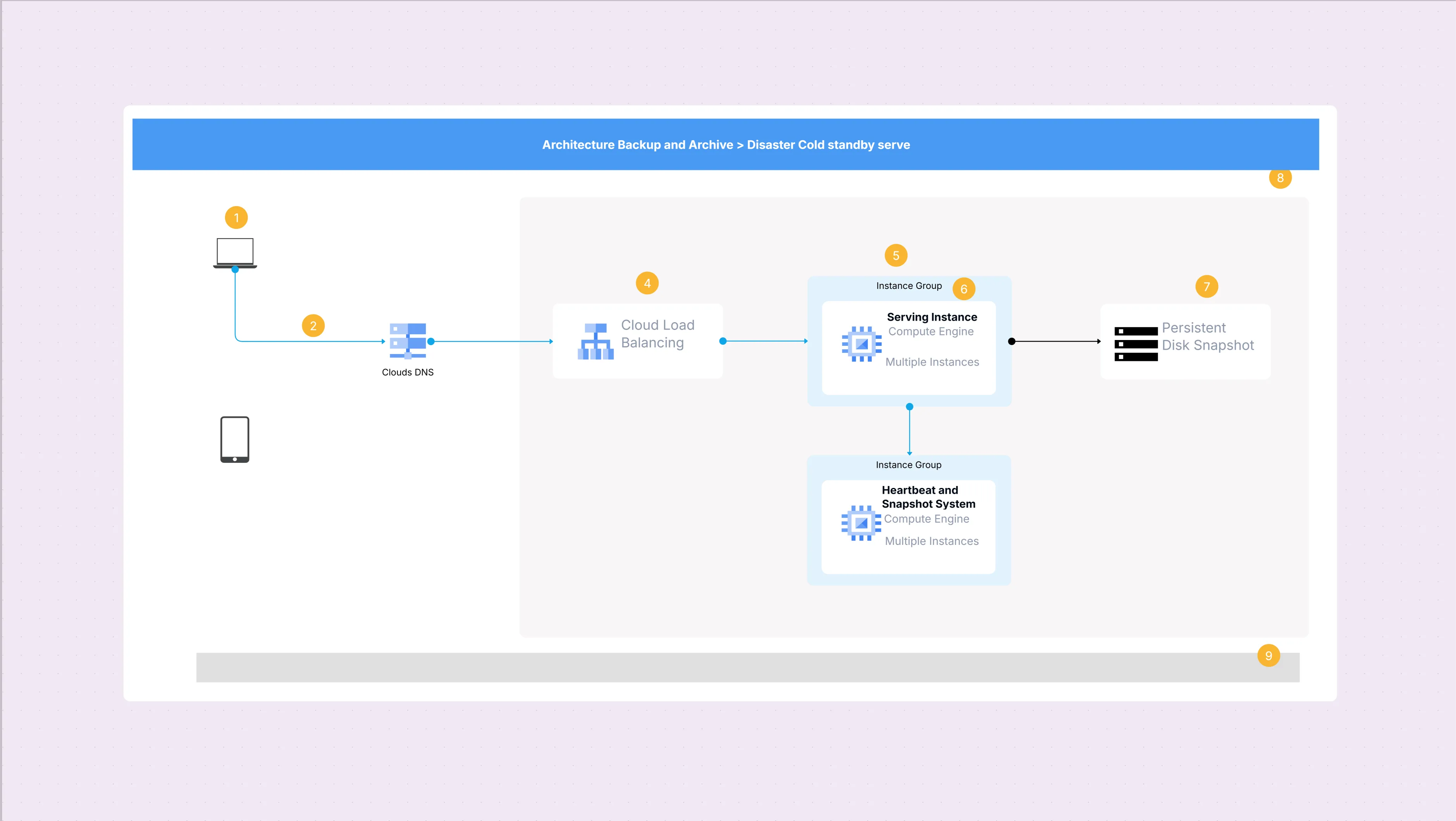
GCP Architecture Diagram Template

Cloudairy
 Copy link

Get your team started in minutes
Sign up with your work email for seamless collaboration.
Whiteboard
Copy link

Create GCP architecture diagrams with this editable template. Easily visualize Google Cloud compute, storage, networking, and security services to design, plan, and present scalable, secure, and cloud-native solutions for modern applications.
Create GCP architecture diagrams with this editable template. Easily visualize Google Cloud compute, storage, networking, and security services to design, plan, and present scalable, secure, and cloud-native solutions for modern applications.
A diagram representing GCP architecture depicts the arrangement of Google Cloud services that are utilized in creating cloud-based applications and infrastructure. It displays the interconnection of various services such as computing, storage, networking, and identity, which assists the team in designing eco-friendly and robust systems. Using this template, you will be able to create a visual representation of your workloads, record the dependencies of your system, and schedule your deployments using the official Google Cloud icons and patterns that are in accordance with the industry's best practices.
Create clear cloud architecture diagrams using Cloudairy templates
The provided template encompasses all the required elements to create precise GCP-based structures. Furthermore, it provides service icons and pre-designed formats for frequently used cloud-native techniques. By utilizing these assets, the groups can speed up the process of planning and assure the same level of correctness, thus eliminating the chances of misconfigurations as well as miscommunication. The template plays the role of an archetype for the adoption and modernization of the cloud, accommodating both the simple and the complex scenarios.
GCP diagrams are handy for organizations that are either employing Google Cloud services or creating multi-cloud systems. They bring light to planning, operations, and conformity checks. With this template, teams can speed up workshops, sync-up business and tech decisions, and keep systems documented in a way which is very easy to upgrade as the architectures change over time.
This template is fully editable and can be tailored to represent small-scale projects or enterprise-scale deployments. You can build on reference diagrams, add annotations, or expand into multi-cloud scenarios. By customizing it, your team can create diagrams that not only explain infrastructure but also highlight governance, compliance, and long-term architectural strategies.
Google Cloud has a solid reputation in the field of data and AI services, yet at the same time, it supports the entire enterprise workloads. Through the use of the template, these situations demonstrate how the idea can be employed. The layouts that are ready-to-use not only facilitate the visualization of the specific use cases for the teams, but they also help to simplify the communication and to align the cloud strategies across different industries.
1. Why use GCP-specific diagrams instead of general cloud diagrams?
GCP diagrams use official Google Cloud icons and patterns, making designs accurate, recognizable, and easier to share with technical teams and stakeholders.
2. Can this template show hybrid or multi-cloud setups?
Yes. You can combine GCP services with AWS or Azure icons, making it suitable for hybrid and multi-cloud strategies.
3. Does this template stay updated with new Google Cloud services?
Absolutely. The template library is refreshed regularly to reflect new GCP offerings and architectural patterns.
Loading subcategories...
 Manage all your work in one place
Collaborate with your team
Use Cloudairy for FREE—forever
Explore More