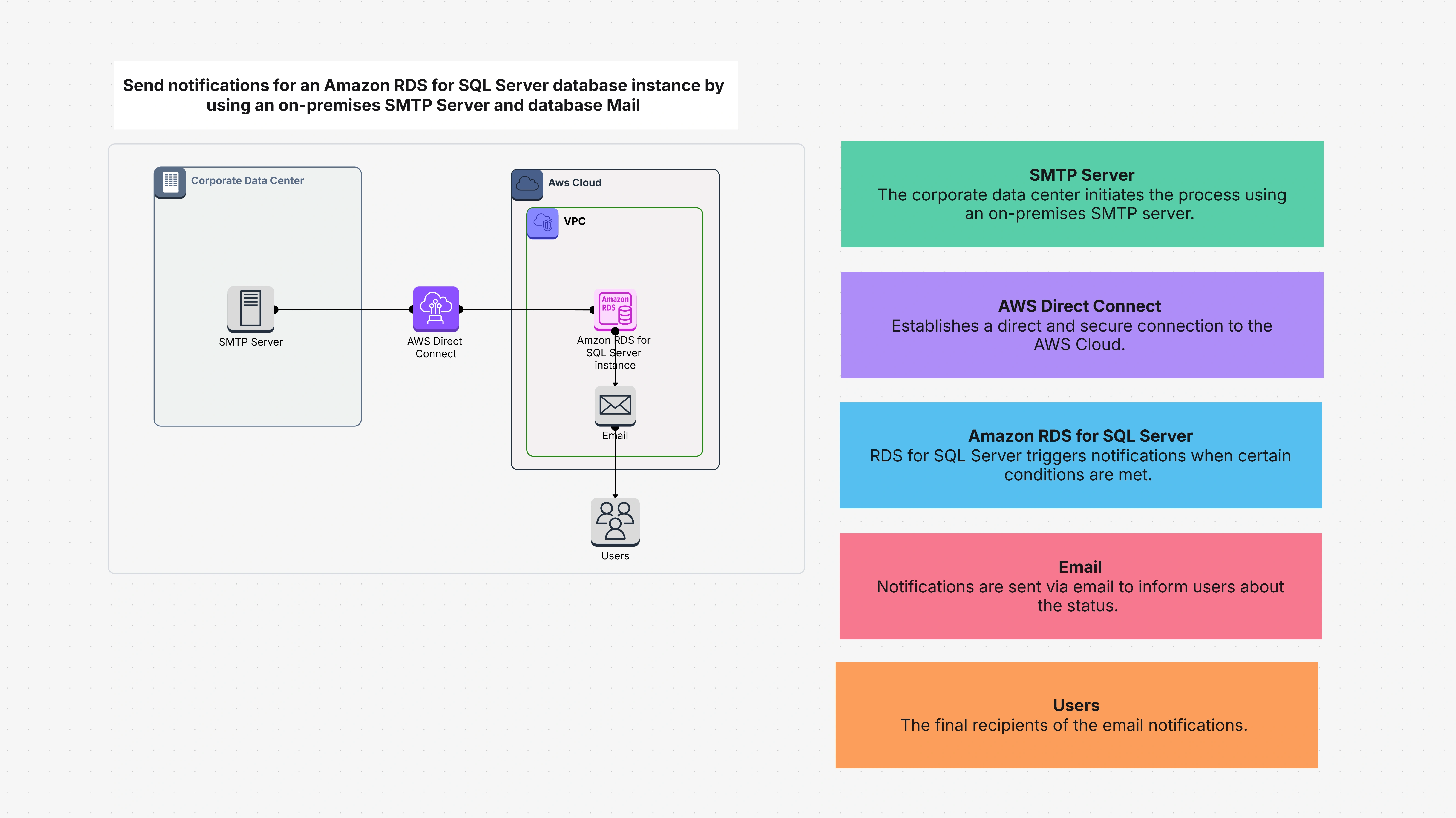
What Amazon RDS Template Is About
The Amazon RDS SQL Server database mail template helps you to configure a system through which your Amazon RDS for SQL Server notifies you by sending email through your internal SMTP server. Thus, whenever anything notable happens in your database, you get an instant email without exposing your SMTP server to the internet or relying on any third party email service. It uses a dedicated link from your data center or office to your AWS environment. This eliminates the delays and insecurity of sending a notification, and it is ideal for institutions that like to maintain total control of their email systems.
Why Amazon RDS Template Is a Game Changer
Most organizations have an in-house email system. The setup enables you to use the very same system to send database notifications, which works and avoids the introduction of new tools.
That is why this Amazon RDS template is effective:
- You do not have to use a public email service – Your SMTP server remains private.
- You get instant and reliable notifications – Remain informed about what is happening with your database in real time.
- It is secure It is all via a secure AWS Direct Connect connection.
- You remain compliant Ideal for companies with stringent security or data privacy needs.
Who Can Use Amazon RDS Template and When
This template is best for:
- Database administrators who need to monitor Amazon RDS for SQL Server
- IT departments with an already installed SMTP server in their data center or office
- Organizations seeking internal, secure notifications without the need to use third-party solutions
- Staff in banking, medical, or other professions that have data regulations
You should deploy this configuration when:
- You want to be notified for your Amazon RDS SQL Server
- You've got AWS Direct Connect set up
- You don't want to use services like Gmail or Amazon SES
- Your SMTP server is not open to the general internet
Main Components of the Amazon RDS Template
This template includes various main components that work together to send emails from your database:
- Amazon RDS for SQL Server – This is your central database. This is where the alerts start.
- Database Mail – Generally used in SQL Server to send email. You will set this up in RDS with the help of some configurations.
- AWS Direct Connect – A specialized private link between your AWS deployment and your office/data center.
- On-Premises SMTP Server – This is your current mail server that relays the emails.
- VPC Security Groups – These identify who has permission to communicate with your SMTP server at AWS.
- Firewall Rules – Used to make sure that only valid traffic is allowed.
- IAM Roles and Policies – Helps in managing who sends what and manage access securely.
- Database Event Triggers – Specify what issues or activities should raise an alert (e.g., failed login attempts, slow queries, etc.).
- CloudWatch Metrics – This helps monitor the database’s performance and spot issues.
- AWS CloudTrail – Maintains records of what occurs, which is helpful in audits.
- Email Templates – Makes alerts readable, so you can easily see what's wrong.
- SMTP Authentication – Only keeps approved sources from sending messages through your server.
- Amazon SNS (Optional) – Also used to deliver notices in other media, like text messages or push notifications.
How to Use Amazon RDS Template in Cloudairy
It is very easy to use this setting in Cloudairy. Just follow these steps:
- Log in to your Cloudairy account.
- Go to the templates page.
- Find "Send Notifications for Amazon RDS for SQL Server."
- Click to see a preview of the template.
- Press Open to open it in your workspace.
- Set your SMTP settings and use security options if needed.
Steps to Set It Up: Once you have opened the template, follow the following:
- Select the Template – Choose the Amazon RDS SQL Server alert setup to proceed.
- Include the Required Sections – Add your RDS instance, SMTP server, and AWS Direct Connect connection.
- Collaborate with Your Team – Coordinate with your IT staff or your network to allow for connections from the firewall and to open SMTP access.
- Change Security Settings – Make sure IAM rules and VPC rules are correct and secure.
- Check the Flow – Use Cloudairy's visual aids to visualize how the alert will be transported from Amazon RDS to your mail server.
- Use – When everything is set, click deploy and the system will go live.
Summary of the Amazon RDS Template
The Amazon RDS SQL Server database mail template gives you a simple means to send email notifications from Amazon RDS for SQL Server through your existing on-premises SMTP server. It connects your database to your internal mail system with AWS Direct Connect, in a private, secure, and high-speed way. It is simple to deploy, does not require any new tools, and is perfect for teams who want to keep control of their infrastructure. You'll never again miss a critical Amazon RDS database alert.

 Copy link


 Manage all your work in one place