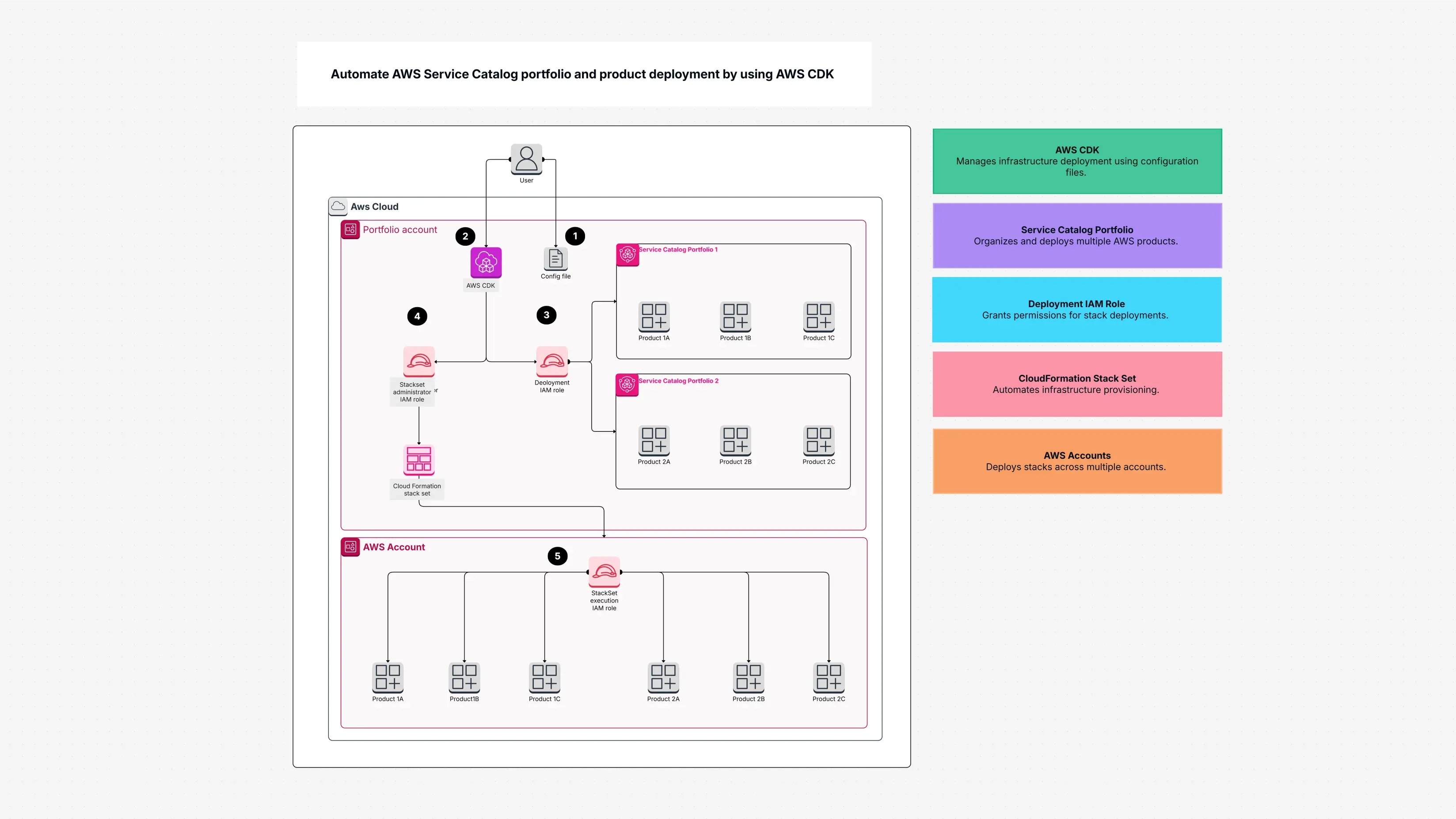
AWS Service Catalog Portfolio Template

Cloudairy
 Copy link

Get your team started in minutes
Sign up with your work email for seamless collaboration.
Whiteboard
Copy link

Use this AWS Service Catalog Portfolio template to simplify cloud resource management, track AWS services, and streamline project execution all in one place.
Use this AWS Service Catalog Portfolio template to simplify cloud resource management, track AWS services, and streamline project execution all in one place.
The AWS Service Catalog portfolio template in Cloudairy helps you set up and manage your cloud in a very simple way. Think of it like a ready-made plan that shows you how to build things in AWS without getting confused.
It uses AWS Service Catalog and AWS CDK to create cloud pieces you can reuse again and again. This keeps everything safe, the same, and easy to manage. You can even work with your team at the same time and make changes together.
This AWS Service Catalog portfolio template makes your work easier because:
It helps you save a lot of time and keeps your cloud neat and organized.
This AWS Service Catalog portfolio template is great for:
Use it when:
The AWS Service Catalog portfolio template includes:
These features help you manage many AWS accounts without stress.
Starting is simple:
Cloudairy’s AWS Service Catalog portfolio templates make cloud work easier. They help you save time, avoid mistakes, and build your cloud in a safe and organized way.
With these templates, you can design your AWS setup faster, deploy it easily, and manage everything with confidence. Whether you're a developer, DevOps engineer, or cloud architect, these templates help you work smarter not harder.
Ready to make your cloud work simple?
Start using Cloudairy’s AWS Service Catalog portfolio templates today and build your cloud with ease, speed, and confidence.
Loading subcategories...
 Manage all your work in one place
Collaborate with your team
Use Cloudairy for FREE—forever
Explore More