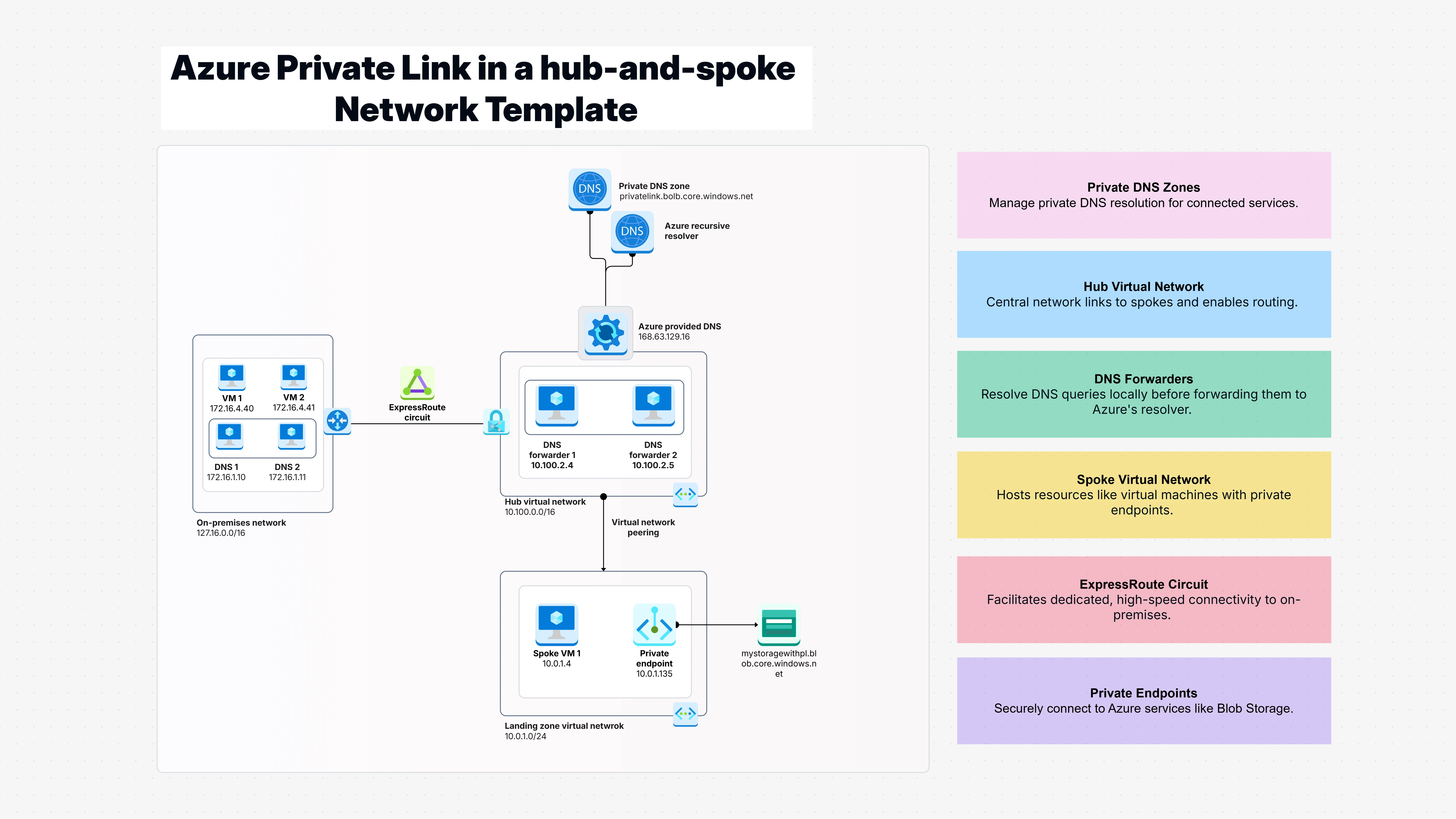
Azure Private Link in a hub-and-spoke Network Template

Cloudairy
 Copy link

Get your team started in minutes
Sign up with your work email for seamless collaboration.
Whiteboard
Copy link

Easily secure Amazon DynamoDB access with Azure Private Link in a hub-and-spoke network for scalable, private, and reliable connectivity.
Easily secure Amazon DynamoDB access with Azure Private Link in a hub-and-spoke network for scalable, private, and reliable connectivity.
An Azure Private Link Hub in a hub-and-spoke network Template is like having a private tunnel system that connects all your different office locations without ever going through public streets. It is a simple blueprint that shows you how to set up your cloud network so your applications can talk to Azure services privately, without their conversations ever traveling over the public internet. Think of it as creating a secure internal highway system where your Azure Private Link Hub acts like a central hub with private roads leading to all your important destinations.
This template helps you build secure Azure architectures where sensitive data never leaves your private network, even when accessing cloud services like databases or storage. Instead of hoping your connections are secure, you get a proven framework for creating private endpoint Azure connections that guarantee your traffic stays completely private. The Azure Private Link Hub ensures your data moves safely through isolated, private paths across your entire Azure environment.
Ever worried about your sensitive business data traveling over the public internet just to reach an Azure service? Or spent sleepless nights wondering if someone could intercept your database connections or storage uploads? That is exactly what this template eliminates. It gives you a clear roadmap for setting up Azure Private Link Hub connections, so your data never has to leave the safety of your private network. Without proper private connectivity, it is like sending confidential documents through regular mail instead of a secure courier technically it usually works, but you are always taking unnecessary risks.
This template shows you how to create private endpoint Azure connections the right way, so when your applications need to access cloud services, they do it through secure, private tunnels that no one else can see into. Your compliance team will love it, and you will sleep better knowing your data is traveling safely.
This template is perfect for:
It is easy to get started with the "Azure Private Link Hub in a hub and spoke network" template in Cloudairy:
When setting up the Azure Private Link Hub in a hub and spoke network, many of us initially found secure cloud connectivity to be complicated, but this blog template makes it simple and clear. It works almost like having a trusted advisor by your side, showing exactly how to design a private highway system that protects your most critical company traffic from the chaos of public internet routes. With the detailed framework provided in this blog, implementing Azure Private Link Hub within your Azure environment becomes a confident step forward, ensuring your data travels securely in private tunnels beyond anyone’s reach.
Forget the old concerns about data exposure or the uncertainty of internet-based transfers; this blog-driven approach delivers consistent, private connections that meet enterprise-level security requirements while remaining painless to maintain even for smaller teams. If your goal is to eliminate public data transfers and build dependable private connections to Azure services, this thoughtfully designed blog template offers the precise foundation your technical team can rely on for trusted security and clean architecture.
Loading subcategories...
 Manage all your work in one place
Collaborate with your team
Use Cloudairy for FREE—forever
Explore More