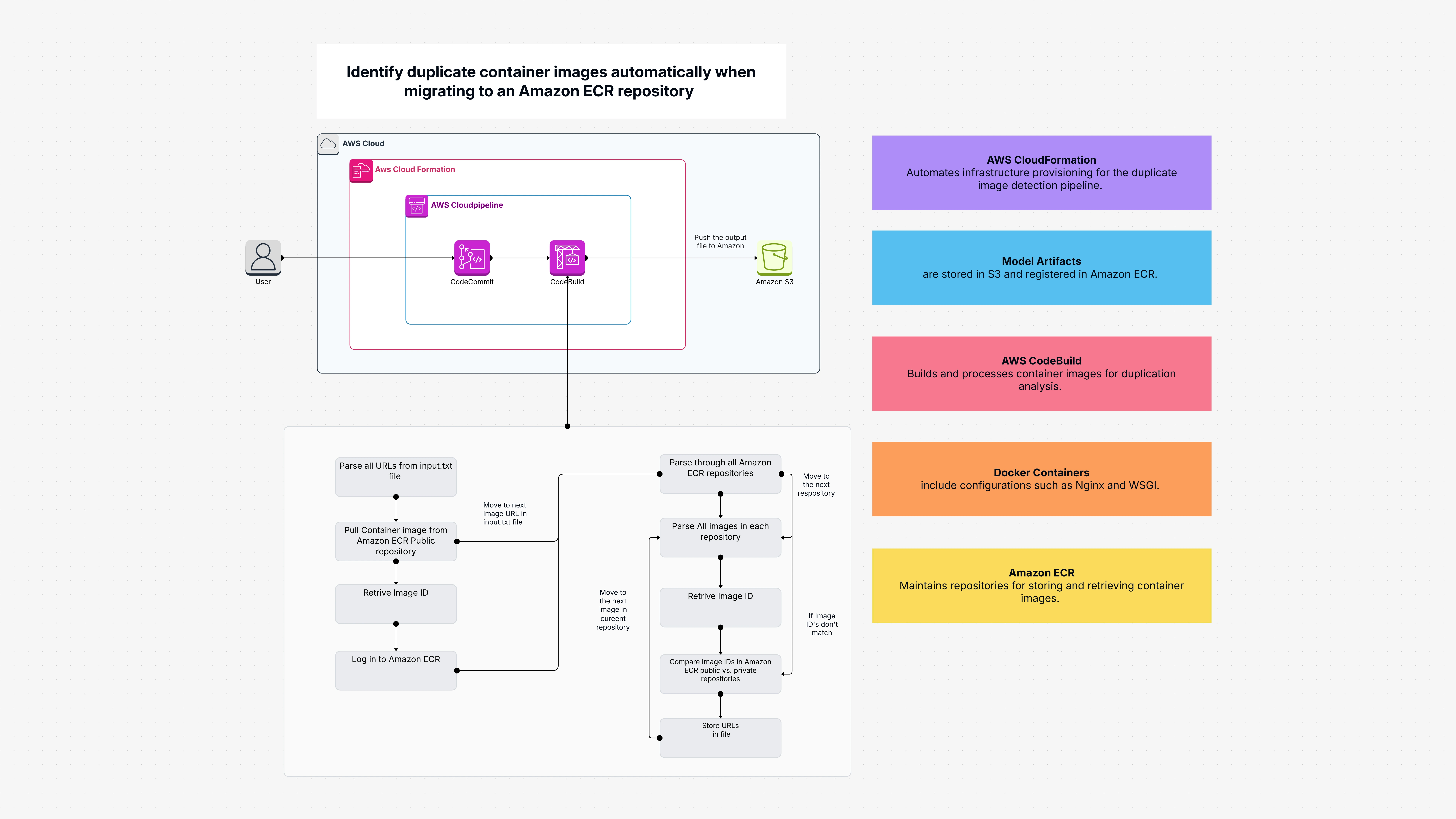
Identify duplicate container images automatically when migrating to an Amazon ECR repository

Cloudairy
 Copy link

Get your team started in minutes
Sign up with your work email for seamless collaboration.
Whiteboard
Copy link

Automatically detect and remove duplicate container images in Amazon ECR during migration to streamline repositories, optimize storage, and cut costs efficiently.
Automatically detect and remove duplicate container images in Amazon ECR during migration to streamline repositories, optimize storage, and cut costs efficiently.
The Identify Duplicate Container Images Amazon ECR repository template helps you find duplicate container images during a move to Amazon ECR. It does this by pulling images from public repositories, checking their unique IDs (also called digests), and comparing those against what you already have in your own private ECR. If there is a duplicate container image, the template will know about it, and it will not upload it.
It uses a combination of AWS services such as:
Therefore, instead of having to keep an eye on which image has already been included and which hasn't, this template does it for you.
Let’s face it you are copying dozens or hundreds of duplicate container images, and it is nearly impossible to keep track of them manually. Re-uploading the same image repeatedly can:
This duplicate container template solves all of that automatically. It retrieves all your images from your list, looks for identical images (by ID or hash) in your ECR, and pushes only the new ones. This keeps your repository clean, saves storage, and keeps everything running smoothly.
You do not have to create any custom scripts or develop a tool from the ground up the setup is already taken care of for you with this duplicate container template.
This duplicate container template is appropriate for:
Use this template when you are copying images to Amazon ECR and do not want to include the same image twice.
Even if you are a beginner to ECR, this duplicate container template will help you start with a clean and optimized setup.
The following are the main AWS components this duplicate container template is built on:
You can open and use this duplicate container template with ease in Cloudairy, a visual service for managing cloud workflows.
Here’s how to start:
Once the duplicate container template is open in Cloudairy, you can visualize the entire migration and verification workflow. You can:
Even if you are not a cloud expert, Cloudairy’s visual interface makes it intuitive to use this duplicate container template effectively.
Migrating container images to Amazon ECR is fast but duplicate container images can clutter and slow things down. This duplicate container template automates the identification and elimination of duplicate images, making migrations faster, cleaner, and more efficient.
Using AWS services like CloudFormation, CodePipeline, and S3, this solution cross-checks every image and uploads only new ones. It saves time, reduces waste, and keeps your ECR repository perfectly organized.
If you often move container images or want a tidy, duplicate-free ECR, this ready-to-use duplicate container template is the solution for you.
Loading subcategories...
 Manage all your work in one place
Collaborate with your team
Use Cloudairy for FREE—forever
Explore More