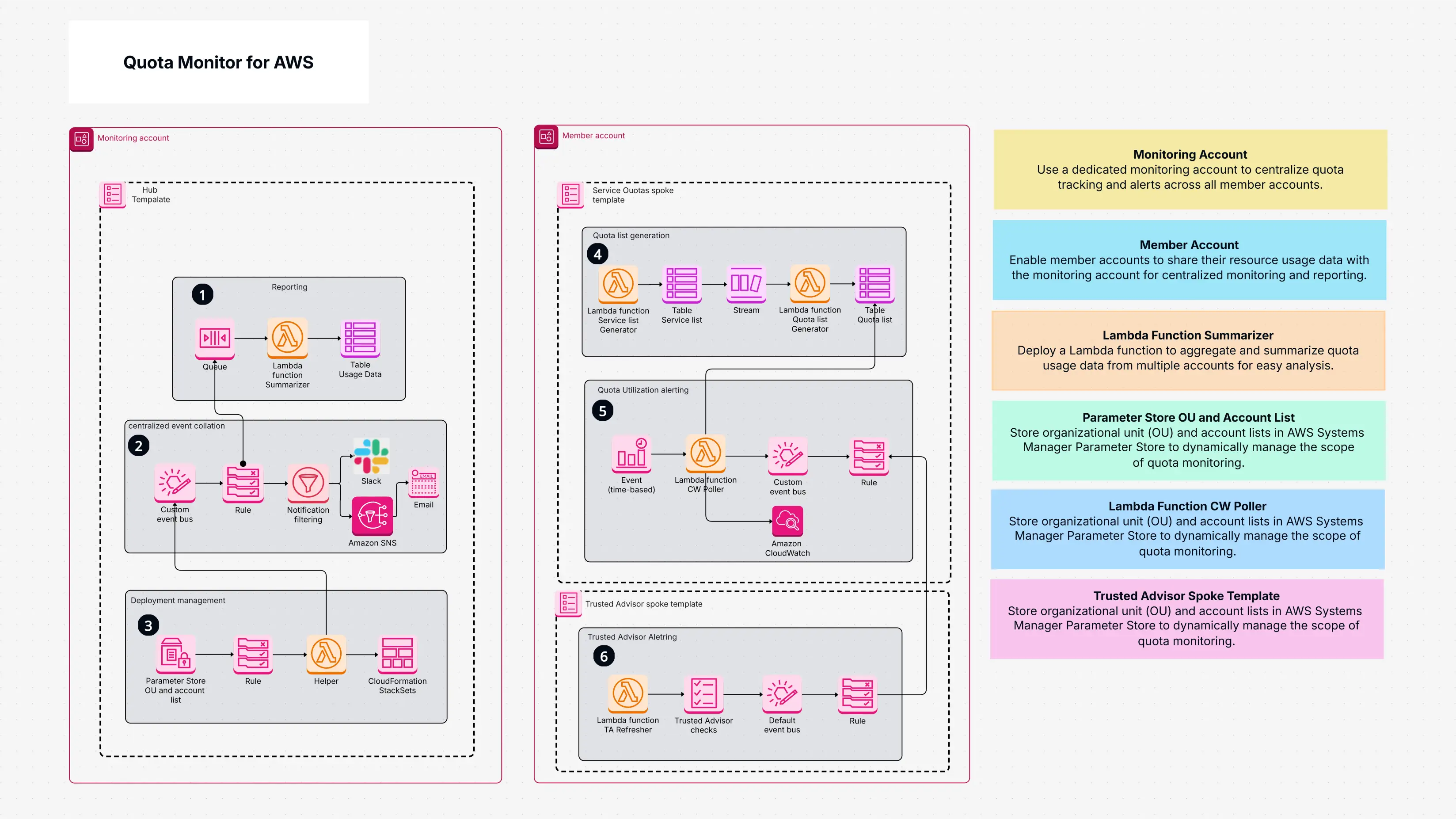
Quota Monitor for AWS

Cloudairy
 Copy link

AI Workspace for Diagrams & Collaboration
Get your team started in minutes
Sign up with your work email for seamless collaboration.
Whiteboard
Copy link

Learn how to set up an AWS quota monitor to track service limits, avoid disruptions, and ensure smooth cloud operations with clear alerts and proactive monitoring. Perfect for maintaining reliable AWS performance.
Learn how to set up an AWS quota monitor to track service limits, avoid disruptions, and ensure smooth cloud operations with clear alerts and proactive monitoring. Perfect for maintaining reliable AWS performance.
Quota monitor for AWS is a ready-to-use template that tracks your AWS service quotas and how close you are to a specific limit. It quietly runs in the background, keeps monitoring the quotas, and alerts you when you are approaching a limit. It uses services such as Lambda, CloudWatch, and SNS to achieve this. Lambda monitors how much of your quota you've consumed, CloudWatch provides you with rules on when to notify you, and SNS notifies you through email or Slack. There are other components such as Trusted Advisor and dashboards that help you in realizing how to use your resources more effectively. The concept is simple: rather than learning about a problem after it's occurred, you're notified ahead of time. This allows you sufficient time to correct the problem, ask for an increase in quotas, or organize your resources more efficiently.
Without this template, quotas are tested by most teams only when something breaks. By then, you're too late and you will have to suffer from delays or outages in service. This template prevents this from occurring by:
Rather than worrying over unexpected limits, you can concentrate on executing your workloads and expanding your applications. It saves time, avoids unexpected problems, and keeps your AWS environment in the best possible manner.
If you are developing your projects on AWS either as an individual developer, a small team developer, or a large organization with many accounts, this template can help you. It is best to start using it at an early point, even if you feel you are far below your capacity. Quotas can be reached earlier than you expect as your usage grows. Having it installed at an early point means you are always ahead of the game.
It is of greatest value to those teams engaged in heavy workloads, manufacturing plants, or big projects. Even small setups, however, can be helped by it to prevent errors.
The AWS Quota Monitor is developed on top of several AWS services that peacefully work together. The key components and their functions are the following:
All these elements operate in the background. You don't need to work with each one individually; the template handles them for you upon deployment.
You can easily install and use quota monitor for AWS template from Cloudairy.
Here is how:
Once you've deployed, you can set up how you get notified. You can get notified by Amazon SNS, email, or Slack. You can also collaborate with your team to monitor usage, forecast changes, and even export reports to review trends or pass on to someone else.
Quota monitor for AWS is an easy and effective means of preventing issues resulting from reaching service limits. It provides you with automatic monitoring, easy alerts, and informative data so that you can better manage your resources. Rather than having to be on top of quotas yourself, you have a system in place that tracks you. With the help of AWS services such as Lambda, CloudWatch, SNS, and Trusted Advisor, this template keeps you notified whenever you are getting close to a limit. You can easily place it in Cloudairy by locating the template, opening it, establishing limits, and deploying it. Then, you see your quota usage clearly, get regular updates, and fewer surprises. Whether you are new to AWS or have several accounts, this template has you ready and your workloads running without disruption. Use Instance Scheduler on AWS to automate start and stop times for EC2 and RDS resources, reducing operational costs.
Loading subcategories...
 Manage all your work in one place
Collaborate with your team
Use Cloudairy for FREE—forever
Explore More