50,000 + Trusted Users with
star star star star star

Trusted by Professionals at Leading Companies

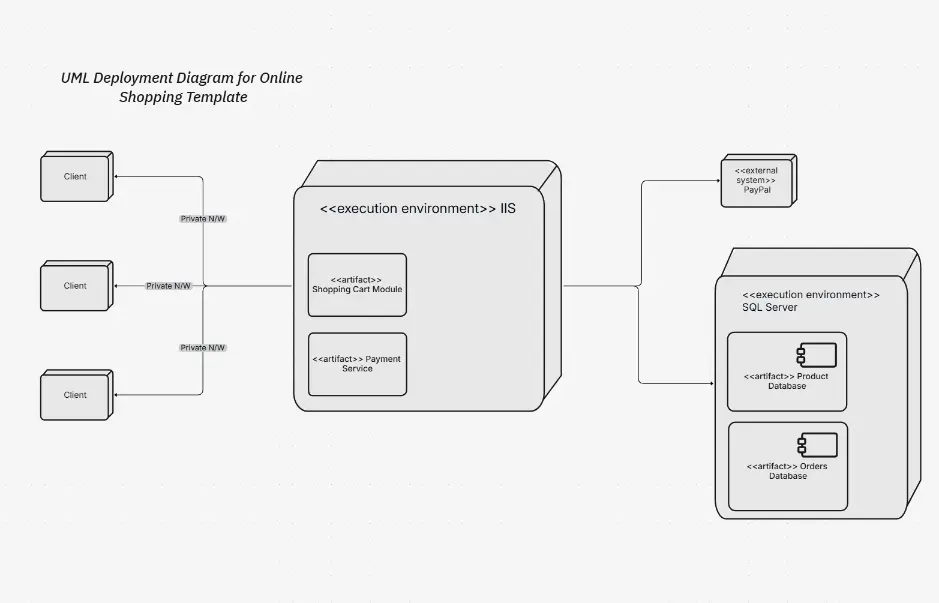
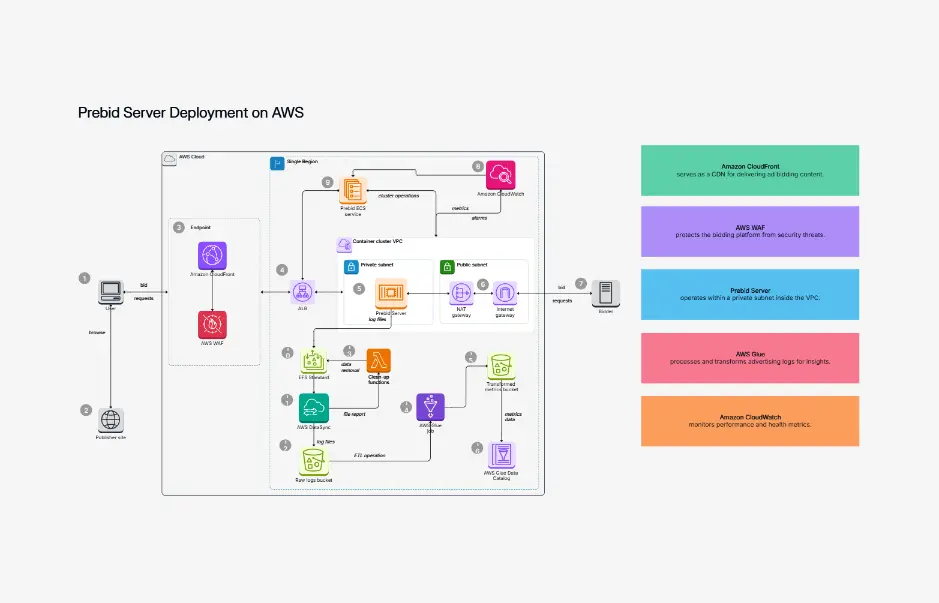
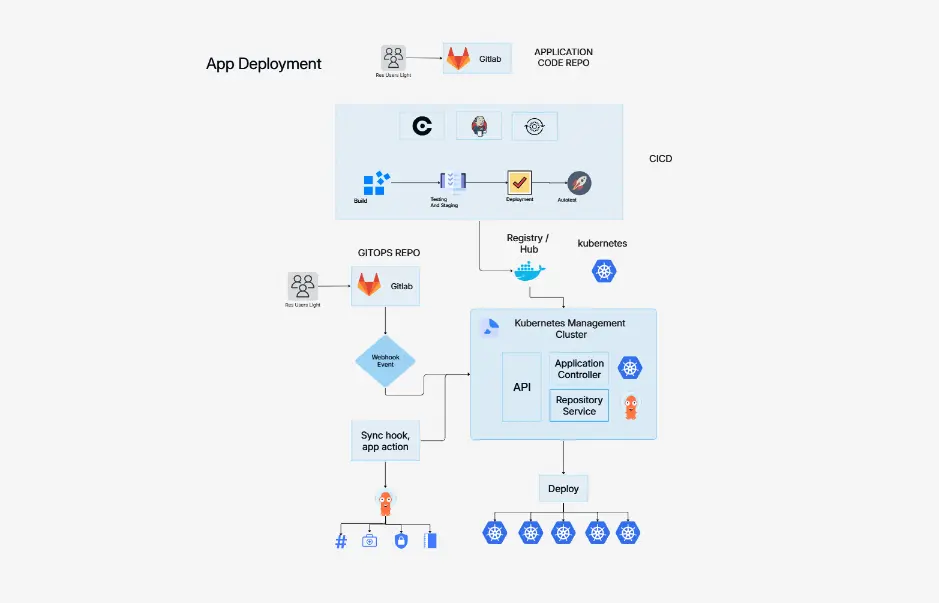
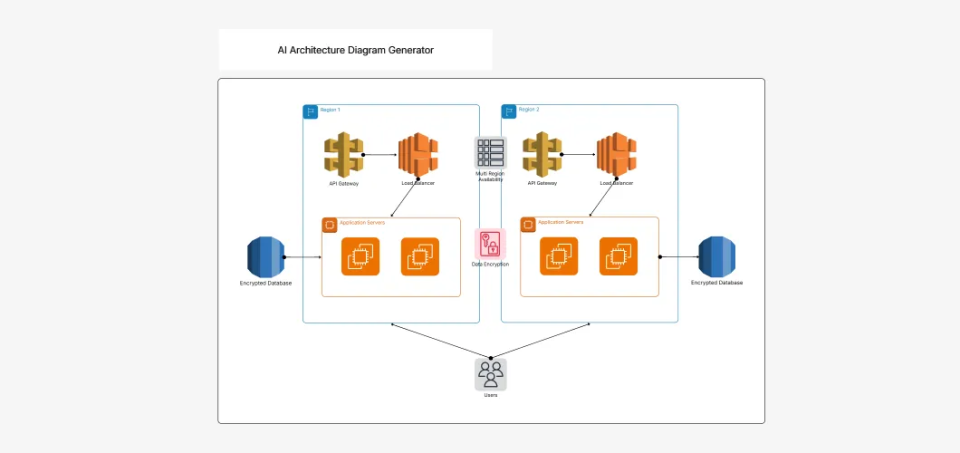
What is a deployment diagram — example showing microservices nodes, containers, and artifact deployment

What Is a Deployment Diagram?

A deployment diagram is a type of structure diagram in the Unified Modeling Language (UML 2.5) that depicts the physical architecture of a system. It shows how software components are deployed to hardware nodes, containers, servers, and cloud infrastructure — mapping the relationships between execution environments, artifacts, and components so that your team, DevOps engineers, and stakeholders can understand the runtime topology.

Deployment diagrams are essential for DevOps, Kubernetes, CI/CD, and microservices documentation. They serve as the source of truth for infrastructure reviews, deployment planning, disaster recovery strategies, and compliance documentation. Well-designed deployment diagrams use standard UML notation with proper nodes, execution environments, and artifact symbols.

Cloudairy's AI Deployment Diagram Maker goes beyond static templates. Describe your deployment architecture in plain English — "Kubernetes cluster with microservices, database pod, and load balancer" — and the AI produces a ready-to-edit UML 2.5 diagram instantly. Export to Visio, draw.io, PlantUML, or C4 Model format. Pair your deployment diagrams with architecture diagrams for complete system documentation, or use the sequence diagram maker for behavioral views.

How to Create a Deployment Diagram with Cloudairy

Go from idea to professional UML 2.5 deployment diagram in four steps — no manual drawing, no Visio license, no coding required.

1

Describe your deployment architecture

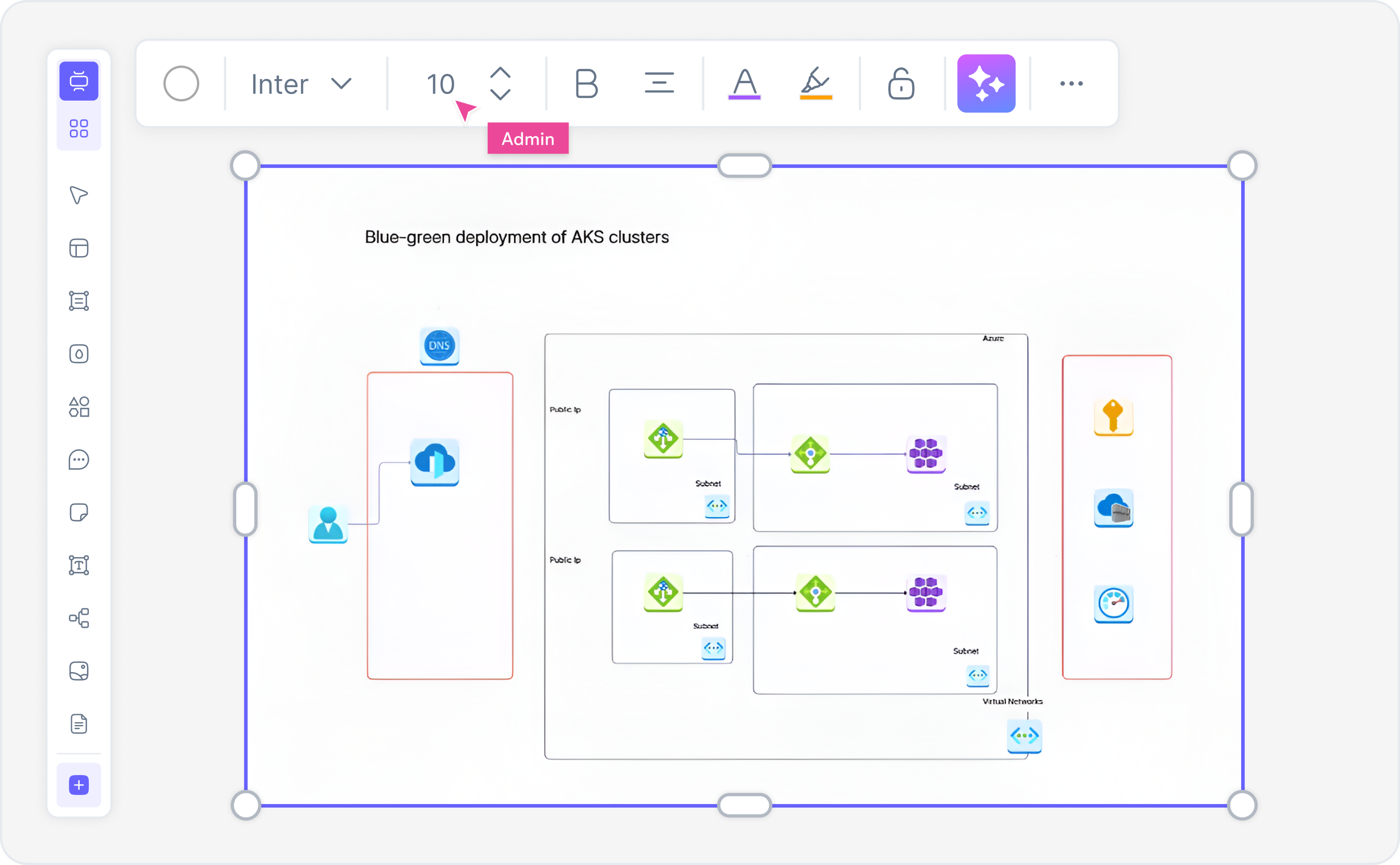
Type a plain-English description in the AI prompt box. For example: "Kubernetes cluster with API deployment, microservices nodes, PostgreSQL database pod, and load balancer." Or choose one of the example prompt chips — Kubernetes, microservices, serverless, blue-green deployment, Docker container orchestration.

2

Click Generate

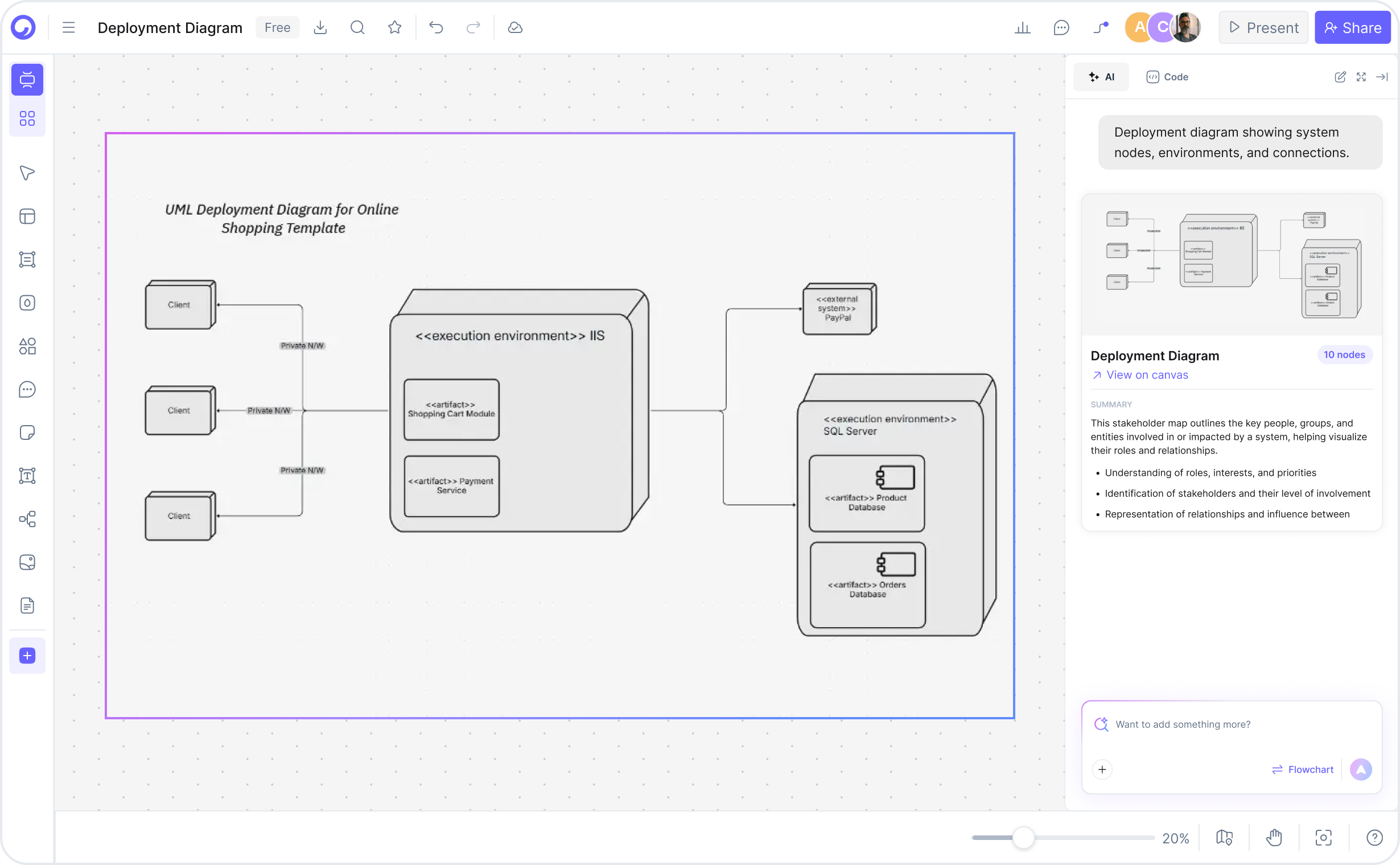
Cloudairy's AI instantly builds the UML 2.5 deployment diagram with proper notation. Nodes, execution environments, and artifacts are correctly structured, relationships show deployment flow, and component dependencies are mapped automatically.

3

Customize — drag, drop, and refine

Refine the AI-generated diagram in Cloudairy's editor. Rearrange nodes, adjust component layout, add deployment stereotypes, insert execution environment details, or customize UML notation. Full support for Kubernetes, Docker, and cloud deployment patterns.

4

Export or share

Export to Visio (.vsdx), draw.io (.drawio), PlantUML, C4 Model, PNG, SVG, or PDF. Or copy a shareable live link for view-only or collaborative editing with your team — no account required for viewers.

How to create a deployment diagram with Cloudairy — four steps from prompt to export

Start Building Your Deployment Diagram Free

Join thousands of DevOps engineers, cloud architects, and platform teams who use Cloudairy to create UML 2.5 deployment diagrams in seconds. AI generation. UML notation. Real-time collaboration.

No credit card required • Start creating in seconds

Why Use Cloudairy as Your Deployment Diagram Tool

Cloudairy is the only tool that combines an AI prompt-to-diagram experience with UML 2.5 notation, Kubernetes examples, multi-format export, and real-time collaboration — all on a single platform.

AI Prompt-to-Diagram

AI Prompt-to-Diagram

Describe your deployment architecture in natural language and get a complete, properly structured UML 2.5 diagram in seconds. No templates to search, no shapes to drag from scratch. The AI understands Kubernetes, microservices, and infrastructure patterns.

UML 2.5 Notation

UML 2.5 Notation

Generate deployment diagrams with proper UML 2.5 structure diagram notation. Full support for nodes, execution environments, artifacts, components, and deployment relationships. Compliant with Unified Modeling Language specification.

Kubernetes Support

Kubernetes Deployment Examples

Built-in Kubernetes deployment diagram templates covering Pods, ReplicaSets, Services, Ingress, StatefulSets, and DaemonSets. Generate diagrams for Kubernetes architectures with proper notation and relationships.

Multi-Format Export

Multi-Format Export

Export to Visio (.vsdx), draw.io (.drawio), PlantUML, C4 Model, PNG, SVG, or PDF. Choose the format that fits your workflow. No lock-in — your diagrams stay portable across tools and platforms.

Real-Time Collaboration

Real-Time Collaboration

Work on the same deployment diagram simultaneously with your team. Live cursor presence, inline comments, and @mentions keep engineers and architects aligned. Share view-only or edit links with no account required.

Version History and Sharing

Version History & Sharing

Track every change with full version history and branching. Roll back to any previous version, compare edits, and share specific diagram versions for deployment reviews. Shareable view-only links require no login.

Cloudairy vs. Other Deployment Diagram Tools

See how Cloudairy compares to the tools currently ranking for deployment diagram creation.

Capability Cloudairy Visio Lucidchart draw.io PlantUML C4 Model
AI prompt → diagram Yes No Limited No No No
UML 2.5 notation support Yes Yes Yes Partial Yes Yes
Kubernetes deployment support Yes No Limited Yes Yes No
Export to PlantUML & C4 Yes No Limited Limited Native Native
Real-time collaboration Yes Limited Yes Limited No No
Free tier available Yes No Limited Yes Yes Yes
Version history & branching Yes No Limited No No No

Who Uses Cloudairy for Deployment Diagrams?

DevOps Engineers

Document Kubernetes clusters, microservices deployments, and infrastructure topologies. Generate deployment diagrams from plain English prompts and export to PlantUML or C4 Model for version control.

Cloud Architects

Design deployment strategies, document CI/CD pipelines, and visualize infrastructure-as-code (Terraform, CloudFormation). Keep diagrams in sync with deployments using shareable live links and version history.

Platform Teams

Create standardized deployment diagram templates for your organization. The AI generates complete deployment diagrams from brief descriptions so teams spend time building, not drawing.

Students & Certification Candidates

Prepare for Kubernetes, CKAD, and DevOps certification exams by visualizing deployment architectures and their relationships. Generate study diagrams from exam topics in seconds.

Infrastructure Specialists

Document infrastructure deployments with current-state and future-state deployment diagrams. Use the comparison layout to show before/after migrations and deployment strategy changes.

DevOps engineers, cloud architects, and platform teams using Cloudairy for deployment diagrams

Frequently Asked Questions

Cloudairy is the best free AI-powered deployment diagram maker. It combines an AI prompt-to-diagram experience with UML 2.5 notation, Kubernetes examples, and multi-format export (Visio, draw.io, PlantUML, C4 Model) — capabilities no other tool currently offers together on a single platform.

With Cloudairy: (1) Type your deployment architecture description into the AI prompt box. (2) Click Generate — Cloudairy builds the UML 2.5 deployment diagram with proper notation. (3) Customize using drag-and-drop. (4) Export to Visio, draw.io, PlantUML, C4 Model, PNG, SVG, or PDF, or share a live link with your team.

Yes. Cloudairy's free tier includes access to the AI deployment diagram maker with UML 2.5 notation support and PNG export. Premium plans unlock Visio export (.vsdx), unlimited boards, Kubernetes templates, and full team collaboration features.

A deployment diagram is a type of UML 2.5 structure diagram that depicts the physical architecture of a system, showing how software components are deployed to hardware nodes, execution environments, and containers. It's essential for DevOps, Kubernetes, CI/CD, and infrastructure documentation.

Yes. Cloudairy supports two-way export to Visio (.vsdx) and draw.io (.drawio), plus PlantUML, C4 Model format, PNG, SVG, and PDF. You can also import existing draw.io files into Cloudairy for editing. This provides a frictionless migration path for teams using other tools.

Yes. Cloudairy has dedicated Kubernetes deployment diagram support with templates covering Pods, ReplicaSets, Services, Ingress, StatefulSets, and DaemonSets. You can generate Kubernetes cluster diagrams from plain English prompts with proper UML notation.

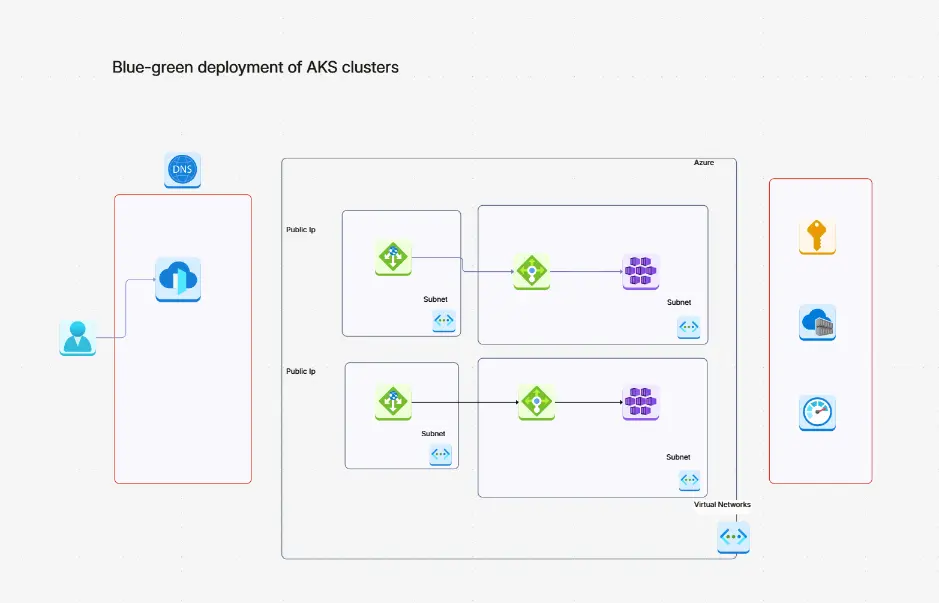
Yes. Cloudairy supports microservices deployment diagrams with full support for distributed components, APIs, message queues, databases, and deployment strategies like blue-green and canary deployments. Perfect for documenting complex microservices topologies.

A deployment diagram focuses on physical infrastructure and how software components are distributed across nodes and containers. An architecture diagram shows overall system design and component relationships. Cloudairy supports both with proper UML 2.5 notation.

Success Stories from Our Community

See how cloud architects, solutions engineers, and DevOps teams use Cloudairy to create Azure architecture diagrams faster and with better results.

As a cloud architect, I need precision and speed. Cloudairy helps me design complex Azure architectures in minutes without losing detail or accuracy. The official Azure icons save me hours every week.

Cloudairy makes Azure solution design so simple. I can create client-ready architecture diagrams instantly and focus on delivering value instead of spending hours formatting Visio files.

I'm studying for AZ-305 and Cloudairy helps me visualize Azure reference architectures instantly. I can generate a landing zone diagram from a single sentence and use it as a study aid.

I use Cloudairy to teach Azure architecture in my courses. The AI generator lets students produce real-world diagrams on the first day instead of spending weeks learning Visio.

Our team uses Cloudairy to document every Azure deployment. The Visio export means our diagrams drop straight into client deliverables without any reformatting. Huge time saver.

Secure, compliant, and enterprise-ready

Cloudairy safeguards your work with enterprise-grade security, compliance, and access controls — so your teams can create, collaborate, and scale with confidence.

SOC 2 Type II
SOC 2 Type Ⅱ

Cloudairy is SOC 2 Type Ⅱ certified and penetration tested annually, ensuring your architecture diagrams and data meet the highest standards for security and reliability.

GDPR
GDPR

We comply with the European Union General Data Protection Regulation (GDPR) and extend it to all our customers even those outside of the EU.

ISO 27001
ISO 27001

Our Information Security Management System is ISO 27001 certified — the leading global standard for information security.

Flexible Pricing for Every Team

Free

Discover what Cloudairy can do for you. Start for free

$0

for unlimited members
Try for free

Upgrade now

Show key features

up-arrow

Includes:

Starter

Unlock unlimited and private boards with important features

$4

per member / month

billed annually

monthly

Show key features

up-arrow

Includes everything in Free, plus:

money-back

Business

MOST POPULAR

Ideal for agencies or growing businesses managing multiple projects.

$5

per member / month
billed annually

Show key features

up-arrow

Includes everything in starter, plus:

Enterprise Plan

For large organizations needing scalability, control, and security.

contact-pricing
Contact for pricing
Contact us

Upgrade now

Show key features

up-arrow

Includes everything in Business, plus: