50,000 + Trusted Users with
star star star star star

Trusted by Professionals at Leading Companies

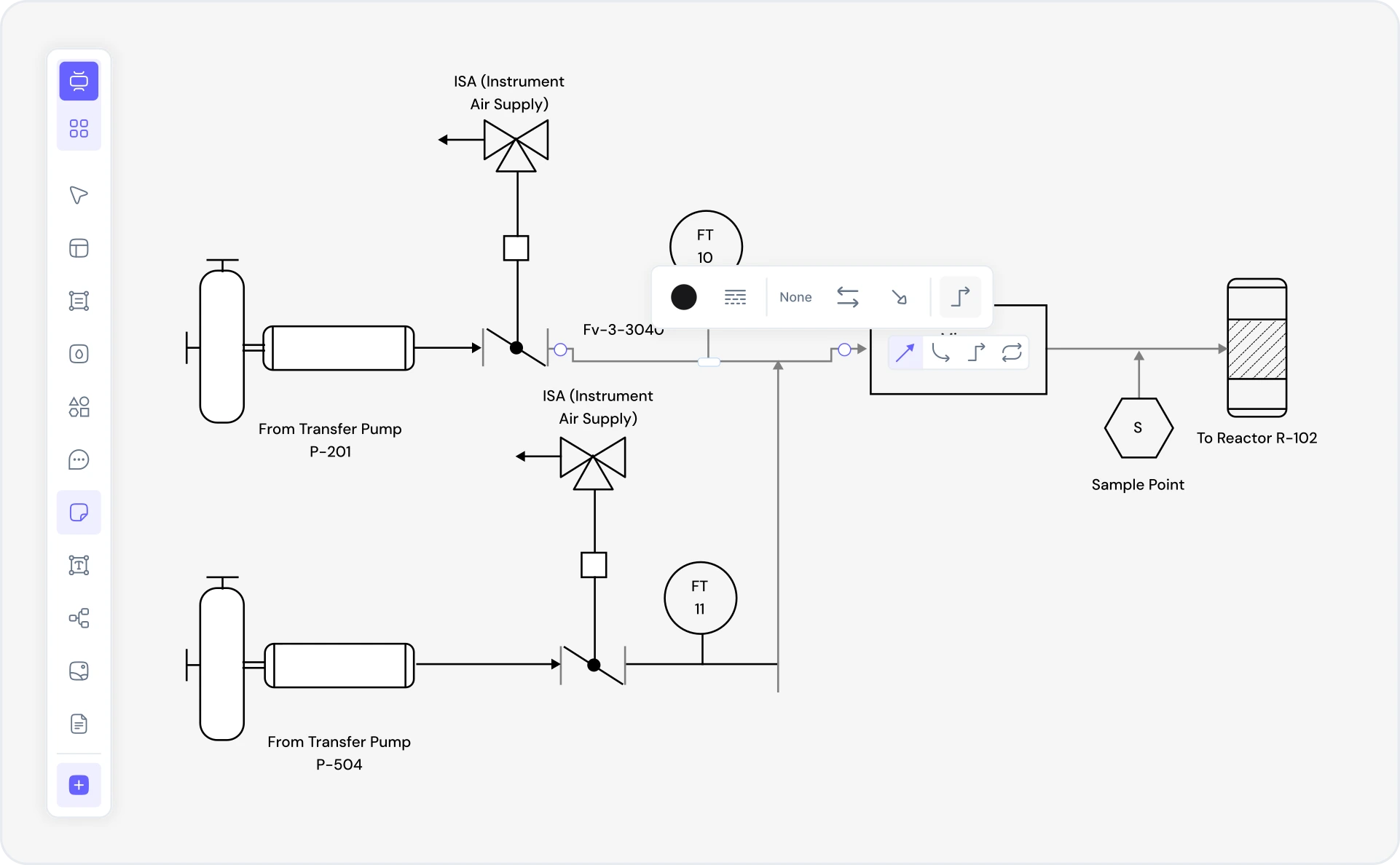
What is a P&ID diagram — example showing instrumentation, valves, actuators, and control logic

What Is a P&ID Diagram?

P&ID (Piping & Instrumentation Diagram) is an ISO/ISA-standard engineering drawing for process control systems. Unlike generic process flow diagrams (PFD), P&IDs show the complete physical layout, instrumentation, control logic, tag numbers, valve types, material specifications, and connectivity. They are essential engineering documents in chemical, petrochemical, petroleum refining, water treatment, HVAC, and power generation industries — the source of truth for construction, operation, and maintenance.

P&IDs must adhere strictly to ISA 5.1 notation standards and compliance with ISO 10628 and PIP (Process Industry Practices) guidelines. Every symbol matters: pressure transmitters (PT), temperature sensors (TT), control valves (CV), block valves (BV), relief valves (RV), actuators (pneumatic, hydraulic, electric), controllers, and logic elements. Instrument tags follow ISA format (e.g., FIC-101 = Flow Indicator Controller, TT-205 = Temperature Transmitter). Well-engineered P&IDs prevent installation errors, ensure operational safety, and provide clear documentation for process control systems.

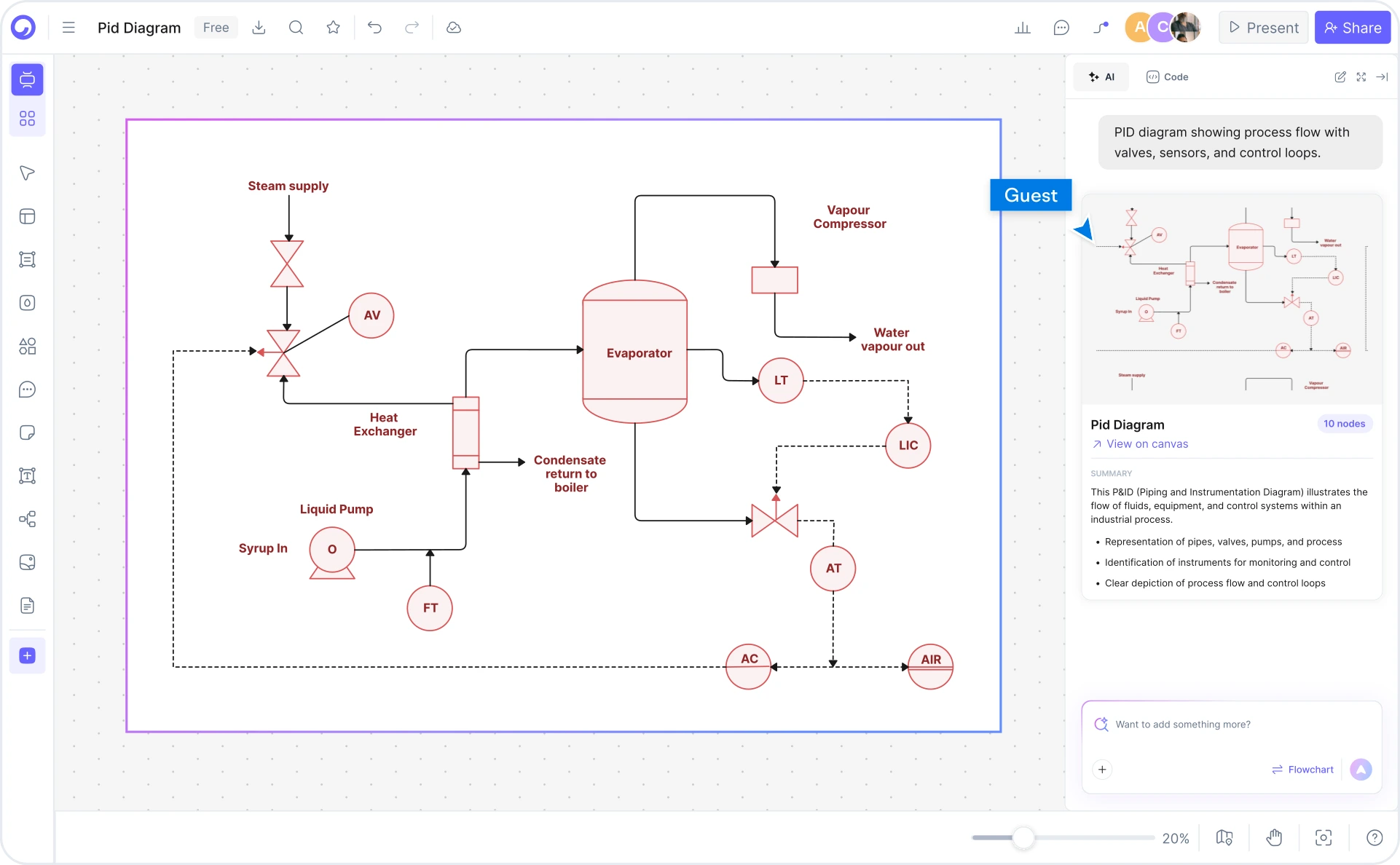
Cloudairy's AI P&ID Diagram Maker is the first AI-powered solution to combine prompt-to-diagram generation with ISA 5.1 notation and smart tag management. Describe your process system in plain English — "Chemical reactor with cooling jacket, temperature control valve, level indicator, pressure transmitter, and relief valve" — and the AI generates a complete, ready-to-edit P&ID with correct ISA symbols, instrument tagging, and connectivity. Export to AutoCAD DWG for precision CAD refinement, Visio VSD for office collaboration, draw.io XML for open editing, or PDF for documentation.

How to Create a P&ID Diagram with AI

Describe your process system and Cloudairy's AI generates a professional P&ID with ISA 5.1 symbols in four steps — no manual drawing, no expensive CAD licenses, no engineering delays required.

1

Describe your process components and instrumentation

Type a plain-English description in the AI prompt box. For example: "Chemical reactor with cooling jacket + temperature control valve, level indicator, pressure transmitter, and relief valve." Or choose from example chips — Distillation column, Water treatment plant, Oil refinery heater, HVAC system with damper control, Steam generation.

2

AI generates your P&ID with ISA 5.1 notation

Cloudairy's AI instantly builds the P&ID with proper ISA 5.1 symbols, instrument notations, valve specifications, control logic, and automatic tag numbering (FIC-101, TT-205, etc.). Pressure transmitters, temperature sensors, control valves, actuators, and controllers are correctly positioned.

3

Edit with smart tag management and refinement

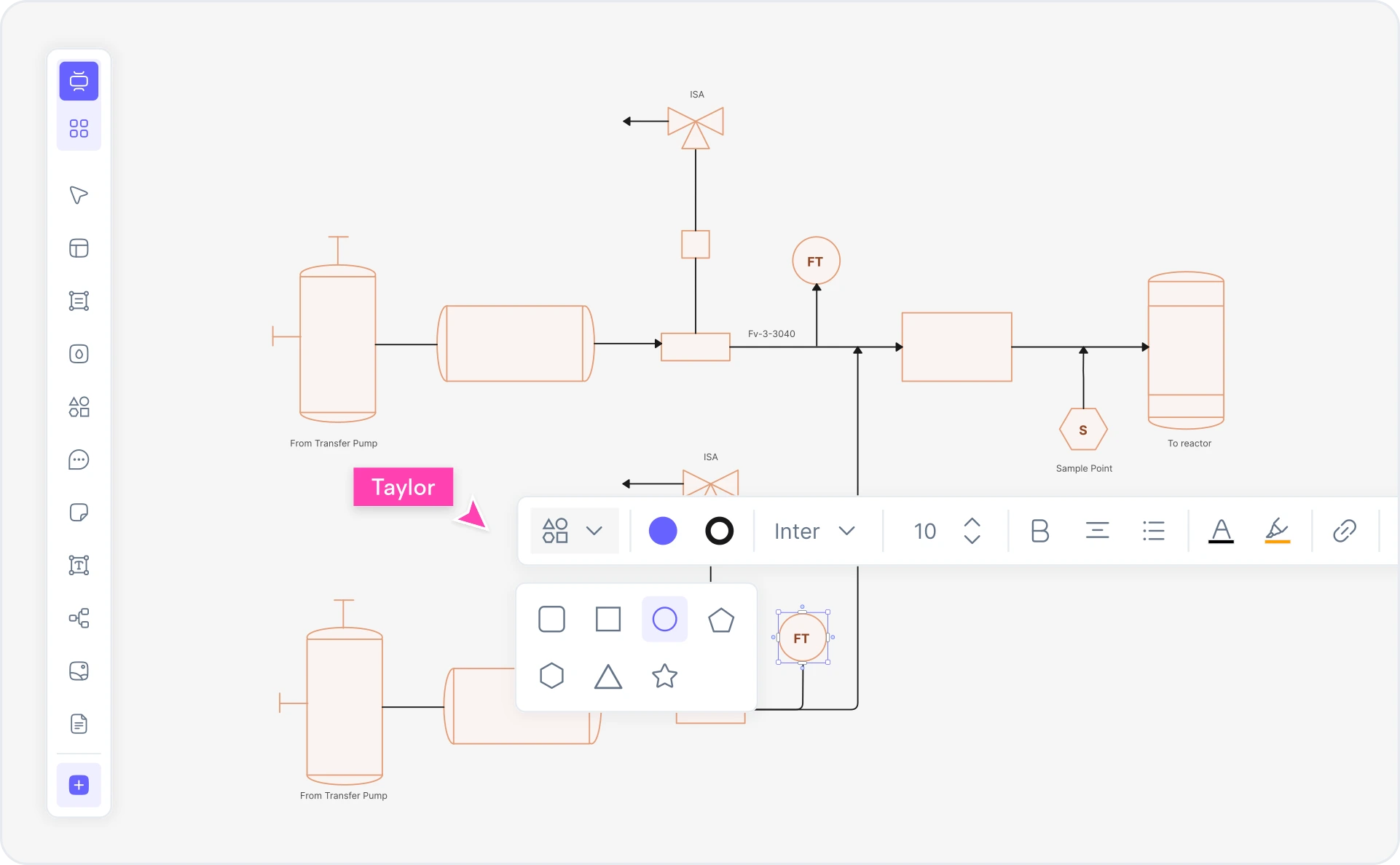
Refine the AI-generated P&ID in Cloudairy's editor. Adjust valve types, modify instrument ranges, add equipment details, update material specifications, and manage ISA 5.1 tag numbering. Full support for process control annotations and compliance notes.

4

Export for CAD and engineering documentation

Export to AutoCAD DWG for CAD refinement, Visio VSD for office collaboration, draw.io XML for open editing, or PDF for printing and documentation. Share live links with your engineering team for real-time collaboration.

How to create a P&ID diagram with Cloudairy — four steps from prompt to CAD export

Start Building Your P&ID Diagram Free

Join chemical engineers, petroleum engineers, plant engineers, and process control specialists who use Cloudairy to create ISA 5.1 P&ID diagrams in seconds. AI generation. ISO standard compliance. CAD export.

No credit card required • Start creating in seconds

Why Use Cloudairy as Your P&ID Diagram Maker

Cloudairy is the only AI-powered tool that combines prompt-to-diagram generation with ISA 5.1 notation, smart tag management, multi-format export, and process engineering domain intelligence — all on a single platform.

AI Prompt-to-Diagram

AI Prompt-to-Diagram

Describe your process system in plain English and get a complete P&ID with ISA 5.1 symbols in seconds. No manual drawing, no expensive CAD licenses. The AI understands process components, instrumentation, control logic, and industrial engineering patterns — chemical reactors, distillation columns, water treatment plants, HVAC systems, and refinery processes.

ISA 5.1 Symbols

ISA 5.1 Symbols & Standards

Generate P&IDs with correct ISA 5.1 notation and ISO 10628 compliance. Full support for pressure transmitters, temperature sensors, control valves, block valves, relief valves, actuators (pneumatic, hydraulic, electric), controllers, indicators, and logic elements. Automatic instrument tag numbering (FIC-101, TT-205, etc.) following ISA standards.

Smart Tag Management

Smart Tag Management

Auto-generates consistent ISA 5.1 tag numbering with identification letters (F=Flow, L=Level, T=Temperature, P=Pressure) and sequential numbering. Manage instrument ranges, valve types, material specifications, pressure ratings, and temperature limits directly in the editor. Full compliance with PIP guidelines.

Multi-Format Export

Multi-Format Export

Export P&IDs to AutoCAD DWG for precision CAD refinement, Visio VSD for office collaboration, draw.io XML for open editing, PDF for documentation, PNG/SVG for presentations. Two-way workflow: refine in CAD, re-import updates. No lock-in — your P&IDs stay portable across engineering tools.

Real-Time Collaboration

Real-Time Collaboration

Work on the same P&ID simultaneously with your engineering team. Live cursor presence, inline comments, and @mentions keep chemical engineers, plant engineers, instrument technicians, and automation specialists aligned. Share view-only or edit links with no account required.

Version History and Sharing

Version History & Compliance Documentation

Track every change with full version history and branching. Roll back to any previous revision, compare edits side-by-side, and maintain audit trails for regulatory compliance (ISO, ASME, API standards). Shareable view-only links for design reviews and construction handover require no login.

Cloudairy vs. P&ID Software — The AI Advantage

Cloudairy is the only AI-powered P&ID software combining prompt-to-diagram generation, ISA 5.1 notation, and multi-format export. See how we stack up against enterprise tools and generic diagram platforms.

Feature Cloudairy Autodesk Lucidchart Visual Paradigm SmartDraw
AI Generation from Text Yes No No No No
ISA 5.1 Symbols Yes Yes Limited Limited Yes
P&ID vs PFD Support Yes Yes Limited Limited Limited
Smart Tag Management Yes Yes No Limited No
AutoCAD DWG Export Yes Yes No No Limited
Visio Export Yes Yes Limited No Yes
draw.io/Mermaid Export Yes No Native Native No
Free Tier Yes No Yes Yes No

Who Uses Cloudairy for P&ID Diagrams?

Chemical & Process Engineers

Design reactor systems, separation processes, and chemical plants. Generate P&IDs with ISA 5.1 notation from process descriptions and export to AutoCAD for detail engineering and CAD refinement.

Petroleum & Refinery Engineers

Model crude oil processing, fractionation columns, and refinery control systems. Create production P&IDs with instrument specifications, flow rates, and pressure control annotations for operational documentation.

Plant & Operations Engineers

Document facility piping, HVAC systems, and utility distribution. Generate maintenance and compliance P&IDs quickly. Share live links with operations and maintenance teams for real-time collaboration.

Instrument & Automation Technicians

Install and troubleshoot control systems from P&ID specifications. Use ISA 5.1 tag numbers to identify instruments, connections, and control logic. Generate installation checklists and commissioning documentation from P&IDs.

Control & DCS Specialists

Design control logic, model sensor networks, and configure DCS systems. Transform process descriptions into complete P&IDs with control system architecture, then refine instrument specifications and safety interlocks.

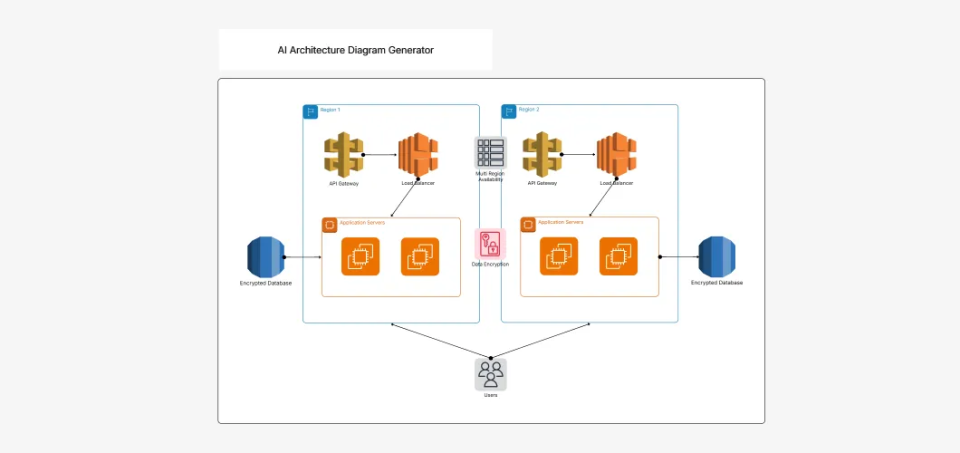
Enterprise architects, microservices teams, and backend engineers using Cloudairy for component diagrams

Frequently Asked Questions

A PFD (Process Flow Diagram) shows material and energy flow at a high level. A P&ID (Piping & Instrumentation Diagram) adds detailed instrument specifications, control logic, tag numbers, material specs, and valve types. P&ID is the engineering drawing for construction and operation.

ISA 5.1 is the international standard for instrumentation and control system symbols and tagging. It defines the notation for pressure transmitters, temperature sensors, control valves, actuators, controllers, and logic elements used in P&ID diagrams.

P&ID tags follow ISA 5.1 format: identification letters + number. Example: FIC-101 (Flow Indicator Controller), TT-205 (Temperature Transmitter). F=Flow, L=Level, T=Temperature, P=Pressure. Cloudairy auto-generates consistent tag numbering based on ISA standards.

Yes. Cloudairy supports two-way workflow with AutoCAD. Generate P&ID diagrams in Cloudairy, export to AutoCAD DWG format for precision refinement, then re-import updates. Also supports Visio VSD, draw.io XML, and PDF export.

Cloudairy exports P&ID diagrams to AutoCAD DWG, Visio VSD, draw.io XML, PDF, PNG, and SVG formats. Perfect for CAD systems, office collaboration, and technical documentation.

Yes. Cloudairy exports to AutoCAD DWG format with precision coordinates, ISA 5.1 symbols, and tag information preserved. Engineers can refine designs in CAD and import updates back into Cloudairy.

Yes. Cloudairy supports real-time collaboration. Multiple engineers can edit the same P&ID simultaneously with live cursor presence, comments, and version history for process engineering teams.

P&IDs are standard in chemical, petroleum, pharmaceutical, water treatment, food & beverage, power generation, HVAC, and natural gas processing industries. Any process industry requiring process control documentation uses P&ID diagrams.

Success Stories from Our Community

See how cloud architects, solutions engineers, and DevOps teams use Cloudairy to create Azure architecture diagrams faster and with better results.

As a cloud architect, I need precision and speed. Cloudairy helps me design complex Azure architectures in minutes without losing detail or accuracy. The official Azure icons save me hours every week.

Cloudairy makes Azure solution design so simple. I can create client-ready architecture diagrams instantly and focus on delivering value instead of spending hours formatting Visio files.

I'm studying for AZ-305 and Cloudairy helps me visualize Azure reference architectures instantly. I can generate a landing zone diagram from a single sentence and use it as a study aid.

I use Cloudairy to teach Azure architecture in my courses. The AI generator lets students produce real-world diagrams on the first day instead of spending weeks learning Visio.

Our team uses Cloudairy to document every Azure deployment. The Visio export means our diagrams drop straight into client deliverables without any reformatting. Huge time saver.

Secure, compliant, and enterprise-ready

Cloudairy safeguards your work with enterprise-grade security, compliance, and access controls — so your teams can create, collaborate, and scale with confidence.

SOC 2 Type II
SOC 2 Type Ⅱ

Cloudairy is SOC 2 Type Ⅱ certified and penetration tested annually, ensuring your architecture diagrams and data meet the highest standards for security and reliability.

GDPR
GDPR

We comply with the European Union General Data Protection Regulation (GDPR) and extend it to all our customers even those outside of the EU.

ISO 27001
ISO 27001

Our Information Security Management System is ISO 27001 certified — the leading global standard for information security.

Flexible Pricing for Every Team

Free

Discover what Cloudairy can do for you. Start for free

$0

for unlimited members
Try for free

Upgrade now

Show key features

up-arrow

Includes:

Starter

Unlock unlimited and private boards with important features

$4

per member / month

billed annually

monthly

Show key features

up-arrow

Includes everything in Free, plus:

money-back

Business

MOST POPULAR

Ideal for agencies or growing businesses managing multiple projects.

$5

per member / month
billed annually

Show key features

up-arrow

Includes everything in starter, plus:

Enterprise Plan

For large organizations needing scalability, control, and security.

contact-pricing
Contact for pricing
Contact us

Upgrade now

Show key features

up-arrow

Includes everything in Business, plus: