What Exactly Is Amazon Fsx for Netapp Ontap?
Amazon FSx for NetApp ONTAP is a managed file storage service on AWS that uses NetApp’s ONTAP file system already popular in the enterprise world. Think of it as your familiar NetApp environment, but in the cloud and fully managed by AWS. You don’t need to worry about hardware or low-level configuration.
This Amazon FSx setup is especially useful for companies that need to run file-heavy workloads but do not want the complexity of managing storage systems manually.
Why the Amazon Fsx Template Is Actually Useful
Here’s why this isn’t just another AWS template collecting dust:
- You are not starting from zero: The architecture is already laid out. Networking, IAM, EC2, and storage all stitched together neatly.
- Security is already baked in: With IAM roles and AWS Managed Microsoft AD, you don’t have to build access control from scratch.
- NetApp tools are included: You get NetApp’s BlueXP UI, which makes managing storage so much easier. No constant jumping between AWS services.
- Scales without headaches: The setup supports auto-scaling, backups, and automation with Lambda, so you’re not firefighting as data grows.
- It just works: Everything talks to each other EC2, Amazon FSx, authentication, backup, even your on-premises environment if you need that.
Who’s the Amazon Fsx Template For? And When Should You Use It?
This is not just for cloud experts. If you’re:
- A systems admin or IT lead migrating storage to the cloud
- A DevOps engineer trying to set up file storage for internal apps
- A company already using NetApp on-prem and now moving to AWS
- A project team that needs shared storage across EC2 or container workloads
Then this Amazon FSx template is for you.
It is especially useful during cloud migrations, hybrid setups, or when you want to modernize legacy file servers without rewriting everything.
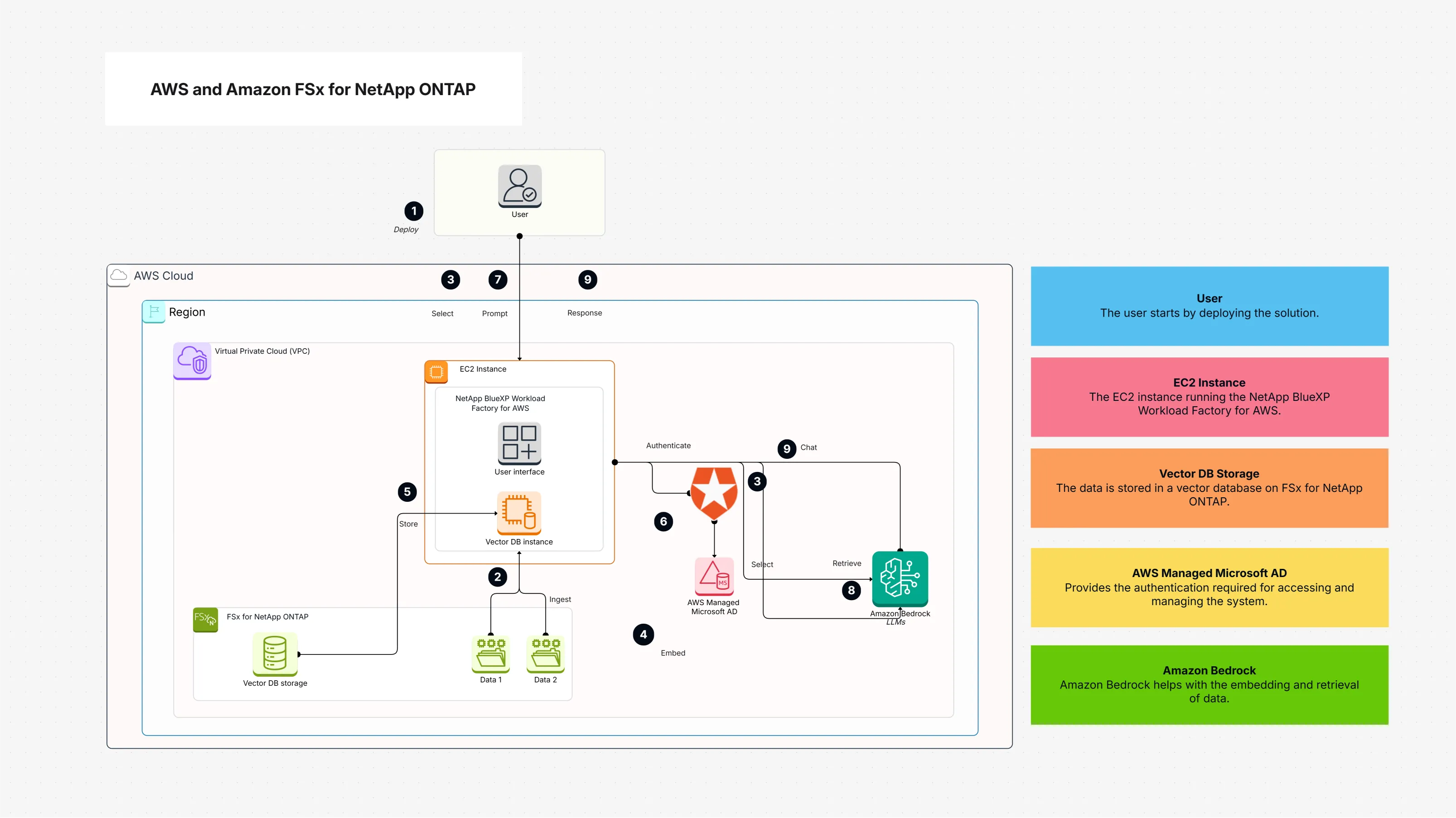
What Is Included in the Amazon Fsx Template
Here’s what you will see when you open it:
- AWS Cloud – The overall environment where everything lives
- VPC – Keeps your Amazon FSx and EC2 resources in a private, secure network
- Amazon FSx for NetApp ONTAP – The core storage service
- EC2 Instance – You can run apps or tools here that interact with the file system
- NetApp BlueXP – A web-based UI to manage NetApp storage
- IAM + Microsoft AD – User and access management
- Storage Gateway – Optional, but useful if you want to connect on-premises systems
- Backup and Restore Tools – Keeps your data safe
- Auto Scaling + Lambda – For dynamic capacity and automating common tasks
- Vector DB Instance + Bedrock LLM – For advanced data use cases (e.g., AI/ML workflows)
- CloudTrail – For security logs and compliance tracking
The point is: everything’s pre-integrated. You do not have to figure out how these services should interact it is all mapped out.
How to Use the Amazon Fsx Template in Cloudairy (Step-By-Step)
- Log in to Cloudairy: Pretty straightforward open Cloudairy and sign into your account.
- Head to the ‘Templates’ section: You will find this on the main dashboard.
- Search for the template: Use the keyword: AWS and Amazon FSx for NetApp ONTAP.
- Click on the result and open the preview: This will show you the full architecture what is included, how it connects.
- Hit “Open in Designer”: This lets you tweak settings. You can change storage size, adjust networking, or assign IAM roles based on your setup.
- Customize if needed: You might want to adjust backup frequencies, change performance modes, or set user permissions depending on your team.
- Save and Deploy: Once you're happy, deploy it into your AWS environment. Everything will spin up automatically.
- Monitor via NetApp BlueXP or AWS console: Use these tools to check performance, track usage, and make any updates.
Summary: Why Amazon Fsx Simplifies Cloud Storage
You do not need to reinvent the wheel when setting up cloud storage especially not with something as reliable and capable as Amazon FSx forNetApp ONTAP in AWS.
The Amazon FSx template gives you a fast, secure, and scalable way to deploy enterprise-grade file storage without spending hours piecing services together. Whether you are setting up storage for an app, backing up critical data, or replacing legacy file servers, this approach keeps things simple and solid.

 Copy link


 Manage all your work in one place