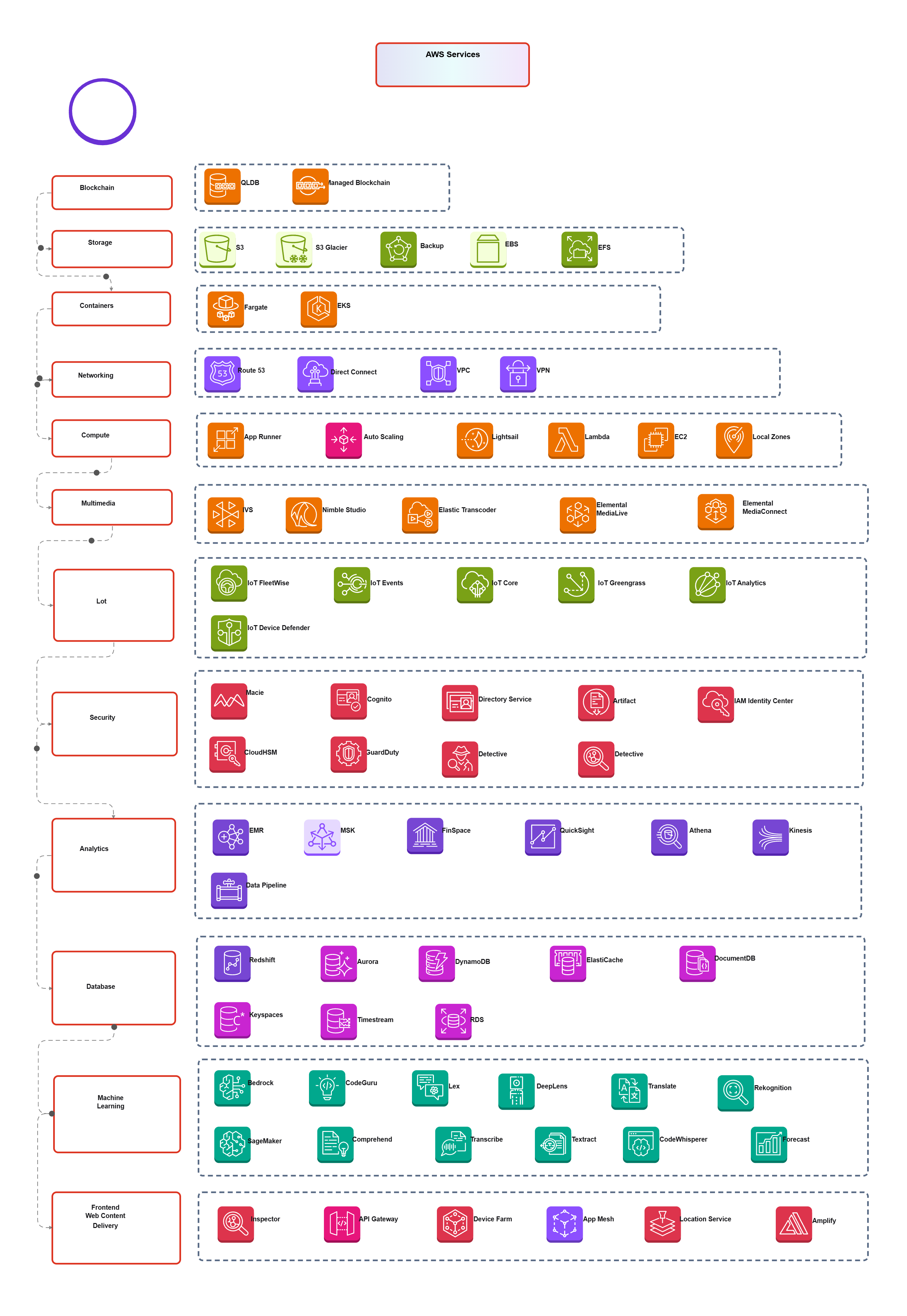
AWS- AWS Native services

Cloudairy
 Copy link

Get your team started in minutes
Sign up with your work email for seamless collaboration.
Whiteboard
Copy link
The AWS Native Services Architecture Template is a ready-made guide that organizes AWS services into logical categories, such as computers, storage, networking, bond, and more.
It helps you quickly see which services you need for your definite cloud project and how they all connect. Whether you’re building a new app or shake-up your infrastructure, this template is like having a clear map to guide you.
This template is perfect for:
When to use AWS Native Services?
Use it early at the architecture planning stage of any AWS Native Services project. It is also helpful during infrastructure audits, migration planning, or onboarding new team members to your cloud environment.
This template breaks down AWS services into neat, easy-to-understand categories:
Compute Services
Storage Services
Networking Services
Security Services
Analytics Services
Database Services
AI/ML Services
Monitoring & DevOps
Identity & Access
Serverless & IoT
Content Delivery
Here’s how to make the most out of this template inside Cloudairy:
Step 1 – Log in
Sign in to your Cloudairy account.
Step 2 – Search the template
Go to the Templates section and search for “AWS Native Services Architecture.”
Step 3 – Open and explore
Click to preview the template. Browse through each category of AWS services it’s all neatly organised.
Step 4 – Customize it
Need to add or remove services? Easy. Tailor to match your project needs whether you're building a web app, data platform, or IoT solution.
Step 5 – Collaborate
Share it with your team. Use it during meetings or workshops to align everyone on the architecture.
Step 6 – Export and deploy
Once finalized, export your architecture for documentation or deployment planning.
The AWS Native Services Architecture Template is your shortcut to building well-structured, efficient, and scalable cloud systems using AWS.
Instead of getting lost in the sea of services, this template gives you clarity, direction, and a solid foundation to design from.
Whether you’re a beginner trying to learn the ropes or an experienced pro organising your cloud stack—this tool helps you work smarter and faster.
Loading subcategories...
 Manage all your work in one place
Collaborate with your team
Use Cloudairy for FREE—forever
Explore More