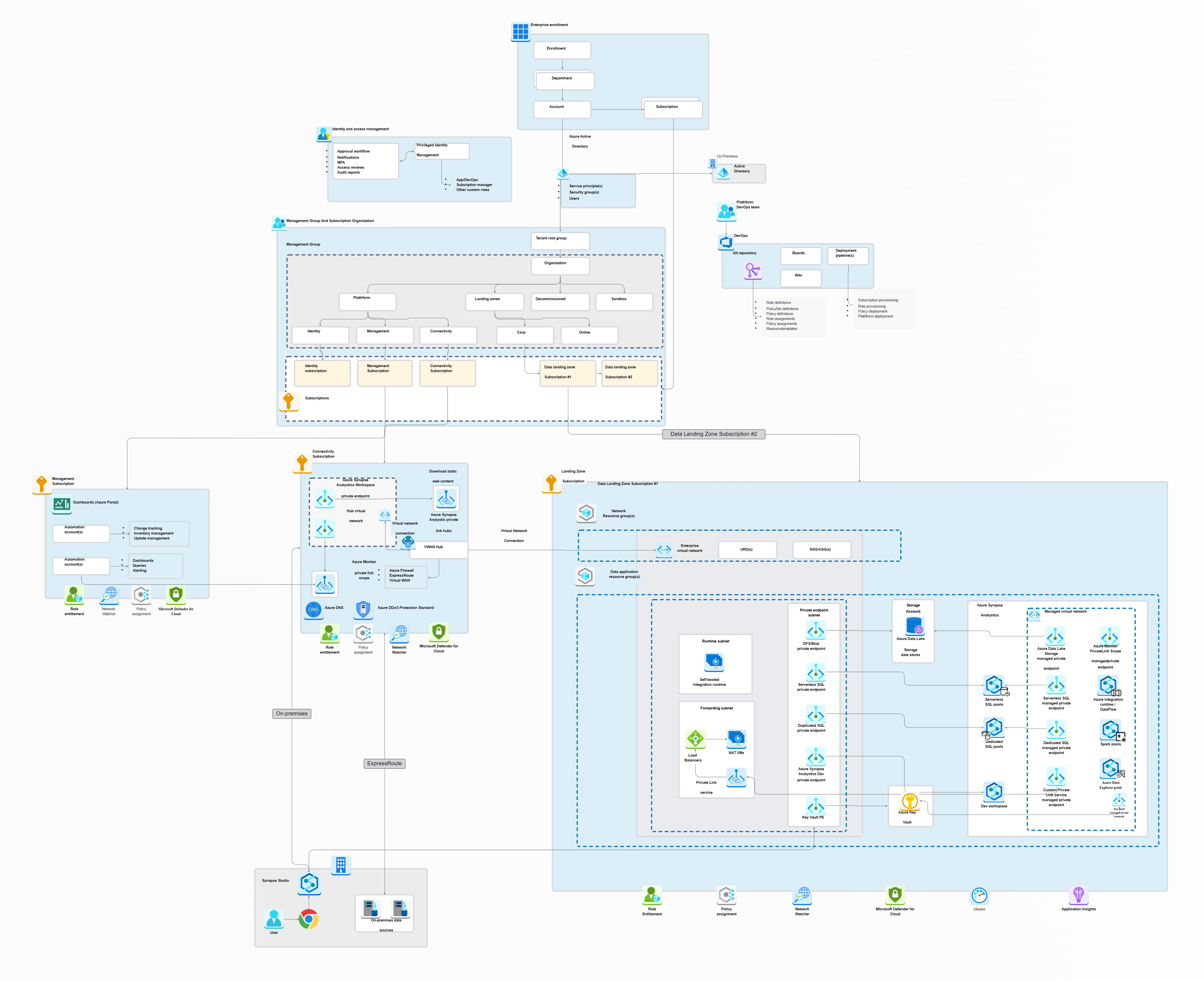
What’s the Azure Synapse Analytics for Landing Zones Template?
This template is like a single, ready-to-use plan for setting up a solid data analytics environment in Azure, especially when you have data coming from various places or "landing zones." Think of it as creating a high-tech data factory where raw materials (your data) come in, get processed, refined, and then turned into valuable insights, all managed in one spot. This template provides a structured approach to handling data analytics across multiple Azure landing zones, illustrating:
- Unified Analytics Hub: It leverages Azure Synapse Analytics as the central brain, seamlessly integrating your Data Lake Gen2 (for raw data storage), Pipelines (for moving and transforming data), and data warehouses into one smooth architecture.
- Ready-to-Go Governance & Security: It comes with pre-built governance features, strong security controls (like Azure Key Vault for secrets, Azure Active Directory for identity, and Azure Defender for posture), and performance optimizations.
- Cross-Zone Data Management: It helps you manage complex data flows across various environments and regions, supporting advanced analytics and reporting needs.
- Full Operational Visibility: The template ensures all data pipelines are monitored and secured using Azure Monitor, giving you a "single pane of glass" view for all your operations, simplifying cross-zone analytics.
- Real-time Insights & Simplicity: It enables real-time insights from data streaming via Azure Event Hubs and fast querying with Azure Data Explorer, all while reducing operational complexity for your analytics deployment Azure.
Why Embrace This Synapse Analytics Template for Landing Zones?
This template provides key benefits for how you handle data analytics:
- Streamline Analytics Deployment Azure: It provides a pre-architected solution, significantly simplifying the process of setting up complex analytics environments in Azure.
- Build a Robust Big Data Landing Zone Azure: The template helps you establish a secure, scalable, and governed environment specifically designed for handling large volumes of diverse data.
- Unify Data Management with Azure Synapse Analytics: It showcases how to leverage Synapse as a central hub for data integration, warehousing, and big data processing across your enterprise.
- Enhance Data Governance and Security: With integrated components like Azure Policy, Azure Key Vault, and Azure Defender, it ensures your data pipelines and storage adhere to strict security and compliance standards across all Azure landing zones.
- Improve Cross-Zone Analytics: Simplifies the process of analyzing data that resides in different landing zones or regions, enabling consistent insights.
- Gain Operational Visibility: Centralized monitoring via Azure Monitor gives you a complete overview of your data pipelines and resource health.
- Accelerate Time to Insight: Supports real-time data streaming and fast querying, helping your organization make quicker, data-driven decisions.
Who Benefits From This Template?
You'll find Azure Synapse Analytics template especially valuable if you're a:
- Data Architect: Perfect for shaping your entire big data landing zone Azure and mapping out robust analytics deployment Azure strategies.
- Data Engineer: Ideal for building and overseeing data pipelines and integration flows within Azure Synapse Analytics.
- Cloud Architect: Great for designing and checking the overall structure of your Azure landing zones with integrated analytics.
- Analytics Team Member: Helps you use a consistent and secure platform for all your advanced analytics and reporting needs.
- IT Operations/Governance Professional: Key for making sure rules is followed, tracking costs (Cost Management), and keeping your security strong (Azure Defender, Azure Policy).
- Business Intelligence Pro: Useful for creating and using reports that pull from a single, reliable data source (Power BI).
How to Open This Template in Cloudairy?
- Log in to Cloudairy Dashboard.
- Navigate to Template Library.
- Search for "Azure Synapse Analytics for Landing Zones."
- Click to preview the template.
- Select "Use Template."
- Confirm import to workspace.
Putting This Template to Work in Cloudairy
- Select the template from the library.
- Add required components from the toolbar (e.g., specific data sources like Azure Cosmos DB).
- Customize connections between Azure Synapse Analytics, Data Lake Gen2, and Azure Monitor.
- Collaborate with your team for review and policy adjustments.
- Use dependency visualization to check connections and data flow.
- Export the final synapse data architecture for documentation and implementation of your analytics deployment Azure.
Key Components of the Synapse Analytics for Landing Zones Template
- Azure Synapse Analytics: The unified analytics service at the core, facilitating big data landing zone Azure.
- Data Lake Gen2: Secure, scalable data storage for raw and processed data.
- Pipelines: Orchestrates data movement and transformation processes.
- Azure Key Vault: Manages secrets, keys, and certificates securely.
- Azure Monitor: Provides centralized monitoring and alerts for your analytics deployment Azure.
- Azure Active Directory: Manages identities and access control.
- Cost Management: Helps track and optimize cloud expenses.
- Azure Event Hubs: For real-time data streaming and ingestion.
- Azure Data Explorer: Fast, ad-hoc querying of large datasets.
- Azure Cosmos DB: A globally distributed NoSQL database for flexible data storage.
- Power BI: Tool for interactive data visualization and reporting.
- Azure Policy: Enforces compliance standards across resources.
- Azure Defender: Monitors and strengthens the security posture of your resources.
- Private Link: Ensures secure data transfer over Microsoft's backbone network.
- Virtual Network: Provides an isolated and secure network environment.
Summary
The Azure Synapse Analytics for Landing Zones template simplifies managing and analyzing data across distributed cloud environments, creating an effective big data landing zone Azure. It offers pre-integrated data pipelines, governance controls, and real-time monitoring for smooth data movement across regions. This helps organizations achieve consistency in their analytics deployment Azure while maintaining security and cost efficiency. The design supports scalability, advanced analytics, and regulatory compliance, all within a collaborative workspace in Cloudairy. Visit now to learn modern strategies for effective Landing zone design.
FAQs
Q1: What is the main purpose of this template?
A1: Azure Synapse Analytics would be utilized for data management and operation, operating with multiple Azure landing zones whereby analytics data are managed.
Q2: How does it help with big data?
A2:It offers a well-organized method for creating a big data landing zone on Azure, combining the use of data lakes, ER diagrams, and data warehouses for massive data processing.
Q3: What role does Azure Synapse Analytics play in this template?
A3:Azure Synapse Analytics is the all-encompassing service that integrates various data tools for analysis, processing, and data warehousing.
Q4: How does the template ensure data security?
A4: This comprises secure data integration and access components like Azure Key Vault, Azure Active Directory, Azure Defender, and Private Link.
Q5: Who would find this template most useful?
A5:Azure landing zones require data architects, data engineers, cloud architects, and the analytics team for analytics deployment using the power of Azure.
Q6: Does this template support real-time data analytics?
A6: The solution includes Azure Event Hubs for real-time data streaming and Azure Data Explorer for fast querying.
Q7: How does it simplify cross-zone analytics?
A7: Featuring a centralized and governed framework thus reduces the complexity of data flow management between different landing zones in Azure.
Q8: Can I customize this template in Cloudairy?
A8: Indeed, the process allows you to opt for a template, insert components, personalize the links, and finally, transfer the architecture that is most suitable for your analytics deployment Azure requirements.
Q9: What is meant by "single pane of glass" monitoring?
A9: An expression may imply that Azure Monitor could be used to gain a consolidated insight over the operations visibility and monitoring for all data pipelines and regions.
Q10: Does this template help with cost management?
A10: Absolutely! Cost Management is one of those features included in the big data landing zone setup in Azure that will enable you to monitor and better manage your cloud expenditures.

 Copy link

 Manage all your work in one place