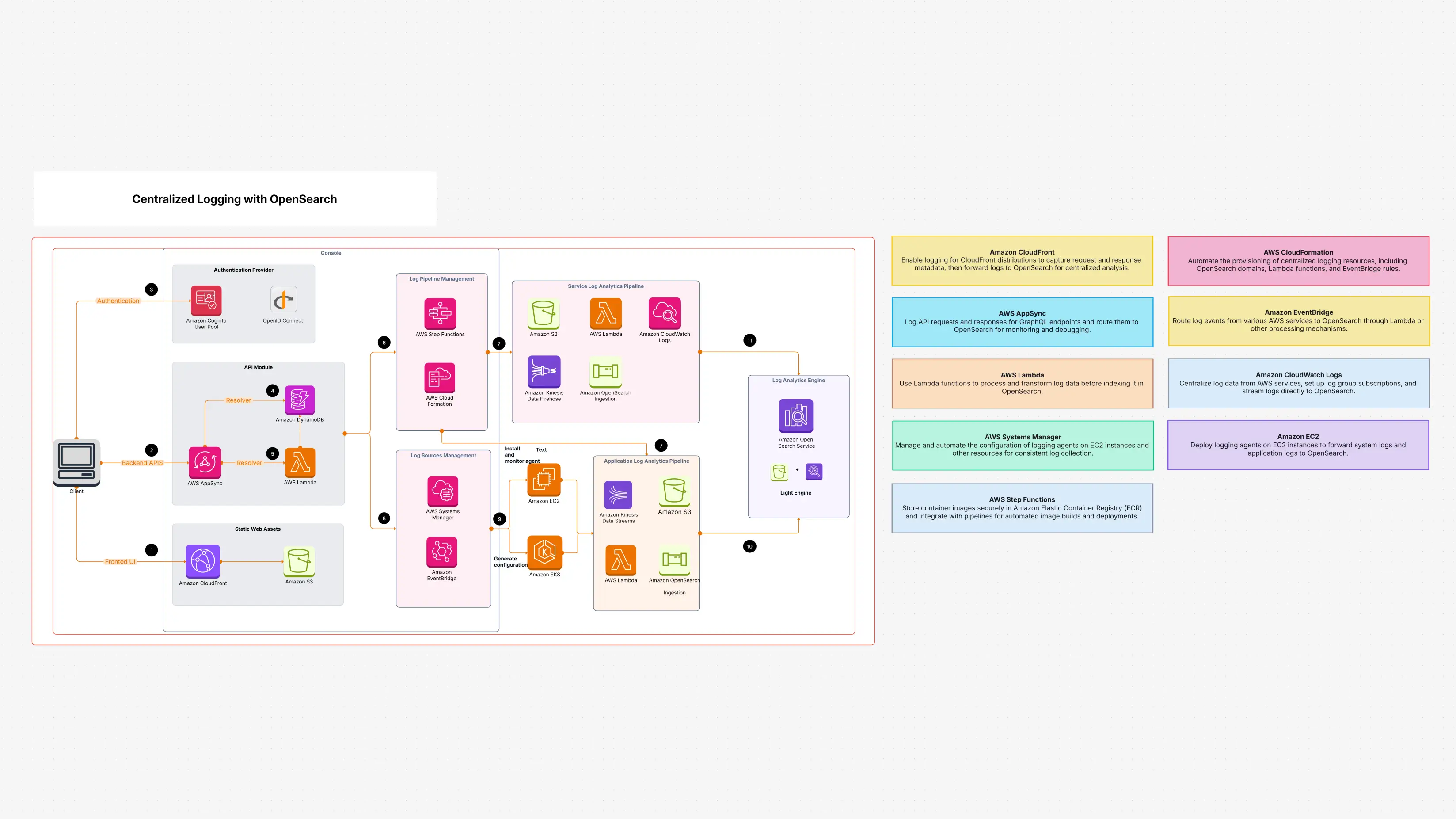
Centralized Logging with OpenSearch

Cloudairy
 Copy link

Get your team started in minutes
Sign up with your work email for seamless collaboration.
Whiteboard
Copy link

Discover how Centralized Logging with OpenSearch simplifies log management, boosts observability, and speeds up troubleshooting across environments. Gain clearer insights, reduce noise, and improve operational efficiency with a unified logging approach.
Discover how Centralized Logging with OpenSearch simplifies log management, boosts observability, and speeds up troubleshooting across environments. Gain clearer insights, reduce noise, and improve operational efficiency with a unified logging approach.
Using OpenSearch, this Centralized Logging with OpenSearch template offers a complete setup for centralised logging. Logs can come from applications, users, or other AWS services. This template helps gather all those logs, run them along a pipeline, and then send them to OpenSearch.
You can search through logs, create dashboards, and detect problems as they arise in OpenSearch. By early visibility of issues, it helps minimize debugging time, improve system monitoring, and enhance security. Everything is already set in this template; so, you can just launch it in Cloudairy and begin setting it up to suit your demands rather than creating it from scratch.
You have to manually check every log to see if they are kept in different tools or systems. That is sluggish and annoying, especially when looking for the source of a problem.
Using this template, when :
Quickly search logs, filter them by type or time using Amazon OpenSearch Service, and then develop visual dashboards. You will always be aware of the activity in your system.
This Centralized Logging with OpenSearch template is meant for anyone controlling systems or applications on AWS. It helps:
Consider utilising this template when:
Here are the major components of the Centralized Logging with OpenSearch template and what each one does:
Every element cooperates to enable you to collect logs, examine them quickly, securely keep them, and process them.
Beginning with Cloudairy is simple:
Choose your log sources, change the pipeline, and create alerts or dashboards depending on your team's demands.
Once you've loaded the template, proceed next by:
Managing all of this is simple with Cloudairy's visual interface, which eliminates the need for extensive technical expertise.
For teams looking for more control over logs, the Centralized Logging with OpenSearch template is a great way to get more control over logs. It gathers all logs in one place; therefore, you can search, manage, and understand what is going on across your cloud infrastructure.
Centralized Logging with OpenSearch lets you fix issues before they get worse, create dashboards, and analyse logs in real-time. And even if you are not a logging specialist, setting up and operating Cloudairy is simple. This template improves performance and security, cuts complexity, and saves time. This is a wise and easy method to keep everything under control if you're running apps or services in the cloud.
Loading subcategories...
 Manage all your work in one place
Collaborate with your team
Use Cloudairy for FREE—forever
Explore More