Simple Organizational Chart Template

Cloudairy
 Copy link

Get your team started in minutes
Sign up with your work email for seamless collaboration.
Whiteboard
Copy link
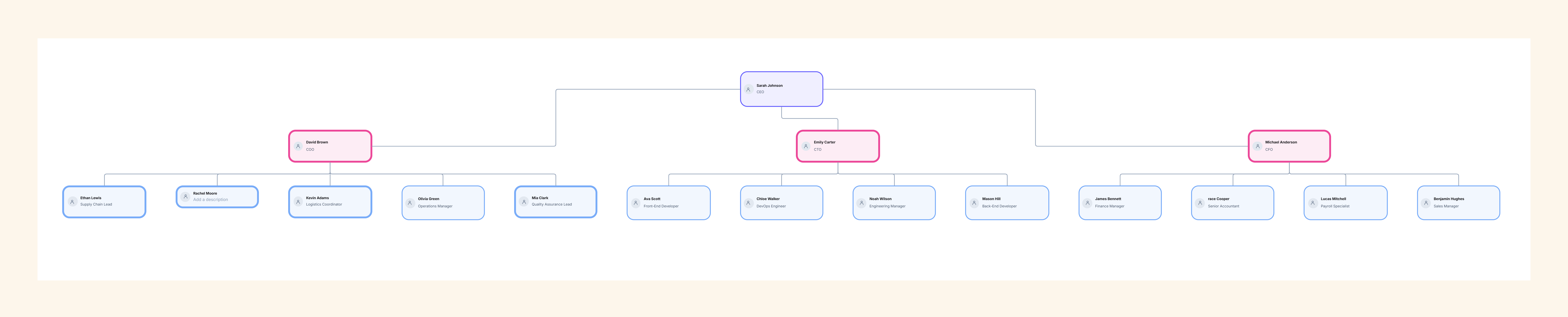
A simple organizational chart template layout is the most straightforward method to see your team structure without any elaborate parts. It is aimed at new ventures, small enterprises, and firms that prioritize transparency rather than hierarchy. This layout stresses simplicity-depicting important positions, immediate connections, and the daily coordination of the staff.
Using confusing spreadsheets or text documents is out; rather, this clean visual presentation clarifies the operations of your company to everyone. The simple layout makes every role and reporting line seen clearly, even if the team changes. In just a few minutes, you can use Cloudairy's Org Chart Maker to modify and share this template online, which helps your team stay informed and in sync.
Complicated multi-level hierarchies are not a necessity for every single company. Small or developing enterprises often benefit from being agile and having easy-going teams and sharing of tasks and free communication among the team members. A straightforward organizational structure reflects such a workplace - it's user-friendly, quick to refresh, and in full tune with the current office dynamics.
1. Ideal for Small Teams
2. Encourages Flexibility
3. Improves Communication
A simple chart provides visibility and transparency without unnecessary detail-perfect for teams where agility and communication matter most.
This simple organizational chart template is quite simple but is still very effective. It contains the main elements necessary for the efficient representation of your organization.
The design emphasizes readability and speed-helping you visualize structure without technical distractions.
The basic organizational structure layout is most suitable for use when your firm enters the initial phases or when the size of your staff is small enough to maintain communication through casual means. Still, this template is perfect for the teams formed temporarily or for project basis.
By starting with a simple layout, you can gradually expand or modify the chart as your business grows-without losing clarity or wasting time.
The Org Chart Maker of Cloudairy allows for seamless and quick modifications of this template according to your organization’s specific structure. The entire process is simple, graphical, and non-expert user friendly.
Step 1: Select Layout Style
Opt for vertical or horizontal perspectives. The vertical design is appropriate for showing clear hierarchies, but the horizontal one works best for depicting equal team structures or partnerships.
Step 2: Add Team Members
Step 3: Customize Appearance
Step 4: Share and Collaborate
Share your org chart as a live link, allowing others to view or comment. You can also export it to PDF or PNG for meetings and onboarding.Cloudairy’s drag-and-drop editing makes maintaining your structure simple - even as teams evolve or new projects begin.
Even minor or moderate-sized firms reap the rewards of representing their structure through visuals. An easy org chart enhances collaboration, hierarchy, and understanding among all functions.
Instead of creating new charts every time a team changes, you can modify this template instantly to reflect current operations.
This simple org chart works across various industries and team setups.
Every organization benefits from having a visual reference that aligns the entire team under one clear framework.
The person might come up with a perfect organization chart without the help of an organization specialist but with decent organization and clarity as crux.
Following these practices ensures your chart stays functional, clear, and relevant over time.
Organization Chart Templates & Tools
Startup Organizational Chart Template
Best Organizational Chart Templates for Businesses
Using a basic organizational chart template will make it easier for you to lay out your team structure in a very straightforward manner. It’s the ideal basic model for small firms and new businesses to express their hierarchy and roles very effectively. By using Cloudairy, this chart can be modified online by you, your team can collaborate, and it can be kept updated in line with your company’s growth. Simplicity does not imply restriction-it implies transparency, and this is precisely what the template does.
Loading subcategories...
 Manage all your work in one place
Collaborate with your team
Use Cloudairy for FREE—forever
Explore More