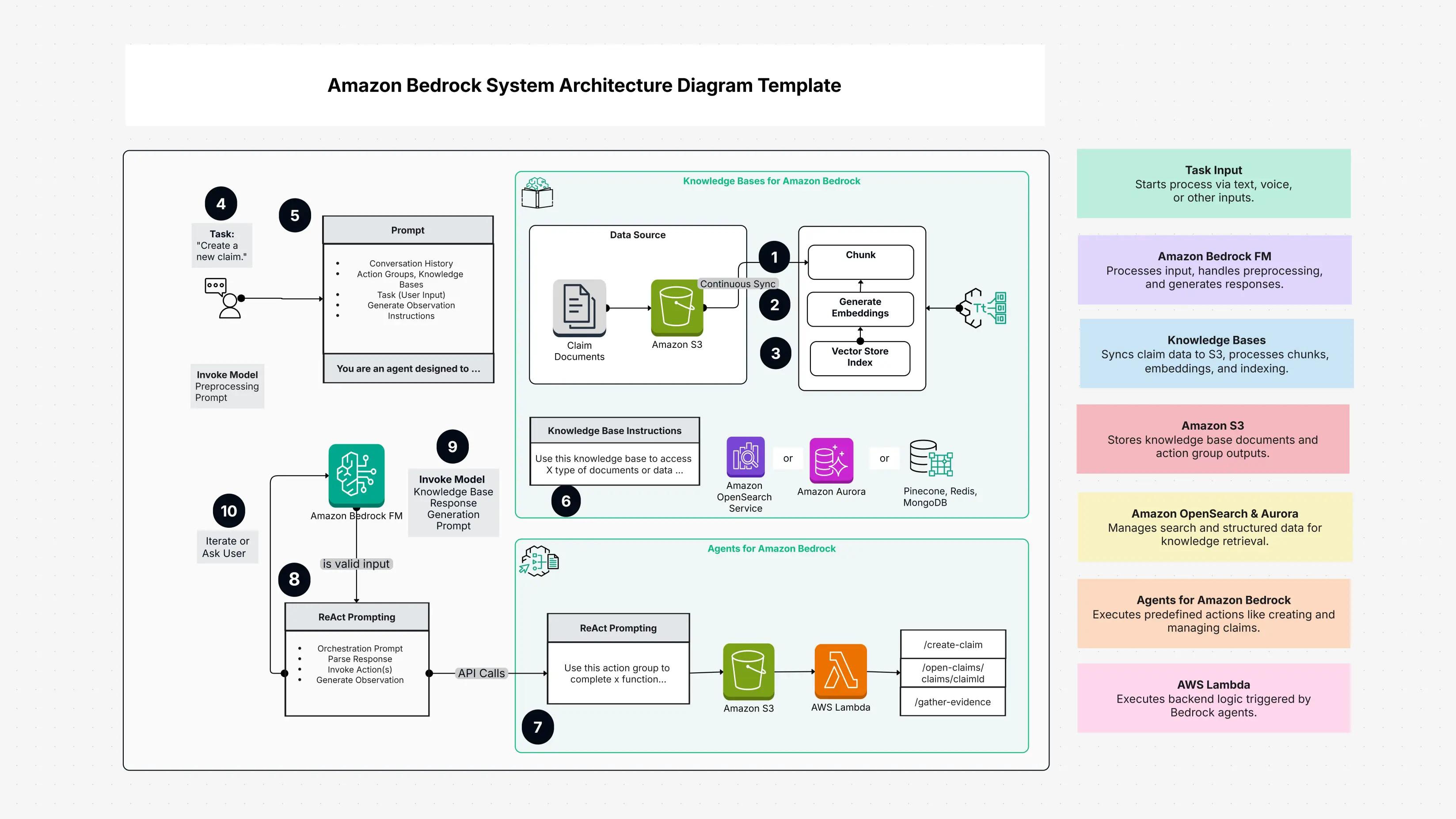
Amazon Bedrock System Architecture Diagram Template

Cloudairy
 Copy link

Get your team started in minutes
Sign up with your work email for seamless collaboration.
Whiteboard
Copy link

Design clear, scalable Amazon Bedrock system architecture diagrams. Visualize components, reduce errors, speed up planning, and help teams stay aligned for faster, more accurate cloud development.
Design clear, scalable Amazon Bedrock system architecture diagrams. Visualize components, reduce errors, speed up planning, and help teams stay aligned for faster, more accurate cloud development.
An Amazon Bedrock System Architecture Diagram Template is like a ready made picture that shows how your AWS Bedrock app works. Think of it as a simple map that shows how Amazon’s big smart models, your data, APIs, and other cloud tools talk to each other.
It has many helpful parts already drawn for you like foundation model blocks, vector database boxes, API gateway shapes, Lambda functions, and safety layers. Instead of making everything from the start, you just use this template and change it for your own project.
This template makes it easy to see how data moves, where problems might slow things down, and how AWS services connect with Bedrock’s AI power.
Check out our Architecture & Technical Design process for building modern digital solutions.
Starting with the template is super simple. Open it and look at the ready-made shapes foundation models, data boxes, APIs, and safety layers all set for you.
Begin by thinking about your use case. Choose which AWS Bedrock foundation model you need. Replace placeholders with your real services. For example, if you're making a chatbot, connect your AI model to your data and your app screen. Next, draw arrows to show how your data moves from one place to another. Make sure your custom data reaches the Bedrock model and returns safely to your users.
Add your safety tools too like IAM roles, VPC, and CloudWatch—so your system follows AWS security rules. At the end, show your diagram to your team. They might find small things to fix or improve. This teamwork makes your system stronger.
An Amazon Bedrock System Architecture Diagram Template is a friendly tool that helps you plan and build strong AI apps on AWS. It turns big, hard ideas into simple pictures that anyone can understand.
Whether you are a cloud architect planning big AI systems or a new developer starting your first Bedrock project, this template helps you create clean, smart designs. With ready-made parts, best-practice ideas, and clear visuals, it makes your AI project easier and faster. Explore how Network Protocols Interaction ensures reliability, speed, and security.
When you use this template, you’re not just drawing lines you are building a strong base for your AI project from the start all the way to launch and beyond. Explore Operating System to understand how computers manage hardware and software.
Build reliable and secure systems using an AWS Architecture Diagram.
Loading subcategories...
 Manage all your work in one place
Collaborate with your team
Use Cloudairy for FREE—forever
Explore More