50,000 + Trusted Users with
star star star star star

Trusted by Professionals at Leading Companies

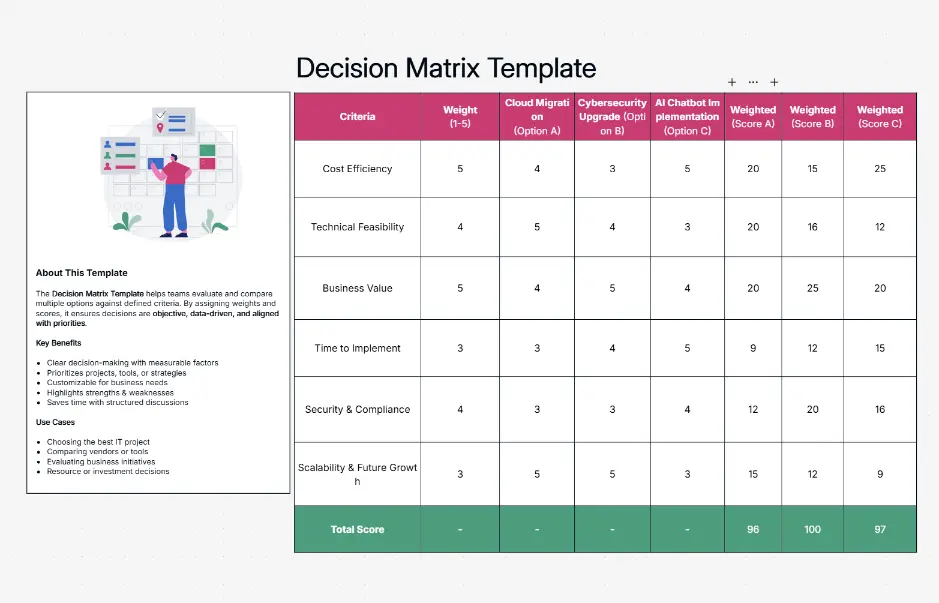
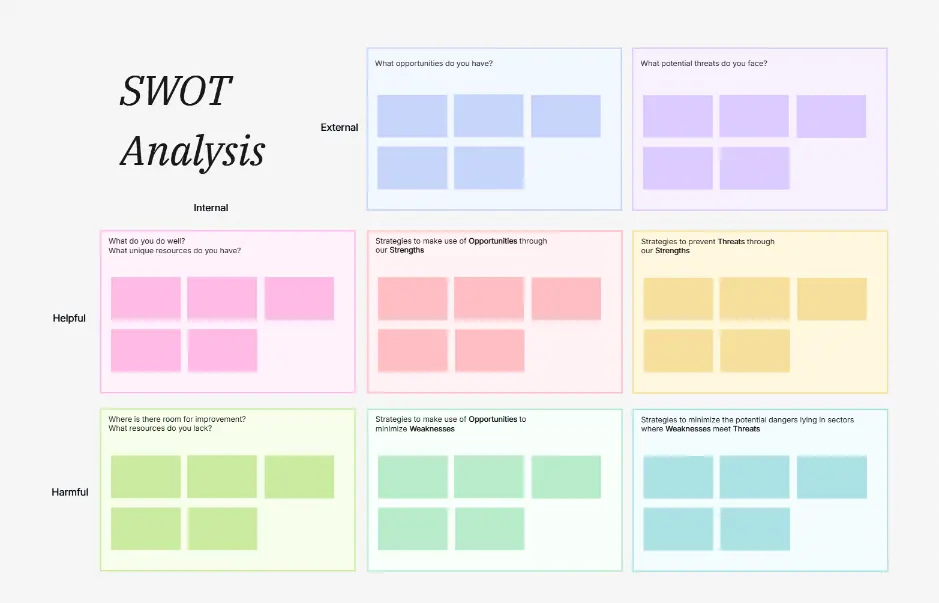
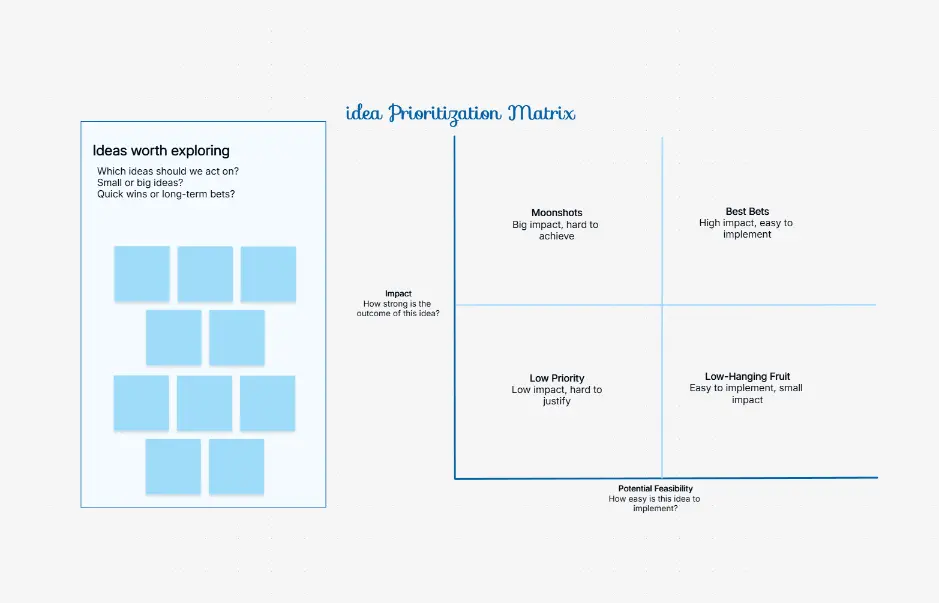
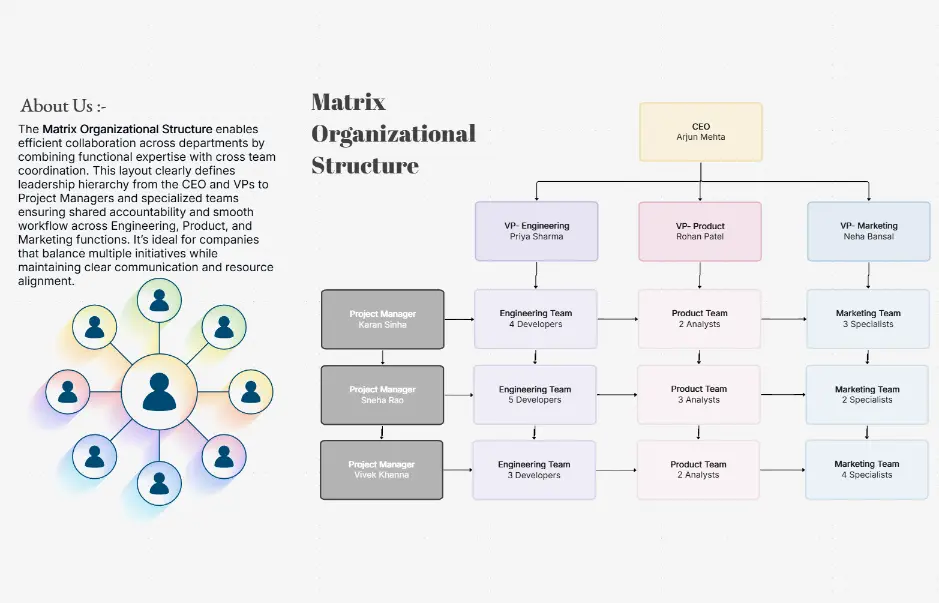
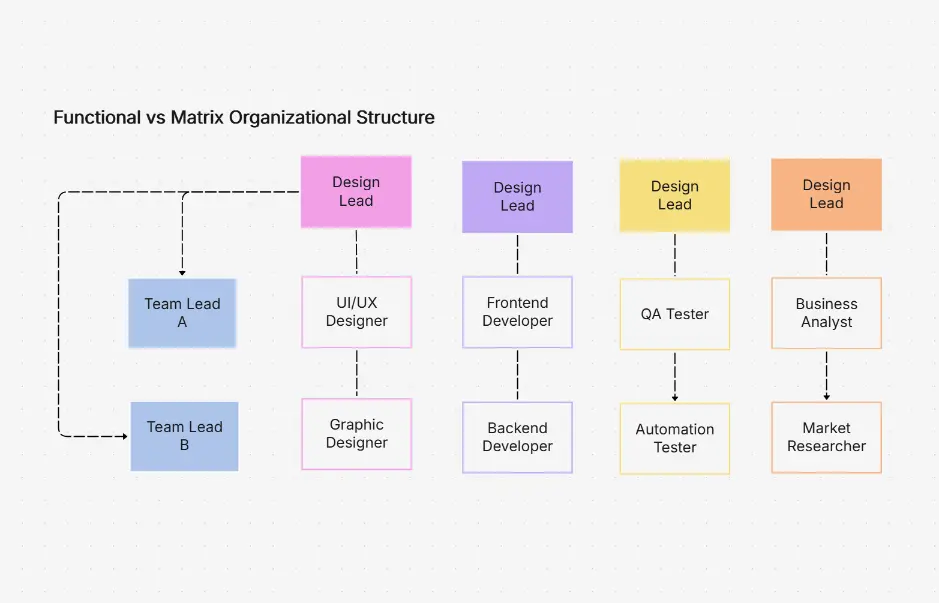
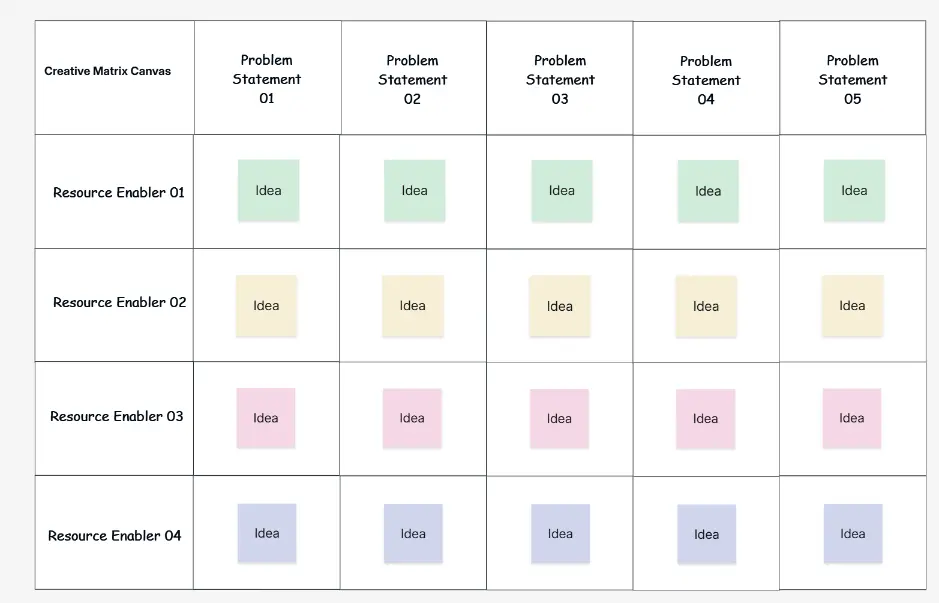
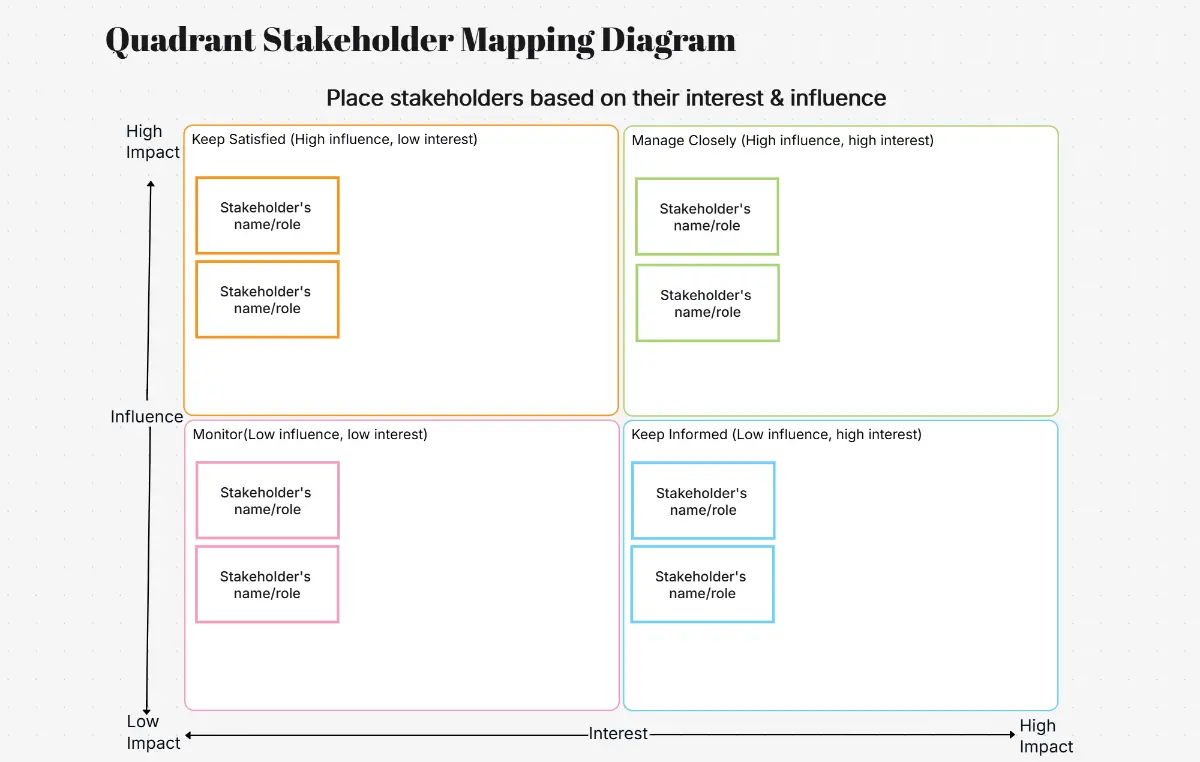
What is a matrix diagram — example showing RACI, decision, priority, and risk matrix types with color-coded cells

What Is a Matrix Diagram?

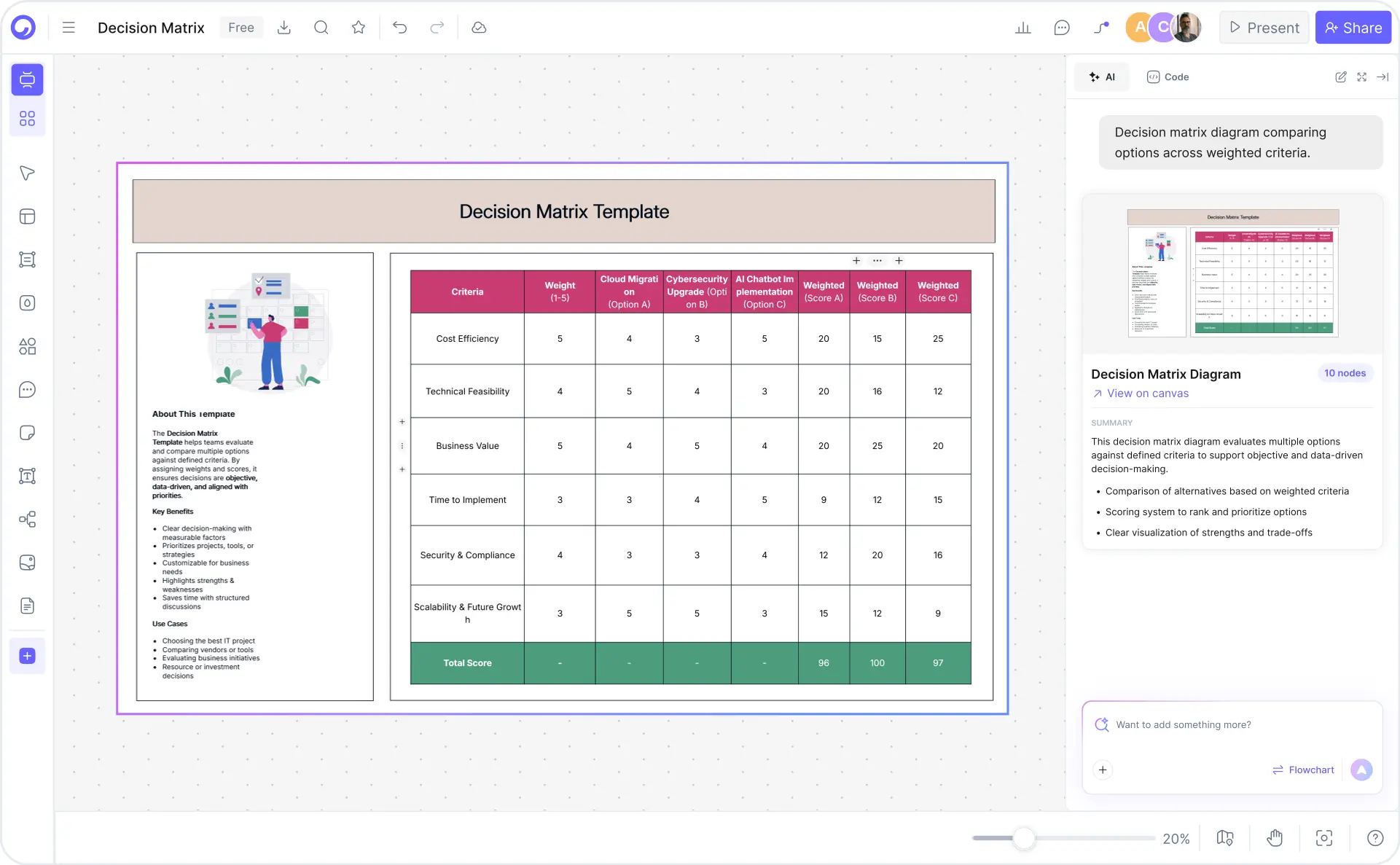
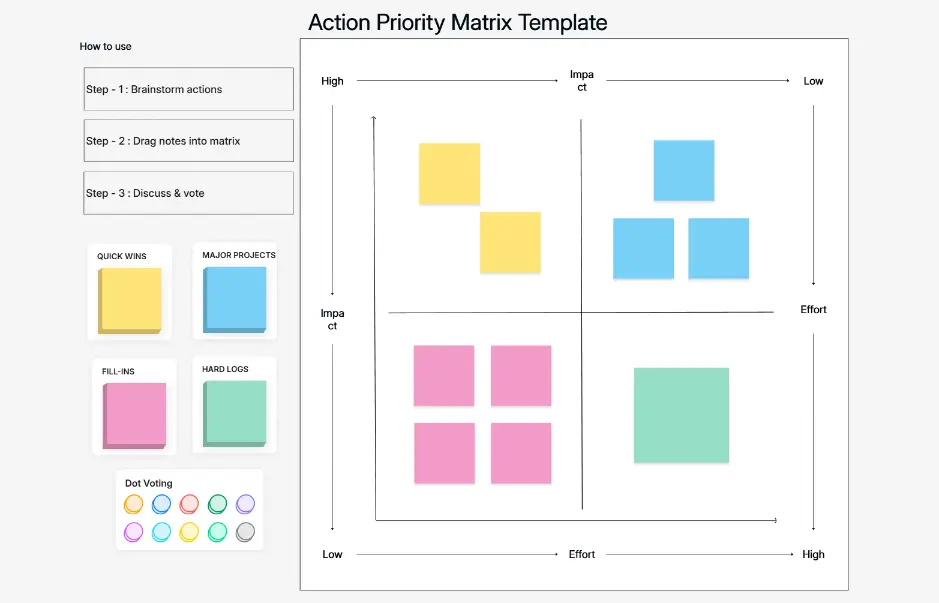
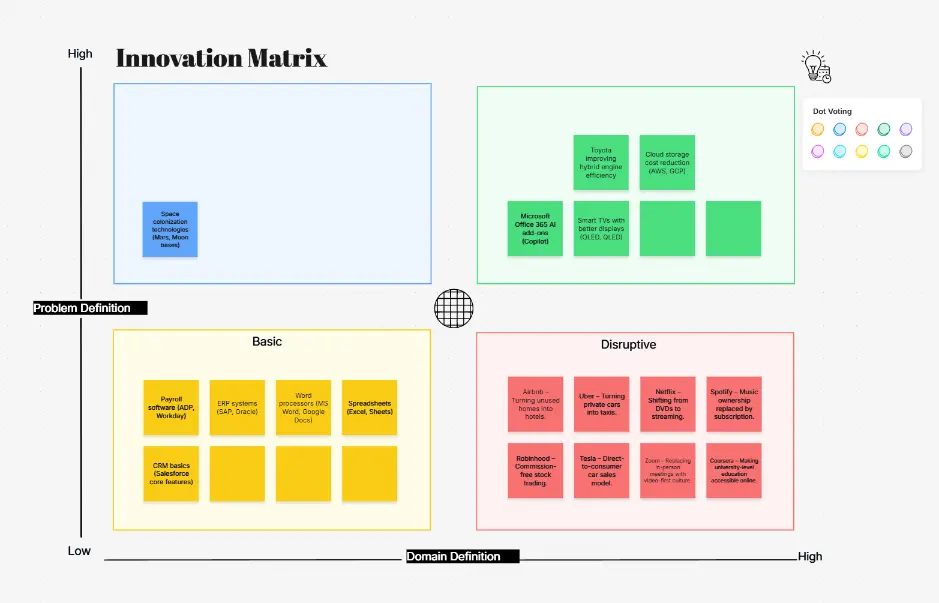
A matrix diagram is a visual tool that organizes information into rows and columns to show relationships, assignments, or comparisons between two or more groups of items. Matrix diagrams are a project management staple used across every industry and function — from assigning project accountability with a RACI matrix to weighing alternatives in a decision matrix, ranking tasks by urgency in a priority matrix, or mapping likelihood against severity in a risk matrix.

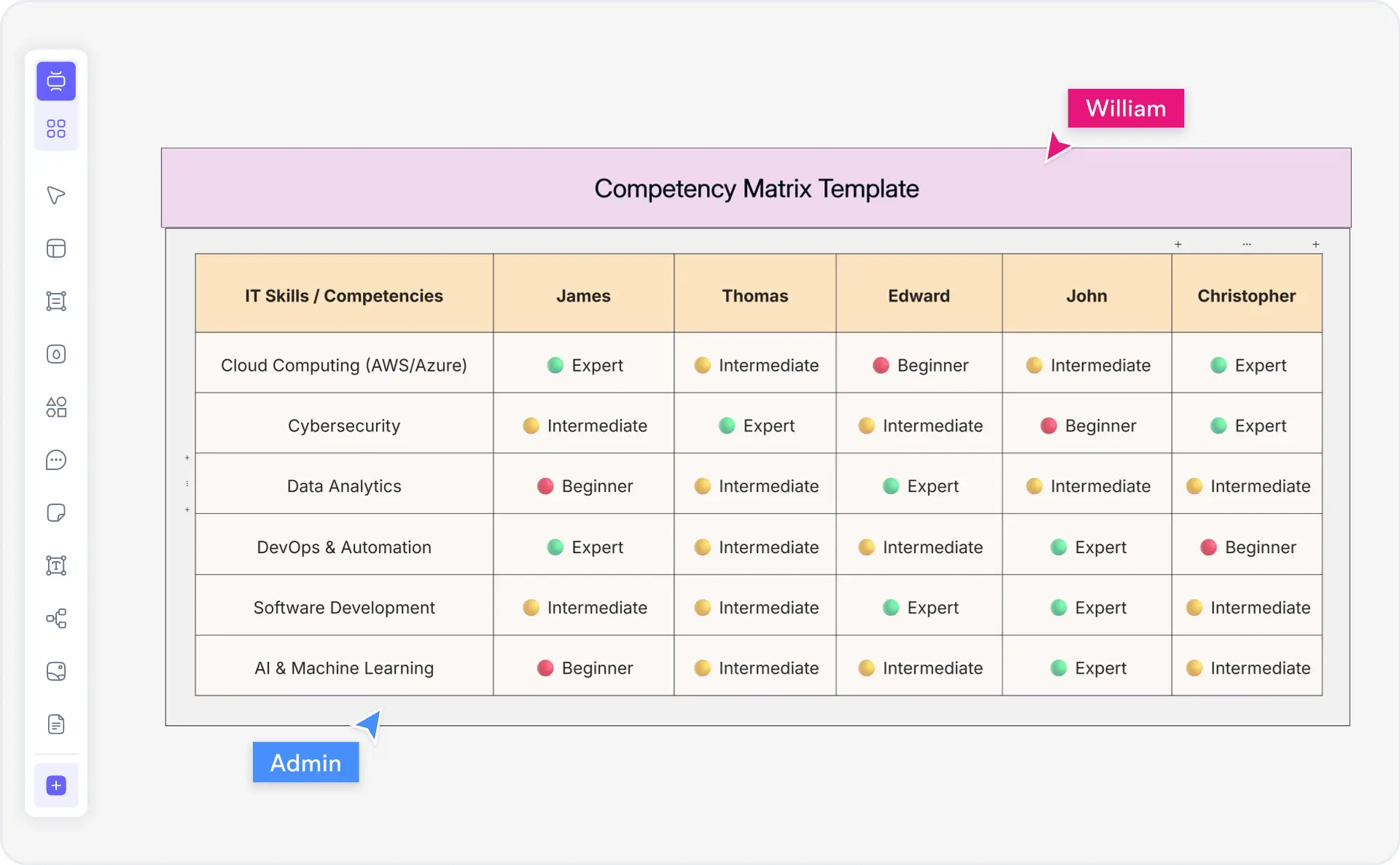
Matrix diagrams are essential for project managers, consultants, operations managers, HR teams, product managers, and quality assurance professionals. Common types include RACI (Responsible, Accountable, Consulted, Informed) matrices for accountability frameworks, decision matrices for weighted criteria scoring, priority matrices using the Eisenhower urgency-impact grid, risk assessment matrices for compliance and safety, BCG growth-share matrices for portfolio strategy, skills matrices for team capability mapping, and traceability matrices for QA and requirements management.

Cloudairy's AI Matrix Diagram Maker eliminates manual formatting and the endless copy-pasting from spreadsheets. Describe your project, roles, criteria, or scenario in plain English — "Create a RACI matrix for a website redesign project with PM, Designer, Developer, QA, and Stakeholder" — and the AI generates a fully formatted matrix with color-coded cells, proper role assignments, and automatic scoring in seconds. Export to PNG, SVG, or PDF for reports and presentations. Perfect for project managers, product teams, operations managers, HR professionals, and QA engineers.

How to Make a Matrix Diagram with AI (5 Steps)

Go from idea to a professionally formatted matrix diagram in five steps — no manual formatting, no spreadsheet wrestling, no design skills required.

1

Choose your matrix type

Select from RACI, decision, priority, risk, Eisenhower, BCG, skills, or traceability matrix. Or describe your scenario and let the AI recommend the best type. Choose from example prompts — RACI for website redesign, decision matrix for vendor selection, priority matrix for backlog, risk matrix for product launch.

2

Describe in a plain-English prompt

Type your scenario in plain English. For example: "Create a RACI matrix for a website redesign with roles: PM, Designer, Developer, QA, and Stakeholder" or "Decision matrix for choosing a CRM with criteria: cost, features, integration, and support." The more detail you provide, the more accurate the output.

3

AI generates the matrix

Cloudairy's AI instantly builds a fully formatted matrix — rows, columns, color-coded cells, role assignments (R/A/C/I), weighted scores, or urgency-impact quadrants applied automatically based on the matrix type. No manual cell-by-cell formatting needed.

4

Customize and collaborate

Edit cells, adjust color coding, add or remove rows and columns, modify scoring weights, and invite team members to collaborate in real time. Leave comments on specific cells, assign edit or view permissions, and track changes with full version history.

5

Export or share

Export to PNG or SVG for embedding in presentations and web pages, PDF for formal reports and documentation, or Visio/draw.io for enterprise diagramming workflows. Share a live view-only or edit link with stakeholders for review and approval.

How to create a matrix diagram with Cloudairy — five steps from prompt to export

Start Creating Your Matrix Diagram Free

Join project managers, consultants, operations managers, and product teams worldwide who use Cloudairy to create professional matrix diagrams in seconds. AI generation. 8 matrix types. Auto color-coding. Export PNG/SVG/PDF.

No credit card required • Start creating in seconds

Why Use Cloudairy as Your Matrix Diagram Maker

Cloudairy is the only AI matrix diagram maker that combines AI prompt-to-matrix generation with support for 8 matrix types, automatic color-coding, weighted scoring, real-time collaboration, and CSV/Excel data import — all on a single platform.

AI Prompt-to-Matrix

AI Prompt-to-Matrix Generation

Describe your project roles, decision criteria, or risk scenario in plain English and get a fully formatted matrix diagram in seconds. The AI understands RACI assignments, weighted decision scoring, priority quadrants, and risk likelihood-severity grids — all automatically.

Multiple Matrix Types

8 Matrix Types in One Tool

RACI, decision, priority, risk, Eisenhower, BCG growth-share, skills/competency, and traceability matrices — all supported in a single tool. Each type includes pre-built templates, AI generation, and type-appropriate color coding and scoring. No competitor covers all 8 in one place.

Smart Auto-Formatting

Smart Auto-Formatting & Color Coding

Color-coded cells, role tags, and scoring systems are automatically applied based on matrix type — green/yellow/red for risk matrices, R/A/C/I color coding for RACI, weighted score highlights for decision matrices. Override any color, font, or label with full manual customization.

Multi-Format Export

Export PNG/SVG/PDF + Visio/draw.io

One-click export to PNG and SVG for presentations and web pages, PDF for formal reports, and Visio (.vsdx) or draw.io for enterprise diagramming workflows. Exported files maintain full formatting and color coding. Two-way Visio/draw.io import also supported.

Real-Time Collaboration

Real-Time Collaboration

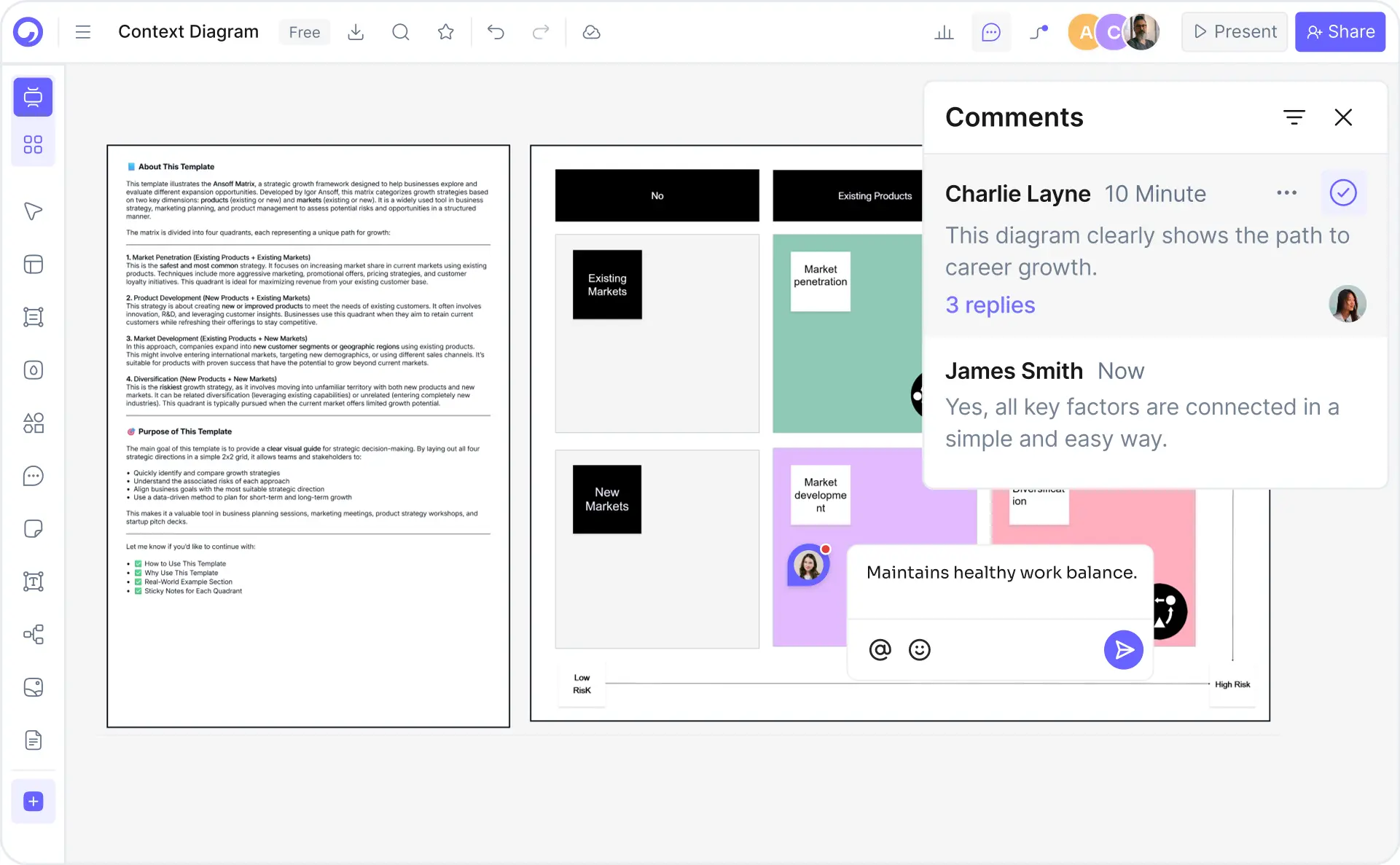
Multiple team members can edit the same matrix simultaneously. Assign edit/view/comment permissions, leave comments on specific cells or rows, see live presence indicators, and access full version history. Ideal for distributed teams running RACI assignments or decision-making workshops.

CSV and Excel Data Import

CSV & Excel Data Import

Convert existing spreadsheet-based matrices into formatted, visual matrix diagrams. Upload your CSV or Excel file, map columns to matrix rows and headers, and Cloudairy generates a properly formatted matrix with color coding and scoring applied automatically.

Cloudairy vs Competitors — Matrix Diagram Tools Compared

See how Cloudairy's AI matrix diagram maker compares to leading diagramming and template tools. Cloudairy is the only tool offering AI prompt-to-matrix generation with full multi-type matrix support.

Feature Cloudairy Lucidchart Miro Canva SmartDraw Creately
AI Prompt-to-Matrix Yes No No No No No
Multiple Matrix Types (RACI/Decision/Risk) Yes (8 types) Limited (2–3) Limited (2–3) Templates only Yes (4–5) Limited (2–3)
Custom Color-Coding Auto + manual Manual only Manual only Template-based Manual only Manual only
Real-time Collaboration Yes (comments, presence, history) Yes (enterprise) Yes (native) Yes (basic) Yes (enterprise) Yes (freemium)
Export PNG/SVG/PDF Yes (all 3 + Visio/draw.io) PNG, PDF, Visio Image, PDF PNG, PDF, SVG PNG, PDF, Visio PNG, PDF, SVG
Data Import (CSV/Excel) Yes Yes Limited No Yes Limited
Free Tier Unlimited diagrams 3 diagrams 1 board Limited templates 7-day trial 5 diagrams

Who Uses Matrix Diagrams?

Project Managers

Create RACI matrices to define accountability across project teams, use priority matrices to rank tasks by urgency and impact, and build risk matrices for project risk management. Generate from a prompt in seconds instead of building in Excel.

Product Managers

Build decision matrices for vendor selection, feature prioritization, and build vs buy decisions. Use Eisenhower matrices to manage product backlogs and roadmap priorities. AI-generated weighted scoring ensures objective, defensible decisions.

Operations Managers

Map process responsibilities with RACI matrices for cross-functional workflows. Use value stream mapping and risk matrices to identify and prioritize operational improvements. Import existing responsibility charts from Excel with one click.

HR & People Teams

Build skills and competency matrices to map team capabilities, identify training gaps, and plan hiring. Generate role-responsibility matrices for onboarding and organizational restructuring. AI auto-populates role and skill columns from your description.

Consultants & Business Analysts

Deliver RACI matrices for client engagements, use BCG growth-share matrices for portfolio analysis, and build risk matrices for compliance and governance reviews. Export to PDF for client reports or Visio for enterprise documentation.

Quality Assurance Engineers

Create traceability matrices to map test cases to requirements, use risk assessment matrices for defect prioritization, and build process matrices for quality management workflows. Ensure no requirement goes untested with structured traceability coverage.

Project managers, product managers, HR teams, and consultants using Cloudairy to create matrix diagrams

Frequently Asked Questions

A matrix diagram is a visual tool that organizes information into rows and columns to show relationships between two or more groups of items. Matrix diagrams are widely used in project management, quality control, and business strategy to compare options, assign responsibilities, assess risks, and prioritize tasks. Common types include RACI matrices, decision matrices, priority matrices, and risk matrices.

Cloudairy supports eight matrix diagram types: RACI (Responsible, Accountable, Consulted, Informed), decision matrices with weighted criteria scoring, priority matrices (urgency vs. impact), risk assessment matrices (likelihood vs. severity), Eisenhower matrices (urgent/important quadrants), BCG growth-share matrices, skills/competency matrices, and traceability matrices for requirements management. Each type includes pre-built templates and AI-assisted generation.

Simply describe your project roles and tasks in plain English — for example, 'Create a RACI matrix for a website redesign project with roles: PM, Designer, Developer, QA, and Stakeholder.' Cloudairy's AI generates a fully formatted RACI matrix with color-coded R/A/C/I cells, proper role assignments, and task rows. You can then edit, add rows or columns, adjust assignments, and export to PNG, SVG, or PDF.

Yes. Cloudairy's decision matrix tool supports weighted criteria scoring out of the box. Enter your alternatives and criteria, assign weights (e.g., cost 30%, quality 25%, timeline 20%, risk 15%, flexibility 10%), and the tool auto-calculates weighted scores with color-coded rankings. You can also describe your decision scenario in a prompt and let the AI suggest criteria and weights based on best practices.

Yes. Cloudairy offers an unlimited free tier for matrix diagram creation. You can create unlimited RACI, decision, priority, risk, and other matrix diagrams without signing up. The free tier includes AI generation, all matrix types, export to PNG/SVG/PDF, and basic collaboration features. Pro features such as advanced data import and team workspaces are available on paid plans.

Absolutely. Cloudairy provides full customization of cell colors, text labels, scoring scales, and formatting. Smart auto-formatting applies appropriate color schemes based on matrix type (e.g., green/yellow/red for risk matrices, R/A/C/I color coding for RACI), but you can override any color, font, or label. Custom scoring scales (1–5, 1–10, percentages) are supported for decision and priority matrices.

Cloudairy differentiates through three key advantages: (1) AI prompt-to-matrix generation that neither Miro nor Lucidchart offers, (2) support for 8 matrix types versus 2–3 in competing tools, and (3) automatic color-coding and scoring that competitors require manual configuration to achieve. Miro excels at general whiteboarding and Lucidchart at complex diagramming, but for matrix-specific workflows, Cloudairy is purpose-built and faster.

Yes. Cloudairy supports real-time collaboration — multiple team members can edit the same matrix simultaneously. You can assign permissions (edit/view/comment), leave comments directly on specific cells or rows, see presence indicators showing who is currently working, and access full version history to track changes over time. This is ideal for distributed teams working on RACI assignments or decision-making workshops.

Yes. Cloudairy supports data import from CSV and Excel files, allowing you to quickly convert existing spreadsheet-based matrices into formatted, visual matrix diagrams. Simply upload your file, map columns to matrix rows and headers, and Cloudairy generates a properly formatted matrix with color coding and scoring applied automatically. This is especially useful for migrating existing RACI or risk matrices from spreadsheets.

Yes. Cloudairy supports one-click export to PNG, SVG, and PDF formats, as well as two-way import/export with Visio (.vsdx) and draw.io formats. Exported files maintain full formatting, color coding, and layout. PNG and SVG are ideal for embedding in presentations or web pages, PDF for formal reports and documentation, and Visio/draw.io for integration with enterprise diagramming workflows.

Success Stories from Our Community

See how cloud architects, solutions engineers, and DevOps teams use Cloudairy to create Azure architecture diagrams faster and with better results.

As a cloud architect, I need precision and speed. Cloudairy helps me design complex Azure architectures in minutes without losing detail or accuracy. The official Azure icons save me hours every week.

Cloudairy makes Azure solution design so simple. I can create client-ready architecture diagrams instantly and focus on delivering value instead of spending hours formatting Visio files.

I'm studying for AZ-305 and Cloudairy helps me visualize Azure reference architectures instantly. I can generate a landing zone diagram from a single sentence and use it as a study aid.

I use Cloudairy to teach Azure architecture in my courses. The AI generator lets students produce real-world diagrams on the first day instead of spending weeks learning Visio.

Our team uses Cloudairy to document every Azure deployment. The Visio export means our diagrams drop straight into client deliverables without any reformatting. Huge time saver.

Secure, compliant, and enterprise-ready

Cloudairy safeguards your work with enterprise-grade security, compliance, and access controls — so your teams can create, collaborate, and scale with confidence.

SOC 2 Type II
SOC 2 Type Ⅱ

Cloudairy is SOC 2 Type Ⅱ certified and penetration tested annually, ensuring your architecture diagrams and data meet the highest standards for security and reliability.

GDPR
GDPR

We comply with the European Union General Data Protection Regulation (GDPR) and extend it to all our customers even those outside of the EU.

ISO 27001
ISO 27001

Our Information Security Management System is ISO 27001 certified — the leading global standard for information security.

Flexible Pricing for Every Team

Free

Discover what Cloudairy can do for you. Start for free

$0

for unlimited members
Try for free

Upgrade now

Show key features

up-arrow

Includes:

Starter

Unlock unlimited and private boards with important features

$4

per member / month

billed annually

monthly

Show key features

up-arrow

Includes everything in Free, plus:

money-back

Business

MOST POPULAR

Ideal for agencies or growing businesses managing multiple projects.

$5

per member / month
billed annually

Show key features

up-arrow

Includes everything in starter, plus:

Enterprise Plan

For large organizations needing scalability, control, and security.

contact-pricing
Contact for pricing
Contact us

Upgrade now

Show key features

up-arrow

Includes everything in Business, plus: