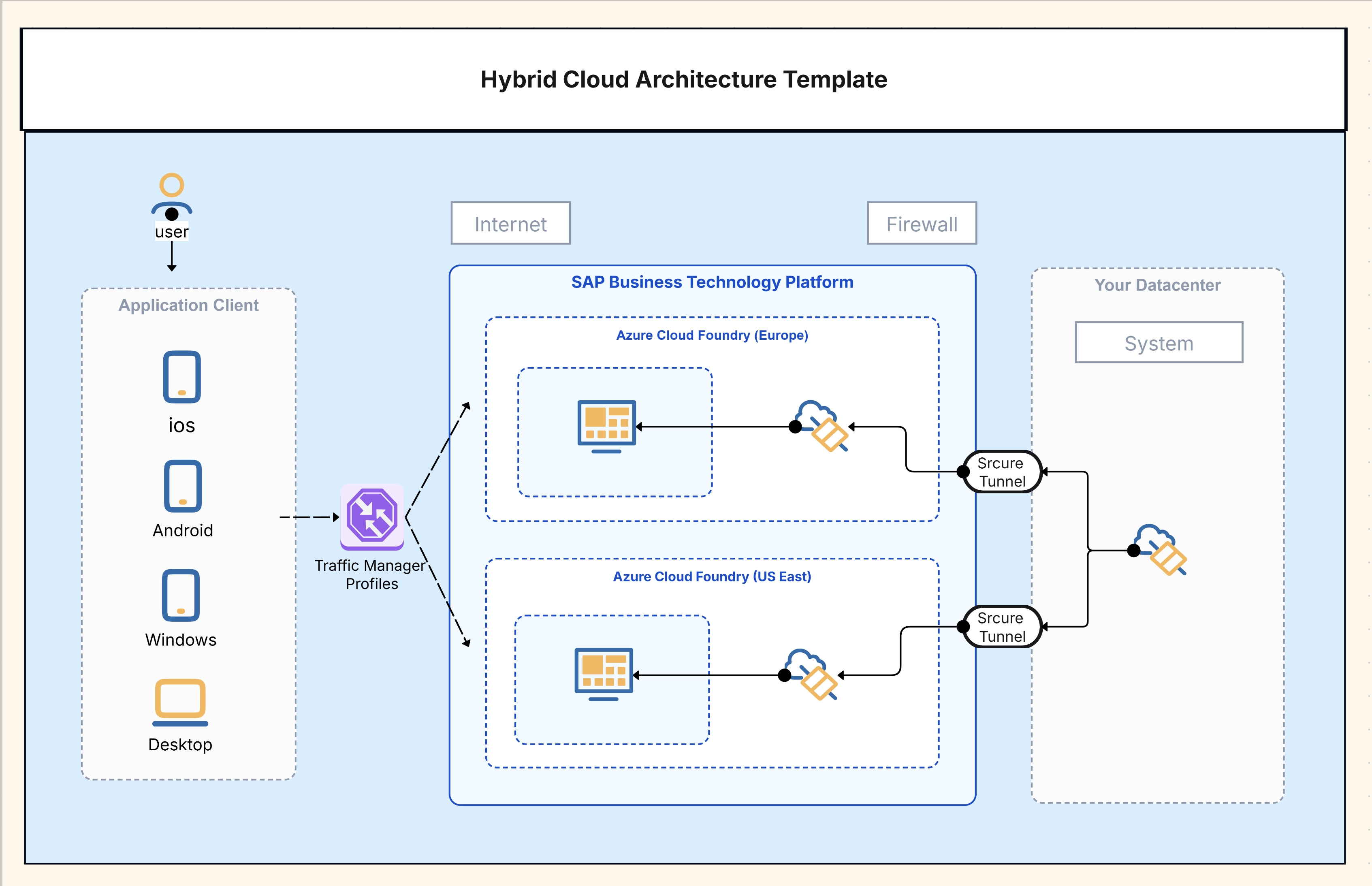
Hybrid Cloud Architecture Template

Cloudairy
 Copy link

Get your team started in minutes
Sign up with your work email for seamless collaboration.
Whiteboard
Copy link

Design hybrid cloud architecture diagrams easily with this editable template. Connect on-premises infrastructure with AWS, Azure, or GCP to build secure, scalable, and well-structured cloud solutions.
Design hybrid cloud architecture diagrams easily with this editable template. Connect on-premises infrastructure with AWS, Azure, or GCP to build secure, scalable, and well-structured cloud solutions.
Hybrid cloud architecture diagrams depict the process of organizations combining their on-premises infrastructure with public cloud platforms like AWS, Azure, or GCP. The use of these diagrams makes it easier to see the distribution of workloads across data centers and cloud services, while also guaranteeing performance, scalability, and compliance. Teams using this template can easily sketch out secure network links, distribution of workloads, and governance structures for hybrid environments that take advantage of the positive aspects of both worlds.
The template has all the necessary parts that contribute to a clear and effective demonstration of hybrid environments. The main purpose of this tool is to provide groups with a ready-to-use kit that delivers hybrid cloud planning with uniformity and precision. Its use of visual representations for both the old infrastructure and new cloud-native services makes it a great help in making the already complicated hybrid topologies simple for understanding and communication purposes.
This template is best used for organizations operating in both on-premises and cloud environments. It supports IT leaders, architects, and DevOps teams in planning secure, compliant, and efficient infrastructures. Whether you’re managing gradual migrations, enabling regulatory compliance, or ensuring resilience through backup strategies, this template offers a clear framework to model every hybrid scenario effectively. Visit now to understand modern applications built on Client Server principles.
The template is a completely editable one and hence you can customize it according to your organization's requirements. You can create perfect illustrations that are in line with real structures and you can even model a simple hybrid link or a multi-cloud multi-region strategy depending on the case. Its flexibility makes it possible to serve both technical architecture documentation and executive-level presentations, thus facilitating a common understanding of the design choices among all the participants.
Use the Hybrid Cloud Security Architecture Template to visualize security controls across on-premises and cloud environments in a unified model.
1. Why do companies choose hybrid cloud instead of full cloud adoption?
Many organizations must retain sensitive data on-premises for compliance, while still benefiting from cloud scalability. Hybrid architecture offers the best of both.
2. Can hybrid cloud work with multiple providers?
Yes, hybrid setups often combine AWS with Azure or GCP, depending on workload requirements.
3. Does this template support network security mapping?
Absolutely - it includes icons and layers for firewalls, IAM, and encryption controls.
Loading subcategories...
 Manage all your work in one place
Collaborate with your team
Use Cloudairy for FREE—forever
Explore More