Technical Diagramming
Best Tools for Architecture Diagrams: Features That Matter



Get your team started in minutes
Sign up with your work email for seamless collaboration.
Architecture diagrams are not just attractive visuals they act as living documentation showing how actual systems, complex data flow, and unique team processes genuinely connect together in real-world practice. A trusted and experienced architecture diagram software provides essential clarity during challenging hands-on projects, reduces annoying back-and-forth miscommunication, and consistently boosts the overall delivery speed for everyone involved in the workflow. The wrong choice, on the other hand, leads to wasted hours fighting persistent alignment issues, missing essential icons, or drawings you simply can’t maintain over the long term. With so many platforms competing out there Visio, Lucidchart, Draw.io, Miro, along with a wave of newer AI-based tools the selection honestly feels a bit overwhelming for many teams at times. This quick, practical guide highlights the main features worth considering, compares the leading tools, and helps you choose the most suitable architecture diagram maker for your team’s specific real-life needs.
.webp)
Prefer to jump ahead? Explore the Cloudchart Architecture Diagram Maker, which blends AI and customizable user-friendly templates.
The best architecture diagram tools combine speed, accuracy, and collaboration. They should provide official stencils, AI assistance, and governance features that scale from startups to enterprises. A strong architecture diagram software isn’t just about drawing boxes it ensures alignment with cloud providers, security requirements, and team workflows. These platforms replace generic drawing tools by focusing on consistency, clarity, and system design efficiency.
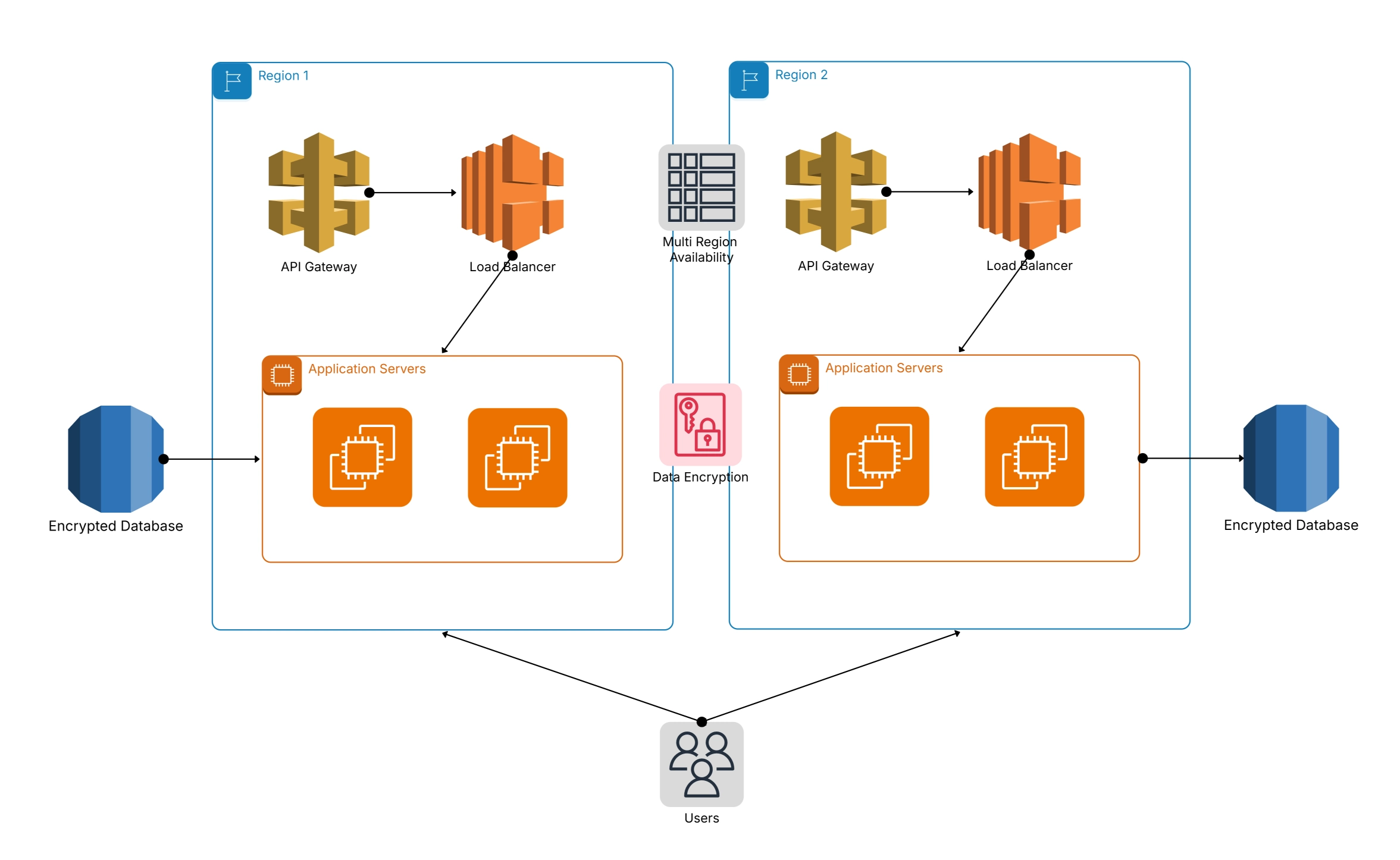
Architecture diagramAWS software must come with rich icon sets and templates out of the box. These include , Azure, and GCP icons, UML notations, BPMN stencils, and architecture diagram templates for common system patterns. Having these resources saves hours sourcing icons and ensures diagrams look professional and accurate.
Explore the Architecture Templates Library for ready to use examples.
Great diagrams are significant collaborative artifacts that serve as guides for real-world teamwork. The best architecture diagram tools enable many users to update in real time, offer useful comments, and view version history as needed. Enterprises also rely on role-based access control (RBAC), transparent approval workflows, and dependable audit logs to maintain proper governance. These team driven capabilities keep diagrams accurate, consistent, and compliant as enterprises expand and systems evolve.
Modern platforms now integrate AI diagram generator features that save hours of manual work. These tools can:
Example: Use the Architecture Diagram Generator (AI) in Cloudchart to instantly create drafts.
For us, architecture diagrams don’t live in isolation they always need to be shared and carefully embedded. Good tools usually support exports in PNG, PDF, SVG, and sometimes even editable formats for extra creative ease. They often integrate smoothly with Confluence, Jira, Notion, and Slack, ensuring our project diagrams remain accessible throughout daily team workflows. Thanks to this, the integrations turn diagrams into genuinely actionable assets instead of dull static files forgotten in crowded folders.
Choosing the best architecture diagram software depends on usability, AI capabilities, and governance. Below is a breakdown of the most widely used platforms.
Feature breakdown helps you identify the right architecture diagram maker for your needs.
|
Feature |
Cloudchart |
Lucidchart |
Draw.io |
Visio |
Miro |
|
AI generation |
✅ Yes |
❌ No |
❌ No |
❌ No |
❌ No |
|
Cloud icons |
✅ 500+ |
✅ Partial |
❌ Few |
❌ Few |
❌ Few |
|
Collaboration |
✅ Full |
✅ Good |
⚠️ Basic |
⚠️ Limited |
✅ Good |
|
Governance |
✅ RBAC |
❌ Limited |
❌ No |
⚠️ Limited |
❌ No |
|
Export formats |
✅ PNG/PDF/SVG |
✅ PNG/PDF |
✅ PNG/PDF |
|
✅ PNG |
|
Ease of use |
✅ Easy |
✅ Easy |
⚠️ Medium |
❌ Steep |
✅ Easy |
For a practical guide, read C4 vs UML: Which Architecture Diagram Is Best?
Generic tools like PowerPoint, Paint, or Photoshop were never built for architecture diagrams. They lack stencils, layouts, and governance. Dedicated architecture diagram software, on the other hand, accelerates design and ensures accuracy.
See How to Design a High-Level System Architecture Diagram for why tooling matters early in design.
Your choice of architecture diagram maker depends on team size, complexity, and governance requirements. A startup may need free AI-powered tools, while large enterprises need RBAC and audit-ready exports.
Architecture diagram templates and guides accelerate learning, reduce rework, and help teams align on visual standards. Using prebuilt templates ensures consistency while providing proven layouts for common system designs.
For inspiration, see Types of Architecture Diagrams .
The best architecture diagram tools balance speed, accuracy, and collaboration. In 2025, the clear trend is toward AI-driven architecture diagram generators that combine prebuilt templates, practical icon libraries, and strong governance features for my team.
Platforms like Cloudchart honestly outperform generic drawing tools by delivering AI-powered efficiency, smooth real-time collaboration, and flexible export options.
Whether you’re designing a system architecture diagram for a new startup or carefully mapping enterprise capabilities, the right tool genuinely accelerates clarity and reduces overall risk.
1.What features matter most in an architecture diagram tool?
2.Which is the best free architecture diagram maker?
3.Can AI generate architecture diagrams automatically?
4.How do dedicated tools compare to general drawing software?
5.What is the best architecture diagram software for enterprises?
Start using Cloudairy to design diagrams, documents, and workflows instantly. Harness AI to brainstorm, plan, and build—all in one platform.
Table of Contents

Introduction
 Manage all your work in one placeCollaborate with your teamUse Cloudairy for FREE—forever


 Related Articles
.webp)