
Sharing & Collaboration
Cloudairy is built for teams. Share boards and docs, work together in real time, and control exactly who can do what.
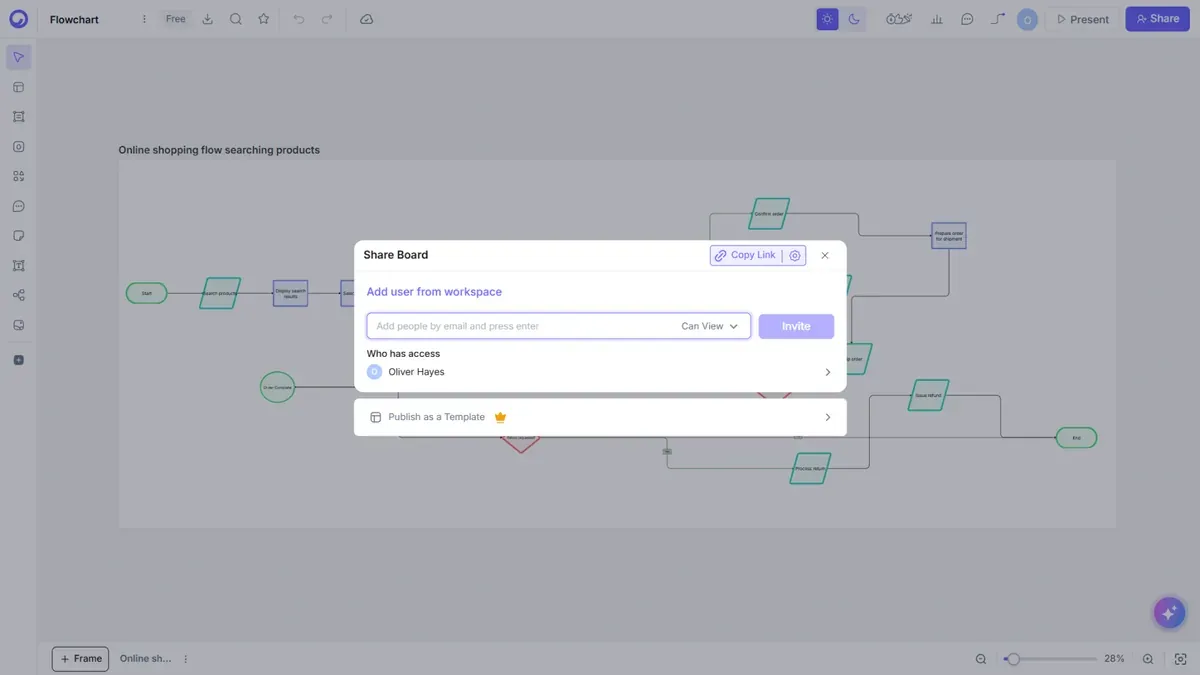
Sharing a board or doc
- Open the item and select Share (top-right of the editor).
- Invite people by email, or copy a share link.
- Choose their access: Can view or Can edit.
Access roles
Access is governed by roles:
| Role | Can do |
|---|---|
| Admin | Full control of the workspace and its content |
| Member | Create and edit content in the workspace |
| Guest (viewer) | View content shared with them |
Note: On Business and Enterprise plans you can invite unlimited guests for secure external collaboration, and protect shared links with a password.
Real-time collaboration
When teammates open the same board, you'll see their live cursors and presence, and edits appear instantly for everyone. No refresh needed.
Comments & mentions
Leave comments anywhere on a board or doc, and @mention teammates to notify them. Comments are threaded, so discussions stay in context.
Public links & requesting access
- Public link — share a read-only view with anyone, even without an account.
- Request access — if someone opens a link they can't view yet, they can request access, and an admin can grant it.
Next steps
- Manage your team in Workspaces & Teams
- Get people started in Getting Started